Claude Team vs Enterprise for Law Firms: Price, Retention, and Admin Controls


Microsoft 365 license types and E5 features: what a law firm uses
July 3, 2026
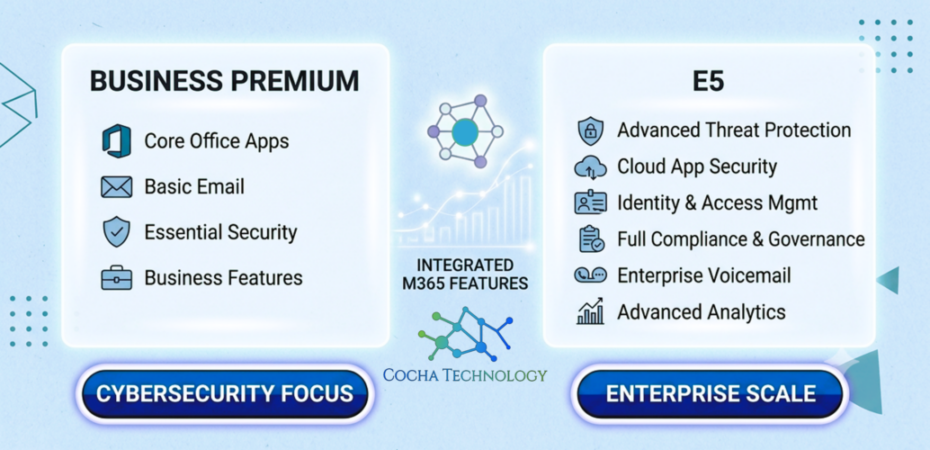
For mid-size law firms, M365 licensing is a control decision: which Purview, DLP, and identity features you need once Copilot is already live. Business Premium can cover a lot. E5 matters when you need deeper compliance and threat tooling. Wrong tier means shelfware or a privilege gap. Start with what your Copilot estate can reach, not a generic SKU chart.
For firms roughly in the 25 to 200 attorney range across Houston and beyond, every renewal line item gets scrutinized. The mistake we see most often is treating license tier as a shopping list instead of a control decision for client matter data, ethical walls, and Copilot reach.
At Cocha Technology we help mid-size law firms buy the controls they need without shelfware. Below we compare Microsoft 365 Business Premium and Enterprise E5 the way firm IT usually has to: what Purview and DLP you get, what Copilot depends on, and when E5 is worth it versus when it sits dark in the admin center. For sourcing help, see our Technology Brokerage service. To prove what agents can already reach, start with a free AI Readiness Snapshot.
Microsoft 365 license types at a glance
Microsoft sells Microsoft 365 in a few families, and the naming trips people up.
- Business Basic, Standard and Premium are for organizations up to 300 users. Premium is the one with Intune, Defender for Business and Entra ID P1, which is what gives you Conditional Access.
- E3 and E5 are the enterprise plans, with no seat cap. E5 adds the advanced security and Purview compliance tooling.
- F1 and F3 are frontline plans for staff who share devices or don’t need full desktop apps.
- Add-ons such as E5 Security, E5 Compliance and Microsoft 365 Copilot layer onto qualifying plans.
For a law firm, the choice usually narrows fast: Business Premium, E3 or E5, and then which people get E5 Compliance or Copilot on top. If you’re weighing Copilot seats specifically, our guide to Microsoft 365 plans for law firms goes deeper on that side.
What does Microsoft 365 E5 include?
E5 is E3 plus a large security and compliance stack. These are the pieces law firm IT asks about most:
- Defender for Office 365 Plan 2 and Defender for Endpoint Plan 2, for phishing investigation and endpoint response
- Entra ID P2, which adds risk-based Conditional Access and Privileged Identity Management for admin roles
- Purview auto-labeling, so client matter files get sensitivity labels without relying on people to apply them
- Insider Risk Management and Communication Compliance
- eDiscovery (Premium) and Audit (Premium), with longer log retention
- Information Barriers, the control that enforces ethical walls in Teams, SharePoint and Copilot responses
- Power BI Pro
My take for a mid-size firm: Information Barriers, auto-labeling and Premium eDiscovery are what justify E5 for litigation and conflict-heavy groups. A lot of the rest sits unused unless someone on staff runs it every week. If that sounds like your firm, E5 Compliance on targeted seats is often the better buy, with Business Premium or E3 underneath.
Microsoft 365 E3 vs E5
E3 is the enterprise productivity and baseline security plan with no seat cap. E5 is E3 plus the advanced Defender, Entra ID P2, and Purview stack (auto-labeling, Insider Risk, eDiscovery Premium, Information Barriers, longer audit retention).
For a law firm, the useful difference is not “more Office apps.” It is whether you need ethical walls, auto-labeling at scale, and Premium eDiscovery enough to pay for them and staff them. If nobody will run Insider Risk or tune Information Barriers every week, E5 on every attorney is usually shelfware. E3 (or Business Premium under 300 users) underneath, with E5 Compliance on the high-sensitivity seats, is the pattern we see work.
Cost follows the same logic. E5 costs more per user than E3. How much more depends on your agreement (EA, ESA, CSP / NCE) and whether you already pay for overlapping third-party tools. We do not publish stale list prices here because Microsoft and partner quotes move. Ask your CSP for a side-by-side on your tenant count, then subtract any Defender, CASB, or eDiscovery tool you would retire if you turned E5 features on.
If you are still on Business plans, read E3 vs E5 only after you confirm you are near or over the 300-user cap. Under that line, Business Premium vs E5 is usually the real decision, not E3.
Why mid-size law firms overbuy E5 (and still miss privilege gaps)
The software industry is brilliant at bundling. They deliberately place a few highly desirable, essential security features behind an incredibly high paywall, forcing you to buy a massive suite of unrelated products just to get the security tools you need.
Take the Microsoft Enterprise E5 tier, for example. It is undeniably a powerhouse. It is designed for multi-national conglomerates, publicly traded enterprises, and organizations managing tens of thousands of global users. It comes packed with advanced voice capabilities, massive data analytics tools, and automated governance systems.
But for a high-performance business with under 300 users, like a specialized Houston legal practice or an aggressive energy subcontractor, the E5 license often represents severe over-engineering. You are effectively paying a massive premium for an entire fleet of corporate buses when all your team needs is a finely tuned, armored sports car to get the job done safely.
Business Premium: strong baseline for many mid-size firms
For mid-size law firms watching cost and control, Microsoft 365 Business Premium is often the right baseline: productivity plus security tools without forcing every seat onto full E5.
It focuses on endpoint, identity, and basic data protection rather than enterprise voice or heavy analytics suites.
- Conditional Access (risk-based sign-in rules)
- Microsoft Defender for Business (endpoint protection)
- Intune (device management and remote wipe)
- Baseline Data Loss Prevention
With this tier you get Microsoft Defender for Business for endpoint detection, Intune for device management (including remote wipe if a laptop walks out of the office), and Conditional Access so matter files stay behind MFA and trusted devices.
You also get basic Data Loss Prevention. That can stop simple accidental leaks. When Copilot is already live and client-data risk is high, many firms still need deeper Purview/DLP depth. That is where E5 Compliance or full E5 enters the conversation. See our companion post on the M365 DLP spectrum for law firms.
When E5 fits a law firm already on Copilot
So when does E5 make sense? Compliance depth, advanced DLP, insider risk, and specialized automation, not prestige.
E5 brings advanced Data Loss Prevention and information governance that can classify sensitive patterns across large matter stores and apply controls with less manual labeling. That matters when Copilot can reach SharePoint and OneDrive libraries that still have oversharing.
It also includes advanced eDiscovery useful for litigation-heavy practices. If your firm does not run continuous, wide-scale discovery workflows, much of that suite can sit unused. Match the SKU to client-data risk and Copilot scope, not a generic enterprise brochure.
Clarity without overpaying: configure what you buy
We remind clients that security is not how much you spend on SKUs. It is how intentionally you configure identity, DLP, and permissions for the tools you already have, especially once Copilot is live.
We have seen firms pushed toward firm-wide E5 for “compliance,” only to find advanced features never turned on. Expensive seats, weak posture. The fix is usually a leaner mix of Business Premium plus targeted add-ons, with Conditional Access, logging, and threat tools actually configured for matter data.
That is the Moment of Clarity for law-firm IT: trade shelfware for controls that match Copilot reach and privilege risk. Pair licensing choices with Copilot readiness work, not a bigger invoice alone.
Mix and match seats by risk, not one SKU for everyone
You do not have to put every attorney on the same tier. Microsoft lets you mix licenses by role and risk.
Through Technology Brokerage and advisory work, we map staff needs: many fee-earners and staff stay secure and productive on Business Premium; partners, finance, and high-sensitivity practice groups may need E5 Compliance or full E5 for deeper Purview, DLP, and monitoring.
That keeps cost aligned with client-data risk and Copilot scope. We handle the licensing audit and backend configuration so firm leadership can focus on practice, not SKU grids. Related reading: five M365 licensing truths law-firm IT usually finds late and Microsoft 365 plans for law firms.
For roadmap calls beyond the SKU sheet, talk to our fractional CIO for law firms.
FAQ
What are the main Microsoft 365 license types?
Business plans (Basic, Standard, Premium) for up to 300 users, enterprise plans (E3, E5) with no cap, and frontline plans (F1, F3). Add-ons like E5 Compliance and Copilot sit on top of those.
What's included in a Microsoft 365 E5 license?
Everything in E3, plus Defender for Office 365 P2, Defender for Endpoint P2, Entra ID P2, Purview auto-labeling, Insider Risk Management, eDiscovery (Premium), Audit (Premium), Information Barriers and Power BI Pro.
Can a law firm mix Business Premium and E5 licenses?
Yes. You can assign different plans to different users in one tenant. Business plans are capped at 300 users each, so firms near that size often standardize on E3 or E5 and add E5 Compliance where it’s needed.
Is Business Premium secure enough for client data?
It’s a solid baseline if it’s configured. Conditional Access, Intune and sensitivity labels cover a lot. It won’t auto-label at scale or enforce ethical walls on its own, and that’s usually the deciding factor.
How much does a Microsoft 365 E5 license cost?
More than E3, and the gap depends on your channel (EA, ESA, or CSP) and term. Public list prices change, so treat any blog number as stale the day it ships. Get a current quote for your seat count, then ask what you would turn off (third-party endpoint, identity, or eDiscovery) if you bought E5 for real. Shelfware E5 is the expensive outcome.
Business Premium vs E3: which should a law firm pick?
Under 300 users, Business Premium is usually enough for Conditional Access, Intune, Defender for Business, and baseline DLP. E3 matters when you need enterprise plans with no seat cap, or when you are standardizing past the Business ceiling. Neither replaces E5 Compliance or full E5 when you need Information Barriers and auto-labeling at scale. Mix seats by risk instead of forcing one SKU on everyone.
Get an AI Readiness Snapshot before you renew or expand Copilot seats
Generic configs and unused bundles create technical debt. Before you renew or expand Copilot seats, know what agents can already reach in your matter estate.
Get an AI Readiness Snapshot. In about 60 minutes we walk read-only checks on agent reach, oversharing risk, shadow AI signals, and Secure Score context, then send a findings report within five business days.
Licenses don’t fix oversharing. A free AI Readiness Snapshot shows what agents can already reach. For step-by-step hardening after you buy seats, use the Copilot data ring-fence guide. Need help sourcing the right SKUs? Talk to us about M365 licensing for your firm.
Recent Posts
Have Any Question?
Call or email Cocha. We can help with your cybersecurity needs!
- (281) 607-0616
- info@cochatechnology.com
About the Author:

Steve Combs
Co-Founder & Managing Director, Cocha Technology
Steven is a fractional CIO/CISO with 30+ years of enterprise IT and security leadership. He has built AI governance frameworks for organizations with 1,700+ users, led enterprise Microsoft Copilot deployments, and conducted security assessments across law firms, energy companies, financial institutions, and PE-backed manufacturers.