Claude Team vs Enterprise for Law Firms: Price, Retention, and Admin Controls


Claude vs Copilot for Law Firms (2026): Data Access, Cost, and When to Use Each
October 6, 2026
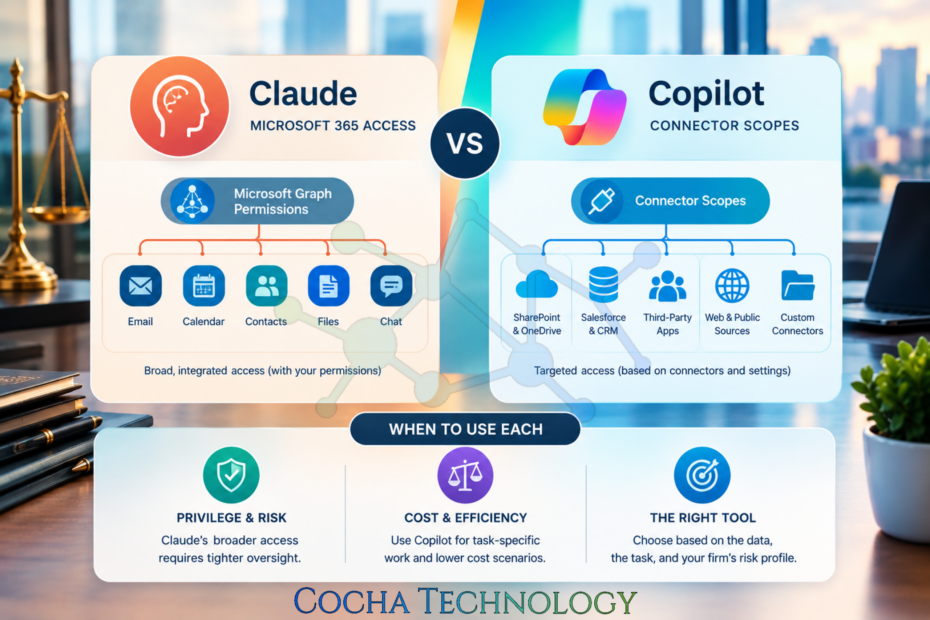
I get some variation of this question almost every week now. A managing partner or an IT director asks which one they should standardize on: Claude vs Copilot, like a clean answer is sitting in a vendor comparison chart somewhere. There isn’t. Most firms I work with in the 50 to 400 attorney range end up running both, for different jobs, with different people allowed to touch each one.
That’s not dodging the question. It’s the honest shape of where this landed in 2026. Copilot showed up first, bundled into licenses firms already owned, wired deeply into Outlook, Word, and Teams. Claude showed up later for most firms, often through a partner who wanted better drafting or research output, and it reaches your systems through a different kind of connection entirely. Different wiring, different risk.
So before picking a side, it helps to understand what each tool can see, how it gets there, and where that creates a problem for privilege or an ethical wall you already have in place. That’s the real decision. Not features. Access.
Claude Vs Copilot at A Glance
| Microsoft 365 Copilot | Claude | |
| Data access model | Microsoft Graph, using the signed-in user’s existing | Connectors, including an official Microsoft 365 connector, scoped per connection |
| What it sees by default | Anything the user can already reach in Outlook, SharePoint, OneDrive, and Teams, including overshared sites | Only the connectors an admin or user has turned on, read-only in most configurations |
| Retention / training posture | Enterprise data isn’t used to train Microsoft’s foundation models by default; check your tenant’s Purview retention settings | Commercial and enterprise Claude conversations aren’t used to train models by default; confirm the specific agreement your firm signed |
| Admin controls | Purview DLP, sensitivity labels, SharePoint Advanced Management, Restricted Content Discovery | Connector-level enable and disable switches, workspace admin controls, audit logs; fewer native DLP hooks than Purview today |
| Pricing shape | Usually an add-on per user on top of existing M365 licensing, sometimes bundled into premium tiers. Check current pricing. | Per-seat or usage-based depending on plan, often lower per seat but billed separately from your Microsoft agreement. Check current pricing |
| Best fit | Day-to-day drafting, email and meeting summarization, anything already living inside Microsoft 365 | Deeper research, long-document analysis, drafting that benefits from a longer context window or a different model’s reasoning |
A caveat before anyone screenshots this into a board deck: pricing goes stale within a quarter, so treat the ballpark as a conversation starter, not a budget figure. I’ve watched firms flip this exact split depending on which practice group asked first.
How Copilot Reaches Your Microsoft 365 Data
Copilot’s access runs through Microsoft Graph, and it uses whatever permissions the signed-in user already has. That sounds reasonable until you remember how most firms configured permissions over the last fifteen years: loosely, with SharePoint sites set to “everyone in the firm” because nobody circled back once the urgent project ended.
Copilot doesn’t create new access. It makes existing access dramatically easier to use. A paralegal with read rights to forty SharePoint sites from some long-closed matter now has an assistant that will summarize all forty in seconds, no folder-clicking required. Microsoft calls this oversharing, and it’s a well-known enough problem that they built dedicated tooling for it: permission state reports, site access reviews, and a feature called Restricted Content Discovery that can block Copilot from searching specific sites even when the user could technically open them by hand.
Here’s the part that should worry general counsel more than IT. If a lateral hire hasn’t been walled off from a matter their old firm handled against your client, Copilot has no idea that’s an ethical wall. It only knows what Graph says the person can see. Permission inheritance and privilege aren’t the same system, and Copilot inherits the first one while knowing nothing about the second.
Copilot doesn't create new access. It makes existing access dramatically easier to use.
How Claude Reaches Your Firm's Data
Claude works differently, though the end risk rhymes. Instead of inheriting a user’s full Graph permission set in one shot, Claude connects through individual connectors, and Anthropic ships an official Microsoft 365 connector built for this. It uses delegated permissions too, so Claude only sees what the signed-in user can see in Outlook, SharePoint, OneDrive, and Teams. It respects Restricted Content Discovery the same way Copilot does, and in most configurations it’s read-only. It can search and summarize. It can’t create documents or send mail on someone’s behalf.
The shape of the risk is narrower but not gone. Because connectors get enabled one at a time, a firm gets a cleaner audit trail of which systems Claude can touch, and I like that part. But the same problem from the Copilot section applies delegated permissions mirror whatever access control list already exists, ethical walls included. A messy SharePoint permission set stays messy once Claude connects to it.
One more detail worth knowing: Claude can’t decrypt files locked behind sensitivity-label encryption, so a properly labeled privileged document stays out of reach even in a connected session. That’s a real control, assuming your firm applies sensitivity labels consistently. Most firms I walk into don’t. Not yet.
Copilot Vs Claude for Law Firms: When to Use Each
Here’s my rough rule of thumb, with the caveat that your own practice mix should move this around:
- Copilot tends to win for anything already living inside a Microsoft 365 workflow: a first-pass email, a Teams meeting summary, cleanup on a Word document someone already started. It’s already there, so attorneys don’t switch apps. For firms chasing broad adoption across a few hundred people with mixed technical comfort, that beats most feature comparisons.
- Claude tends to win when the task is heavier. A long contract or a deposition transcript. Research that benefits from a longer context window. Drafting where reasoning quality outweighs the convenience of staying inside Outlook. Several firms I work with hand Claude to their most senior associates and partners for exactly this reason, rolling Copilot out broadly for everyone else.
Running both isn’t wasteful duplication. It’s closer to giving litigators Westlaw and transactional attorneys a different research tool, because the jobs differ. The mistake isn’t running two AI tools. It’s rolling either one out without checking what it can see first.
What to Check Before Either Tool Goes Live
This is the part firms skip, usually because it feels like someone else’s job until the week after go-live.
- Run a permission audit before you flip anything on, not after. Pull a report of every SharePoint site, Teams channel, and shared mailbox a pilot group can reach, and compare it against what they should reach given their actual matters. You will find orphaned access from closed matters. Every firm does.
- Map your ethical walls to real access controls, not a policy binder. If your conflicts system says attorney X is walled off from matter Y, confirm that wall exists as an actual permission boundary.
- Check what your DLP policies catch versus what they claim to catch. Purview policies written for file transfers and email don’t automatically extend to what an AI assistant summarizes inside a chat window. We’ve tested this. The gaps looked fine on paper and weren’t.
- Decide who can enable new connectors or plugins, and write it down. An admin or an enthusiastic partner connecting a new data source on a Friday afternoon shouldn’t quietly expand what an AI tool can see firm-wide.
- Confirm matter isolation specifically. Can someone on Matter A’s team pull context from Matter B by accident, because the document store doesn’t separate matters the way your billing system does. Test that one yourself before trusting a vendor’s slide.
The mistake isn't running two AI tools. The mistake is rolling either one out without first checking what it can see.
Where This Leaves Your Firm
I’ve written before about [what Copilot Premium changes for data protection at law firms, about why DLP alone won’t protect agents like Claude and Copilot, and about what the new M365 licensing shape means for law firms. All three circle back to the same access question this post keeps raising.
On the confidentiality duty itself, read the ABA’s own guidance directly rather than a vendor’s summary of it: ABA Formal Opinion 512 on generative AI tools. Microsoft has published its own account of the oversharing problem too: Microsoft moves to stop M365 Copilot from oversharing data.
If you’re trying to figure out which of these problems your firm already has, that’s exactly what our AI Readiness Snapshot is built to surface, a quick, no-cost look at your Microsoft 365 permissions, DLP coverage, and matter isolation before you connect anything new. Grab one here: AI Readiness Snapshot.
Quick Answers
- Is Copilot or Claude safer for privileged material?
- Neither is automatically safer. Both inherit whatever access control problems already exist in your environment. The safer tool is the one connected to an environment you’ve audited.
- Does ABA Formal Opinion 512 apply here?
- Yes, for US firms. The July 2024 opinion puts the confidentiality burden on the lawyer, not the vendor, and flags self-learning tools as needing informed client consent before matter information goes in. Confirm in writing whether your agreement trains on your data. Don’t rely on a sales rep’s verbal answer.
- Can we run Claude and Copilot on the same matter without conflict?
- Usually, yes, as long as both tools are scoped to the same permission set and that set already respects your ethical walls. The risk isn’t the tools interacting. It’s each one inheriting access it shouldn’t have had in the first place.
- What does this cost?
- It depends enough on your licensing, attorney count, and tier that a number here would be wrong by the time you read it. Check current pricing with both vendors and ask whether the quote assumes your permission sprawl is already fixed.
Recent Posts
Have Any Question?
Call or email Cocha. We can help with your cybersecurity needs!
- (281) 607-0616
- info@cochatechnology.com
About the Author:

Steve Combs
Co-Founder & Managing Director, Cocha Technology
Steven is a fractional CIO/CISO with 30+ years of enterprise IT and security leadership. He has built AI governance frameworks for organizations with 1,700+ users, led enterprise Microsoft Copilot deployments, and conducted security assessments across law firms, energy companies, financial institutions, and PE-backed manufacturers.