Contents
- The short answer
- E3, E5 and E7 side by side
- What E5 adds once Copilot is on
- What E7 bundles
- Which one fits your company
- Five questions to settle first
- Where this leaves your firm
- Quick answers
1. The short answer
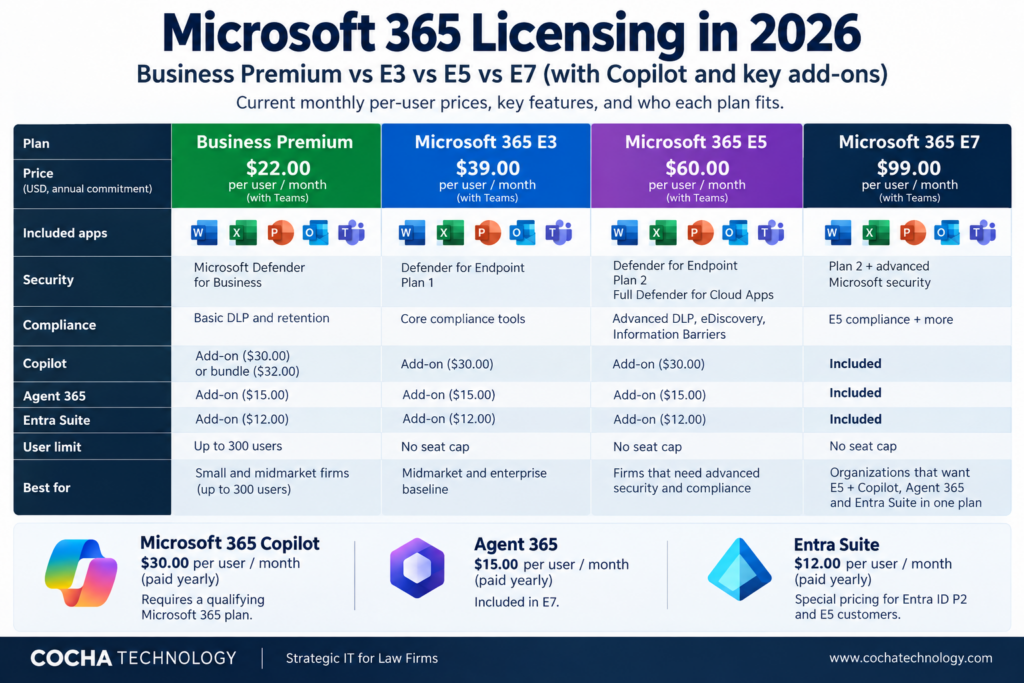
E5 isn’t automatically the right license for Copilot, and E7 isn’t automatically the bargain. Copilot is an add on that needs a qualifying Microsoft 365 plan, so E3 plus Copilot is a perfectly legitimate setup. What E5 changes is control. It’s the plan Microsoft lists for Purview DLP that can keep Copilot away from labeled files and emails, and E3 isn’t. E7 bundles E5, Copilot, Agent 365 and the Entra Suite into one price, and it only pays off if most of your seats will use all of it.
This post covers the Copilot decision and nothing else. If you want every plan, add on and buying channel laid out, start with our guide to Microsoft 365 licensing. Prices below were checked on October 12, 2026, and all are per user per month paid yearly unless noted.
2. E3, E5 and E7 side by side
| Microsoft 365 E3 | Microsoft 365 E5 | Microsoft 365 E7 | |
|---|---|---|---|
| Price with Teams | $39.00 | $60.00 | $99.00 |
| Price without Teams | $30.45 | $51.45 | $90.45 |
| Copilot | Add on, $30 | Add on, $30 | Included |
| Agent 365 | Add on, $15 | Add on, $15 | Included |
| Entra | Entra ID P1 | Entra ID P2 | E5 level, plus Entra Suite |
| Purview DLP that restricts Copilot from labeled files and emails | No | Yes | Yes, E7 includes E5 capabilities |
| Purview DLP that safeguards prompts | Yes | Yes | Yes |
A few notes on that table. Copilot is $31.50 if you pay monthly instead of yearly. Entra Suite lists at $12 on its own, and Microsoft shows special pricing for E5 customers, so your real number may be lower. And no, there isn’t an E4. Microsoft’s current plans page lists E3, E5 and E7.
3. What E5 adds once Copilot is on
People assume Copilot needs E5 for security. That mixes up two things.
Copilot only surfaces what the signed in user can already open. That’s a permissions problem, and it exists on every plan. Microsoft also says prompt safeguards through Purview DLP are available to all Copilot users, so that piece isn’t a reason to upgrade.
The real E5 line is narrower. Purview DLP can stop Copilot from processing files and emails that carry a sensitivity label or match a sensitive information type. Microsoft’s service description marks that as included for E5 and not for E3, Business Premium or Business Standard. The identity side moves too, from Entra ID P1 on E3 to P2 on E5.
Here’s the catch, and I’d say it plainly to any client. That DLP control only works on data you’ve labeled. If your company hasn’t classified matter files or engineering records, E5 gives you a lock with no keys cut. Label first, then decide whether you need the enforcement.
4. What E7 bundles
E7 became generally available on May 1, 2026. Microsoft describes it as E5, Microsoft 365 Copilot, Agent 365 and the Entra Suite in one license, sold with or without Teams. Microsoft’s position is that it costs less than buying those pieces separately. I’d treat that as Microsoft’s claim and run your own numbers, because the pieces list at $60 for E5, $30 for Copilot, $15 for Agent 365 and $12 for Entra Suite, and you may not need every one of them.
Agent 365 is Microsoft’s control plane for observing, governing and securing AI agents. If you don’t run agents and don’t plan to this year, you’d be paying for a control you can’t use yet. If Copilot is going to most of your seats and agents are on the roadmap, one SKU is simpler to buy and easier to explain to a CFO.
5. Which one fits your company
Law firms. Law leads here because the stakes around privilege and ethical walls are highest. A firm with 25 to 200 attorneys usually sits under 300 users, which opens a Business Premium path: $22 without Copilot and $32 with it. Copilot Business is also sold as an add on for eligible Business plans up to 300 users, listed at $21 with a promotional $18 for the first year on purchases through December 31, 2026. Business Premium doesn’t include the Copilot DLP control, so a firm that needs enforcement against labeled matter data should price E5 for the people who touch that data. Our Copilot licensing for law firms guide goes deeper on who to license first.
Oil and gas. Engineering files, bid packages and land data tend to live in a few SharePoint sites, and the workforce splits between office and field. E3 plus Copilot for office staff works when those sites are cleaned up and labeled. E5 enters the picture if a customer or insurer asks you to show Copilot is kept away from labeled data. Frontline plans for field crews are a separate decision, covered in the full licensing guide.
PE-backed companies. Most portfolio companies are under 300 users, so the Business Premium path usually wins on price. E7 jumps both the tier and the bill, and I’d only raise it where a company was already headed toward E5, Copilot and agent governance. One budgeting note: the $18 Copilot Business promotion is first year only, so model year two at the $21 list price.
Medical device manufacturers. Design records, complaint files and quality documents are the data you’d least want a chat assistant summarizing loosely. The question is whether permissions alone are enough or whether you need DLP that enforces labels against Copilot. If it’s the second, that’s the E5 side of the table.
6. Five questions to settle first
- How many users do you have? Over 300 takes Business plans off the table.
- Is your sensitive data labeled, and do you know who can reach it today?
- Do you need Copilot blocked from labeled files, or is permission trimming enough?
- Will most seats use Copilot daily, or only a pilot group?
- Do you run agents now, or plan to within the year?
Two or more answers pointing to enforcement and agents is where E7 starts to deserve a quote. Otherwise price E3 plus Copilot against E5 plus Copilot and compare.
7. Where this leaves your firm
License for the controls you’ll use, not the logo on the box. Start by finding out what Copilot could already reach in your tenant, because that answer decides whether E5’s enforcement matters or whether cleanup does more for the money. Our AI Readiness Snapshot gives you a fast read on that before you sign a quote. For the plan by plan view, go back to our Microsoft 365 licensing guide.
Prices come from Microsoft’s plans and pricing page, the Copilot enterprise page and the Agent 365 page. Microsoft changes prices, so confirm with your reseller before you buy.
8. Quick answers
Do I need E5 for Copilot? No. Copilot is an add on to a qualifying Microsoft 365 plan. E5 matters if you want Purview DLP that restricts Copilot from labeled files and emails.
Is Copilot included in E5? No. It’s a $30 add on per user per month paid yearly. E7 is the plan that includes it.
What’s included in Microsoft 365 E7? E5, Microsoft 365 Copilot, Agent 365 and the Entra Suite, generally available since May 1, 2026.
How much is Microsoft 365 E7? $99 per user per month paid yearly with Teams, or $90.45 without Teams, as of October 12, 2026.
Is there a Microsoft 365 E4? No. Microsoft’s current plans page lists E3, E5 and E7.
Can you mix E3 and E5 users in one tenant? Microsoft sells licenses per user, so mixing plans is common. Which users need the E5 controls is the part to decide up front.