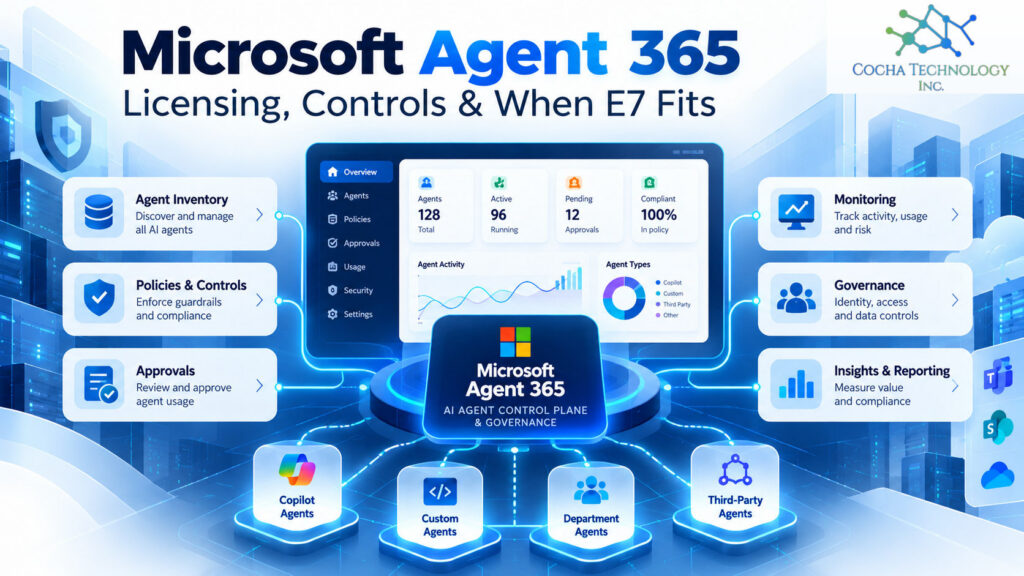
Microsoft Agent 365 is Microsoft’s control plane for AI agents: one place to inventory them, decide who can use them, watch what they do, and apply Entra, Purview, Defender, and Intune controls to them. It became generally available May 1, 2026. It costs $15 per user per month paid yearly on its own, and it’s included in Microsoft 365 E7.
Count the people associated with your agents as well as the agents themselves. Agent 365 is licensed per user, and agents don’t need their own licenses. Before buying, identify who delegates access and who owns or sponsors agents with their own access. For the wider plan comparison, see our Microsoft 365 licensing guide.
What Microsoft Agent 365 does
Microsoft’s service description groups the features into five areas:
| Area | What it covers |
|---|---|
| Registry | An inventory of agents, plus actions like approve, block, deploy, delete, assign, and reassign owner, with automated lifecycle rules |
| Access control | Policy templates, access packages that scope what an agent can reach, sponsor driven lifecycle policies, conditional access for agents with delegated access, and control over which tools and MCP servers agents can use |
| Visibility | Telemetry and monitoring of agent activity |
| Interoperability | Syncing agents from other platforms into the registry, and Graph API access to the registry |
| Security and compliance | Purview audit, eDiscovery, DLP, and sensitivity label controls; Defender detection and threat hunting; Entra conditional access and traffic monitoring; Intune device compliance and blocking unsanctioned local agents |
Microsoft’s Copilot Studio integration page says agents receive an Entra identity and register automatically when created. Its admin center guidance adds a visibility caveat: publishing a custom engine agent in Copilot Studio alone might not make it visible there. Check the agent’s publishing state in the admin center rather than assuming creation guarantees visibility.
The same underlying Copilot Studio agent can appear as separate “Shared by creator” and “Published by your org” entries. Microsoft describes those rows as separate lifecycle and publisher records. Registry rows are not a reliable count of unique agents, and neither count determines your per user license requirement.
Microsoft’s admin center documentation marks the Graph APIs for Agent Registry and Agent Details as preview.
Management is split across the Microsoft 365 admin center, Entra, Purview, Defender, and Intune. Plan for more than one console.
Agent 365 licensing and who needs a license
Microsoft lists standalone Agent 365 at $15 per user per month, paid yearly. It’s also included in Microsoft 365 E7. Agent 365 isn’t included in E3 or E5, and E7 isn’t required to buy it separately.
The license belongs to a person, not an agent. Microsoft’s licensing FAQ says users who delegate their access to agents need a license. For agents with their own access, it names the owner, sponsor or manager. The FAQ also distinguishes required licensing from a broader recommendation to cover users who interact with managed agents. Agents don’t need separate licenses.
Map those roles before counting seats. Ask your reseller to confirm how the requirements apply to your deployment and which underlying licenses you need. Don’t use the number of agents as the license count.
What your current plan already covers
Check your existing licenses against the specific control you want to use. A registry entry doesn’t establish that a data protection or access control feature is included in your plan.
Ask your reseller for a written list of what your current subscriptions cover and what Agent 365 would add. Keep feature entitlement separate from whether the feature is configured and working for your agents. Until those points are confirmed, don’t budget on an assumed set of free controls.
Agent 365 on its own versus E7
Agent 365 is included in Microsoft 365 E7. E7 combines Microsoft 365 E5, Microsoft 365 Copilot, Microsoft Entra Suite and Agent 365. You can also buy Agent 365 separately; you don’t need E7 just to obtain it.
Compare the subscriptions your firm needs rather than the bundle name. Standalone Agent 365 may be worth evaluating when the wider E7 bundle doesn’t match your requirements. E7 is the broader option to compare when you need its other components too. Get a written quote for both paths, including the underlying licenses needed for the controls you intend to use.
Our E3 vs E5 vs E7 post and Microsoft Copilot pricing breakdown cover the wider decision.
Non Microsoft agents and control boundaries
Microsoft says Agent 365 supports agents built across platforms and runtimes, including partner agents. That does not establish that every control works equally on every outside platform.
Before relying on it for a non Microsoft agent, test the control you need with that agent’s integration. Confirm what administrators can observe and what they can enforce. An inventory entry alone doesn’t demonstrate that a data access restriction works.
Our guide to why DLP alone won’t protect agents explains why the enforcement boundary matters.
How Purview DLP and labels apply to agents
Agent 365 agent instances get Purview coverage, and most of it works the way it does for a person: you add the agent to the policy. Microsoft turns on audit and sensitive data classification automatically when you create an agent instance. For DLP, insider risk and the rest, you include the agent instance in the policy, by name or through a security group.
The DLP piece is narrower than people expect. Microsoft documents block or audit for agent-to-human and human-to-agent interactions in Teams, OneDrive or SharePoint, and email. The agent isn’t aware it was blocked, so its owner has to watch the policy and understand what breaks downstream.
Labels need the same care. An agent can only open files that are explicitly shared with it. If a label applies encryption, the label has to grant that agent instance VIEW and EXTRACT rights. A label set to everyone in your organization isn’t enough.
Content the agent creates doesn’t inherit the source item’s label, so it starts out unlabeled and unencrypted. That’s the one I’d test first. An agent that summarizes a highly confidential matter file can hand back a summary with no label at all.
Our Purview DLP for Copilot guide covers the Copilot side of the same policies.
Confirmed details and questions still open
Confirmed: Agent 365 became generally available for commercial customers on May 1, 2026. Standalone list pricing is $15 per user per month, paid yearly. It is included in E7, but not E3 or E5. Agents don’t need their own licenses.
Still to confirm for your deployment: which users meet the licensing requirements, which existing subscriptions satisfy prerequisites, and how the controls behave for each outside agent integration. Get your quoted price and feature entitlements in writing.
Agent 365 price and the costs to confirm with your reseller
- Which users need a license for delegated access or for agents with their own access, and which users fall under Microsoft’s broader licensing recommendation?
- Which of our agents will show up automatically, and which need extra steps?
- What controls apply to agents synced in from other platforms?
- What do we get with Agent 365 alone versus inside E7, at our pricing?
- Which features aren’t available in our cloud yet?
- Which admin roles do we need across the Microsoft 365 admin center, Entra, Purview, Defender, and Intune?
Get the answers in writing. Some of this is still settling.
What to check before an Agent 365 trial
Use a trial to answer a specific deployment question. For example, can your administrators enforce the access restriction a selected agent needs, and can its owner see enough evidence to investigate a failed test?
Microsoft’s licensing FAQ refers to Agent 365 trials and requires acceptance of the applicable terms. That is not a promise that your tenant qualifies or that a trial includes every feature you want. Confirm the current offer and prerequisites before planning the evaluation.
Name the users and agents in scope. Record the controls you will test and what a successful result looks like. If a non Microsoft agent is involved, test that integration rather than relying on a demonstration with a different agent.
Keep the evaluation separate from Microsoft’s Frontier program. Microsoft says Frontier should not be used for product evaluations. Don’t build a pilot plan around assumed trial length, seat counts or conversion terms. Get those details confirmed first.
By industry
Law firms. Agents that touch matter data need the same scrutiny as a new hire: an identity, a sponsor, a defined scope, and an audit trail. Agent 365 gives you most of that structure. Ethical walls still have to be enforced in permissions. Our post on AI agent governance for law firms covers the wider picture.
Oil and gas. Agents built by operations teams to pull reports or summarize field data are the ones to inventory first. Sponsor based lifecycle rules help when the builder moves on.
PE-backed companies. An agent registry and an owner for each agent are easy evidence for diligence. If you’re standardizing across a portfolio, confirm the inventory controls available under each company’s subscriptions before assuming they match.
Medical device manufacturers. Agents that touch design or quality records should be treated like any other validated process change. Audit logs and an owner per agent make that easier.
Where this leaves your firm
Identify the agents touching your data and the people responsible for them. Then compare the controls your current subscriptions provide with the ones you still need. For the wider plan decision, see our Microsoft 365 licensing guide.
Review Copilot Studio governance for law firms when the question is environment and publishing control, not only the Agent 365 license.
Start with Cocha’s free AI Readiness Snapshot to identify selected priorities before changing your AI controls.
Common questions about Agent 365 licensing
What is Microsoft Agent 365?
Microsoft’s control plane for AI agents. It inventories agents, controls their access, monitors what they do, and applies Entra, Purview, Defender, and Intune controls to them. It became generally available May 1, 2026.
How much does an Agent 365 license cost?
Microsoft lists standalone Agent 365 at $15 per user per month, paid yearly. It’s also included in Microsoft 365 E7. Confirm your quote and the underlying subscriptions needed for your intended controls before buying.
Is Agent 365 included in E5?
No. Microsoft says Agent 365 isn’t included in E3 or E5. It’s available separately or within E7. Check the exact prerequisites and feature entitlements for your subscription before purchase.
How does standalone Agent 365 licensing compare with E7?
Standalone Agent 365 provides a separate per user purchase path. E7 includes Agent 365 alongside Microsoft 365 E5, Microsoft 365 Copilot and Microsoft Entra Suite. You don’t need E7 to buy Agent 365. Compare the underlying license requirements and the wider bundle against the subscriptions your firm needs.
Does Agent 365 govern non-Microsoft agents?
Microsoft supports agents across platforms and runtimes, including partner agents. The depth of control can vary with the integration. Test the specific outside agent and restriction you intend to rely on before treating it as enforced.
Who needs an Agent 365 license?
Agent 365 is licensed per user. Microsoft’s FAQ requires licensing for users who delegate access to agents and for the owner, sponsor or manager of agents with their own access. It also recommends broader coverage for people interacting with managed agents. Agents don’t need their own licenses. Confirm the roles and requirements for your deployment before counting seats.
Does Purview DLP work on Agent 365 agents?
Yes, within limits. You add the agent instance to a DLP policy as you would a user, or through a security group. Microsoft supports block or audit for agent-to-human and human-to-agent interactions in Teams, OneDrive or SharePoint, and email. The agent isn’t told about a block, so its owner has to watch.
Can a sensitivity label stop an agent from reading a file?
Yes, if the label applies encryption. The encryption has to grant the agent instance both VIEW and EXTRACT rights before the agent can use the file. Settings such as all users in your organization or any authenticated users aren’t enough. The file also has to be explicitly shared with the agent.
Do files an Agent 365 agent creates keep the source label?
No. Microsoft says newly created content from Agent 365 doesn’t inherit sensitivity labels from the source items, so it isn’t labeled or encrypted automatically. If an agent drafts from labeled files, decide how that output gets labeled before anyone shares it. Test this in a pilot before the agent touches client work.
Is agent activity audited in Microsoft Purview?
Yes. Audit turns on automatically when you create an Agent 365 agent instance. Microsoft lists agent-to-human, human-to-agent, agent-to-tools and agent-to-agent interactions as supported. You can search the audit log for Agent 365 activities or review them in activity explorer in Data Security Posture Management.
How do I find agents that no longer have an owner?
Open the agent registry in the Microsoft 365 admin center and select the Agents without owners card. It filters the list to shared agents whose creator was deleted from your organization, so you can block or delete them. The same view counts unmanaged agents created outside Agent 365.
Do Power Platform data policies apply to Copilot Studio agents?
Yes. Data policies in the Power Platform admin center control which connectors Copilot Studio agents, Power Apps and Power Automate flows can use. They’re separate from Purview DLP. When a policy change blocks a connector an agent relies on, the agent can be suspended, usually within an hour and at most 24 hours.
Is Agent 365 included in E7?
Yes. Microsoft 365 E7 includes Agent 365. Microsoft says Agent 365 is not included in E3 or E5. It can also be purchased separately, subject to the applicable licensing requirements.
Is an Agent 365 trial available?
Microsoft’s licensing FAQ refers to Agent 365 trials, but that doesn’t establish your eligibility or the offer’s terms. Confirm the current trial with Microsoft or your reseller. Microsoft says the separate Frontier program should not be used for product evaluations.