In this guide
- What Copilot can see, and why that’s the whole question
- The seven checks at a glance
- Check 1: Oversharing and permissions
- Check 2: Sensitivity labels
- Check 3: Data loss prevention
- Check 4: Retention, audit, and legal hold
- Check 5: Client confidentiality and ethics duties
- Check 6: Licensing
- Check 7: A pilot group with logging
- Where this leaves your firm
- Quick answers
Yes, Microsoft Copilot is safe for a law firm, provided you fix permissions, sensitivity labels, and retention before anyone gets a license. If you don’t, it isn’t.
That’s the short version, and it surprises people, because the risk isn’t what they expect. Microsoft says Copilot surfaces only organizational data that a person already has at least view permission for, and that prompts, responses, and Microsoft Graph data aren’t used to train its foundation models. So Copilot isn’t breaking into anything. What it does is make your existing access visible, fast. This guide walks through seven checks to run first. Which plan includes which control is covered in our Microsoft 365 licensing guide, so I’ll keep that part short.
1. What Copilot can see, and why that’s the whole question
Picture a deal folder in a SharePoint site that someone shared with the whole firm three years ago because it was easier that week. Nobody has opened it since. Before Copilot, that exposure was theoretical. With Copilot, any person in the firm who asks a good question about that client can get an answer that draws on it.
That’s the pattern behind most Copilot worries, and it’s why I’d rephrase the question. Not is Copilot safe, but is our tenant ready for something that reads everything people can already read?
Here’s what Microsoft documents. Copilot honors the same access controls used elsewhere in Microsoft 365. It also honors usage rights on content encrypted with Purview Information Protection. Prompts and responses are stored with citations, encrypted at rest, and can be managed with Purview retention policies. None of that helps if the underlying permissions are loose.
One more thing, and it’s separate from security. A safe draft isn’t a correct draft. A lawyer still reviews what Copilot produces, the same as work from a first-year associate, only faster to generate and just as capable of a confident mistake.
2. The seven checks at a glance
| # | Check | The question to answer | Main Microsoft tools |
|---|---|---|---|
| 1 | Oversharing and permissions | Who can reach client matter content that shouldn’t be firm-wide? | SharePoint Advanced Management, Purview DSPM data risk assessments |
| 2 | Sensitivity labels | Are matter files labeled so controls can follow them? | Purview Information Protection |
| 3 | Data loss prevention | Which labeled content should Copilot be blocked from using? | Purview DLP for Copilot |
| 4 | Retention, audit, legal hold | Do prompts and responses fall under your retention rules and holds? | Purview retention, eDiscovery, Audit |
| 5 | Client confidentiality and ethics | What do your duties and engagement letters require? | ABA Formal Opinion 512, state opinions, AI provider settings |
| 6 | Licensing | Does your plan include the controls you’re counting on? | Plan comparison |
| 7 | Pilot with logging | Does it behave as expected with a small group? | Purview Audit |
Do 1 through 4 before the first license goes out. Work on 5 in parallel with your general counsel or ethics counsel. Confirm 6 before you promise anyone a control exists. Treat 7 as the gate.
3. Check 1: Oversharing and permissions
Microsoft’s own readiness guide starts here. It tells you to use Purview and SharePoint Advanced Management to find sites and files that are overshared, ownerless, inactive, or hold sensitive data Copilot could surface. I agree with the order. Everything else works better once this is done.
Three tools matter most.
[Data access governance reports](https://learn.microsoft.com/en-us/microsoft-365/copilot/get-ready-copilot-sharepoint-advanced-management) in SharePoint Advanced Management identify sites with potentially overshared or sensitive content. Microsoft suggests starting with the site permissions baseline report and the sharing links activity reports.
Restricted Content Discovery keeps content from appearing in Copilot and in organization-wide search, and it leaves site permissions unchanged. That makes it a good stopgap for a sensitive site while you clean up the permissions underneath. Restricted Access Control goes further and limits a site to members of a group you name.
[Purview data risk assessments](https://learn.microsoft.com/en-us/purview/data-security-posture-management-oversharing) report on oversharing too. The default assessment runs weekly for the top 100 SharePoint sites by usage, and the first results can take about four days to show. Top 100 by usage isn’t your whole tenant, so run custom assessments for the matter workspaces you care about most. Microsoft’s page lists limits, including a maximum of 10 SharePoint sites for item-level scanning, so plan your batches.
Two cautions. Microsoft warns that removing a sharing link can block someone who legitimately needs the item, so test before you sweep. And if your firm relies on ethical walls, check that they’re enforced by permissions and not by a policy memo. A memo isn’t an access control.
On cost: Microsoft says SharePoint Advanced Management comes with a Copilot license, and on E3 and E5 that means the Copilot add-on.
4. Check 2: Sensitivity labels
Labels are how controls follow a document around. Without them, DLP has nothing to act on.
Microsoft’s guidance is to configure auto-labeling and default sensitivity labels so sensitive files and emails are protected. What your plan allows differs. On E3 you can create custom labels and apply them manually. E5 adds automatic labeling, default labels and their policies, and labels on containers like SharePoint or Teams sites.
Manual labeling alone tends to fail quietly. People are busy, and a label nobody applied protects nothing. If you’re on E3, label the documents in your highest-risk matters by hand, and be honest that coverage will be partial.
I’d also keep the label set small. A handful of labels people understand beats fourteen they don’t.
5. Check 3: Data loss prevention
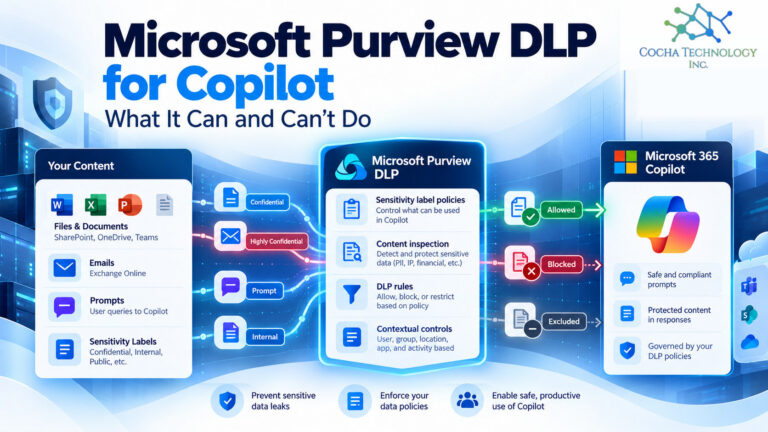
Microsoft Purview lets you scope Microsoft Copilot as a location in a DLP policy. That lets you identify and restrict the use of sensitive content in Copilot grounding and interactions, based on sensitive information types and sensitivity labels. In plain terms, you can tell Copilot to stay away from files and emails carrying a specific label.
The catch is licensing, and it’s a real one. Per Microsoft’s Purview service description, DLP that restricts Copilot from processing files and emails is included with Microsoft 365 E5 and the Purview Suite. It isn’t included with Business Premium or E3. DLP that safeguards prompts is available across those plans.
Two things follow. Label first and DLP second, because the policy keys off labels you’ve applied. And DLP is a backstop for the permissions work in check 1, not a replacement for it. Read Microsoft’s DLP page for current limits before you tell a client what it will and won’t block.
If you’re weighing the paid seat, see our guide to Copilot Basic vs Premium data controls.
6. Check 4: Retention, audit, and legal hold
Copilot interactions are records. Treat them like it.
Microsoft’s retention policies for Copilot and Copilot Chat are now separate from Teams chat retention, and they cover user prompts and responses. Copies live in a hidden mailbox folder that compliance administrators can search with eDiscovery tools. Permanent deletion is suspended when the mailbox is under a Litigation Hold, a delay hold, or an eDiscovery hold. Microsoft also notes that what a user sees in the app isn’t an accurate reflection of what’s retained, and that the deletion timer job typically takes 1 to 7 days to run. So verify with eDiscovery, not by looking at a chat window.
Audit and eDiscovery depth depends on the plan. E3 includes Standard Audit and lets you search. E5 includes Advanced Audit, with up to 10 years of retention, and can search and delete.
What I’d do: add Copilot interactions to your legal hold template, and pick a retention period on purpose. Leaving it at the default is still a decision, just not one you made.
7. Check 5: Client confidentiality and ethics duties
This is the section where your general counsel should be in the room.
ABA Formal Opinion 512, issued July 29, 2024, is the American Bar Association’s first formal opinion on lawyers’ use of generative AI tools. Three points matter here.
- Competence. Under Rule 1.1, lawyers should understand the benefits and risks of the technology they use.
- Confidentiality. Under Rule 1.6, the opinion says a client’s informed consent is required before information relating to the representation goes into a tool in the circumstances it describes. It singles out self-learning tools, where output could expose one client’s information to others. It also says general, boilerplate language in engagement letters doesn’t satisfy that requirement.
- Read the terms. The opinion says lawyers should read and understand a tool’s terms of use and privacy policy, and may need to consult IT professionals or cybersecurity experts to do it.
It also covers client communication under Rule 1.4 and fees under Rule 1.5. Lawyers can bill for time spent entering information and reviewing output, but generally not for time spent learning a tool.
Whether consent is needed for Copilot turns on the facts. Microsoft’s statement that Copilot data isn’t used to train its foundation models bears on that analysis, but the call belongs to you and your ethics counsel, not to me. Texas lawyers should also read Texas Professional Ethics Committee Opinion 705 (February 2025), which addresses the ethical issues generative AI raises under the Texas Disciplinary Rules of Professional Conduct. Read the full opinion for what it requires of you.
One setting most firms haven’t looked at. Microsoft’s current documentation says Anthropic is a Microsoft subprocessor, and Anthropic models are on by default for most commercial customers. They’re off by default in the EU, EFTA, and UK. Unless a model is labeled Anthropic models with Data Retention, the Microsoft Product Terms and Data Protection Addendum apply. The labeled models are different. They’re off until an admin opts in, Anthropic acts as an independent processor, and Anthropic stores most inputs and outputs for up to 30 days. Anthropic models are also excluded from the EU Data Boundary. Admins can turn the whole thing off in the Microsoft 365 admin center under Copilot, Settings, User access, AI providers operating as Microsoft subprocessors.
Cocha advises clients on both Claude and Microsoft products.
My view is that this setting is a client confidentiality decision, so make it on purpose and write down why. Our Claude vs Copilot guide compares the two in more depth. This isn’t legal advice.
8. Check 6: Licensing
Price isn’t the point of this article, but a control you assumed you had and don’t is a safety problem. Here’s the short list. Everything below is per user per month, paid yearly, at Microsoft’s list price with Teams.
| Plan | List price | Copilot | DLP that restricts Copilot from labeled files and emails |
|---|---|---|---|
| Business Premium | $22 | Add-on, or Business Premium with Copilot at $32 | No |
| E3 | $39 | Add-on | No |
| E5 | $60 | Add-on | Yes |
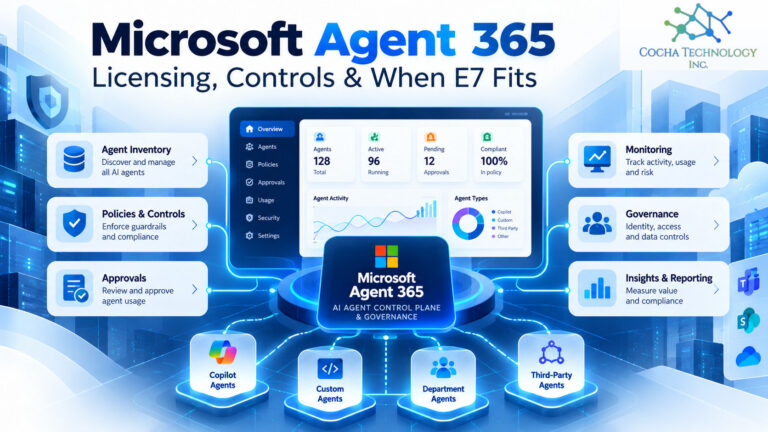
| E7 | $99 | Included | Includes E5 capabilities |
Microsoft 365 Copilot lists at $30 per user per month, paid yearly, on top of a qualifying plan. Copilot Business, for firms on an eligible Business plan with up to 300 users, lists at $21, with a promotional $18 for the first year on purchases made from July 1 through December 31, 2026. Business plans cap at 300 users, so past that you’re choosing among E3, E5, and E7.
Two other things. The Purview Suite can add E5 level controls to lower plans. And plans and promotions change, so confirm at purchase. The full breakdown is in our Microsoft 365 licensing guide.
9. Check 7: A pilot group with logging
Don’t turn Copilot on for 150 people on a Monday. Start with a pilot of 10 to 20 seats in one practice group, pull usage from the Purview audit log after 30 days, and expand from there. That’s our suggestion, not a Microsoft requirement.
Before the pilot starts, run a simple test. Ask a tester to prompt Copilot for a summary of a matter they have no business seeing. If it answers, you’ve just found your check 1 homework. Microsoft’s guidance says the same thing in its own words: validate through Purview Auditing and reports that Copilot no longer surfaces restricted content.
Then keep the log. When a client’s security questionnaire asks how you control AI access to their files, a dated record of what you tested is a better answer than a policy statement.
10. Where this leaves your firm
Skip the abstract question. Ask whether your tenant is ready, and then work through the checks in order. Permissions, labels, DLP, and retention come first. Ethics review runs alongside. Licensing gets confirmed before you promise a control. The pilot decides when you roll out.
Write down what you decide, including the Anthropic setting. A one page record is enough.
If you want a structured look at where your Microsoft 365 environment stands before you assign licenses, that’s what the AI Readiness Snapshot is for. It’s a starting point for the conversation, not a remediation. For the broader program, see our law firm AI governance page, and for plan details, the Microsoft 365 licensing guide.
11. Quick answers
Is Microsoft Copilot safe for law firms?
Yes, when permissions, sensitivity labels, and retention are in order first. Copilot only surfaces data a user can already access, so the risk is existing oversharing, not new access.
Does Copilot train on our client data?
Microsoft states that prompts, responses, and data accessed through Microsoft Graph aren’t used to train its foundation models. Check the Anthropic model setting too, since labeled Data Retention models are handled under different terms.
Can Copilot show a lawyer documents they shouldn’t see?
It can surface anything the person already has permission to view. If a site is shared too broadly, Copilot can bring that content up in answers. Fix the permissions and use Restricted Content Discovery as a stopgap.
Do we need client consent to use Copilot?
It depends on the facts, and that’s a question for your ethics counsel. ABA Formal Opinion 512 says informed consent is required before client information goes into certain tools, and that boilerplate engagement letter language isn’t enough. This isn’t legal advice.
Which license blocks Copilot from labeled documents?
Microsoft’s Purview service description lists Microsoft 365 E5 and the Purview Suite. Business Premium and E3 don’t include it.
Are Copilot prompts kept, and can they be searched?
Yes. Prompts and responses can be covered by Purview retention policies, held under legal hold, and searched with eDiscovery tools.
Can we turn off Claude models inside Copilot?
Yes. An admin can disable Anthropic as a Microsoft subprocessor in the Microsoft 365 admin center under Copilot, Settings, User access, AI providers operating as Microsoft subprocessors. Microsoft notes that turning it off may make some features inaccessible.