In this guide
- The short answer
- What MCP gateway security covers, and what a gateway cannot do
- The identity question that decides everything
- What the MCP specification requires
- SharePoint MCP server: inheritance decides what an agent can reach
- iManage MCP: folder security and what a move changes
- Where Claude and Copilot Studio fit
- The gateway controls checklist for law firms
- Test it the way a walled off lawyer would
- Quick answers
- Where this leaves your firm
1. The short answer
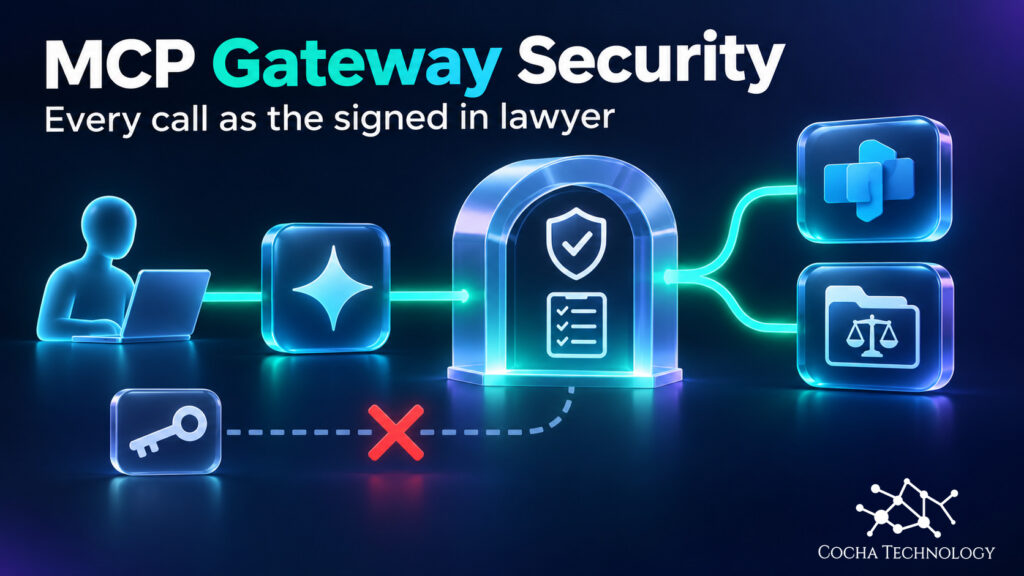
MCP gateway security starts with where the gateway sits: between AI clients and the systems they call. It can allowlist servers, block tools, log calls and limit rates. It holds no document permissions of its own.
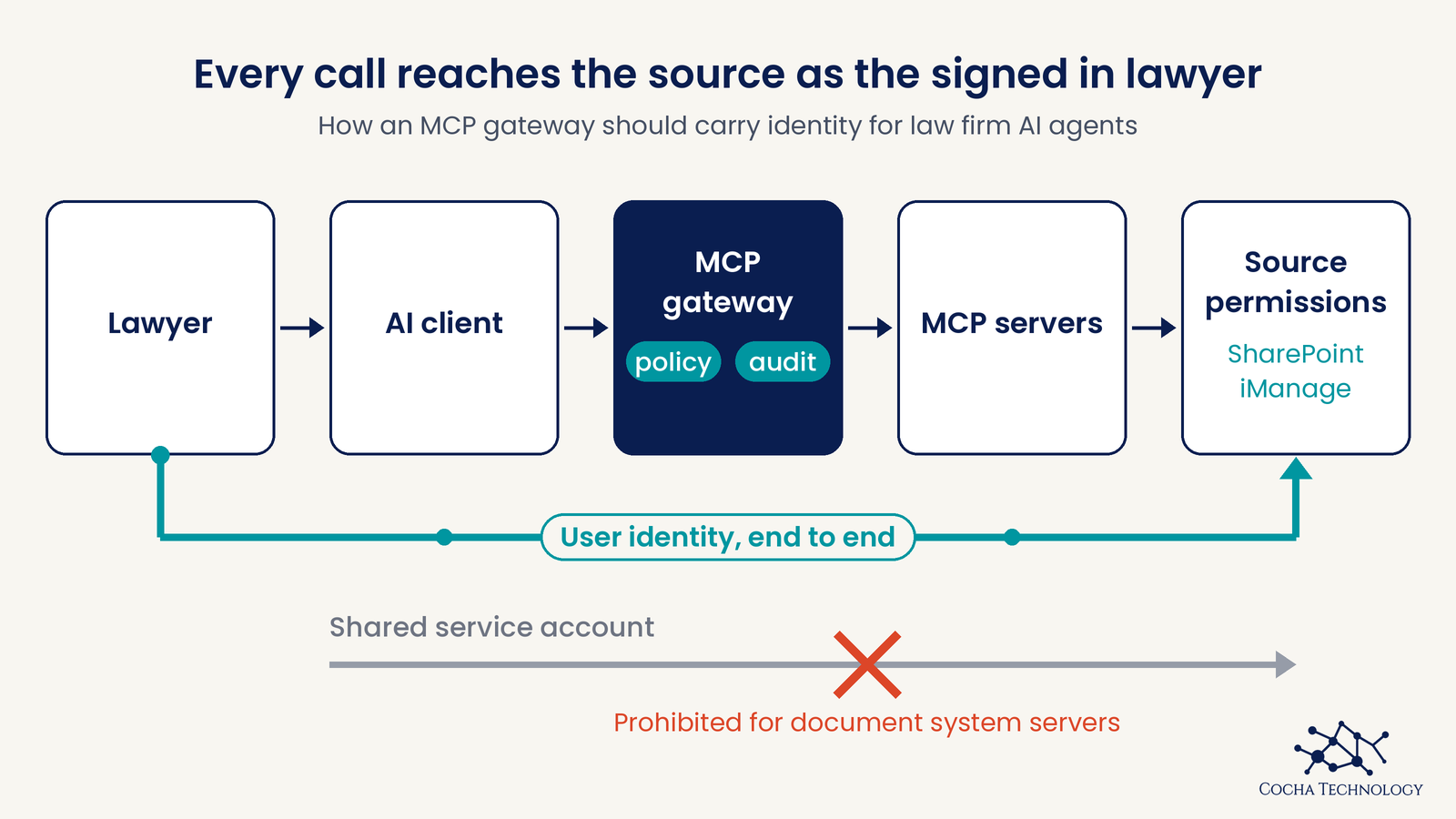
That is the whole argument of this guide. A gateway protects client documents only if every call reaches SharePoint or iManage as the signed-in lawyer, with that lawyer’s permissions and walls. If the call runs under a shared service credential, the gateway is a very orderly way to give an agent access to everything that credential can read.
What you get here is a controls checklist, an architecture to design toward, and a test you can run. For the incident side of the problem, read AI agent security incidents law firms should know. For the agent inventory and permission cleanup, start with permission management for law firm AI agents.
2. What MCP gateway security covers, and what a gateway cannot do
MCP, the Model Context Protocol, is the open standard AI clients use to call tools and read data from other systems. A gateway is a control point placed in that path. Between clients such as Claude, Copilot Studio agents or Claude Code and servers such as SharePoint or iManage, it can:
- Allow only approved MCP servers.
- Allow or block individual tools on those servers.
- Log who called what.
- Limit rates and apply other policy.
What it cannot do is fix the permissions in the source system. If a SharePoint site is open to the whole firm, the gateway will faithfully pass a lawyer’s request to a site the lawyer should never have been able to read. This guide doesn’t recommend a gateway product. If you want the product view, see MCP gateway products we have mapped.
3. The identity question that decides everything
Every MCP connection answers one question: whose identity does the call carry? There are two patterns.
| Delegated | Shared credential | |
|---|---|---|
| Who signs in | Each lawyer | One service account or key |
| Permissions applied | That lawyer’s own | Whatever the credential can read |
| Audit trail names | The person | The credential |
| Ethical wall holds | Only if the source enforces it per user | No, if the credential can see both sides |
Anthropic’s connector documentation describes the delegated pattern: Claude inherits each person’s permissions from the connected service, and a user who cannot access a file in the source cannot reach it through Claude. The same article warns that custom connectors using a shared credential reach whatever that credential can access.
Microsoft’s Copilot Studio shows the same fork. When you connect an agent to an MCP server, you choose None, API key or OAuth 2.0. With an API key, the agent includes the key in its requests. With OAuth 2.0, individual users authenticate and grant permissions without sharing their credentials.
For client documents, design toward delegated access. If a vendor tells you a service account is simpler, they are right, and that simplicity is the risk.
4. What the MCP specification requires
The MCP authorization specification is shorter than most people expect, and one point surprises buyers. Authorization is optional. A gateway that skips it is still an MCP gateway.
Where a server does implement authorization over HTTP, the specification builds on OAuth 2.1. It says implementations using STDIO transport should not follow it and should retrieve credentials from the environment instead. The rules below appear in the 2025-11-25 authorization specification, and the passthrough rule is repeated in the later 2026-07-28 security considerations.
| Specification rule | Ask the vendor |
|---|---|
| Clients use PKCE | Does the gateway enforce it for every client? |
| Clients send the resource parameter (RFC 8707) so a token is bound to one MCP server | Are tokens audience bound to each MCP server? |
| Servers validate that a token was issued for them | What happens to a token meant for another service? |
| Servers must not pass the client’s token through to upstream APIs | How does the gateway get upstream access, and as whom? |
| Servers must implement protected resource metadata (RFC 9728) | Can clients discover authorization requirements automatically? |
| Least privilege scopes, with step up when more is needed | Does a client start with read scopes and step up on demand? |
Two of these deserve more attention. Token passthrough is forbidden because it breaks audience binding and destroys attribution: the downstream system cannot tell who is really asking, and the audit trail loses the person. The MCP security best practices also describe a confused deputy problem for proxies that use a static client ID with third party APIs, and the fix involves consent for each client.
A gateway that cannot answer the first four rows plainly is not ready for client documents.
5. SharePoint MCP server: inheritance decides what an agent can reach
Microsoft states that Microsoft 365 Copilot surfaces only data a user has permission to view, and Graph based agents work under the same boundary. That is good news until you remember how SharePoint permissions accumulate. Broken inheritance, grants to everyone except external users, and organization wide sharing links all become the agent’s reach, because they are already the user’s reach.
So a gateway cannot help you here. The SharePoint oversharing guide covers how to find and fix those permissions before an agent finds them for you.
The SharePoint MCP server deserves its own caution. Microsoft’s reference for it is a preview, and its tool list includes write actions such as shareFileOrFolder, setSensitivityLabelOnFile, moveFileOrFolder and deleteFileOrFolder. Tools like those change permissions, labels or content, so they belong behind approval or off.
Microsoft also says the application specific Microsoft 365 MCP tools, SharePoint among them, are only intended for backward compatibility and shouldn’t be used in production environments or new projects. For new work it points to Work IQ MCP. The reference does not say whether its tools run with the user’s delegated identity or an app identity, so confirm that in your tenant before you rely on it.
6. iManage MCP: folder security and what a move changes
iManage matters here because its security model is built around workspaces, folders and access lists, and some firms enforce ethical walls on top of it with a third party tool that works through those lists. The iManage MCP server is how an agent reaches it.
iManage’s help for Claude says that only read permissions are currently available and selected by default, and that the tools a user gets depend on what the firm’s administrator has configured for the MCP client. iManage states that existing security policies, permissions and audit trails are maintained and that users reach only content they have permission to see. Anthropic’s directory describes the connector as permission bound and auditable.
The detail to test is what happens to security when documents move. iManage’s tool reference lists move_document and upload_document as write tools. By default, after a move, the document’s profile and security are updated to match the destination folder, and both can be turned off.
iManage’s Control Center documentation adds that moving or copying a document can trigger its refile service, which can replace the document’s default security and access list with the destination container’s (per the iManage Control Center help for version 10.5.1; check the help for your version). It advises excluding workspaces managed by a third party ethical wall tool that enforces walls through access control lists. iManage gives the reason as performance: security changes from the wall tool can cause performance issues when the refile service and the wall tool both make changes. So an agent allowed to move documents can change who can see them. Keep move and upload tools off unless a named process needs them.
On ethical walls, this guide makes no claim beyond what iManage documents. Treat wall enforcement through MCP as a test you run, using the procedure in section 9, not a feature you assume.
7. Where Claude and Copilot Studio fit
In Claude, an Owner enables each connector, users authenticate individually, and every tool can be set to Always allow, Needs approval or Blocked. Anthropic’s documentation describes Enterprise-managed auth, in beta, as authorizing a connector once through your identity provider, with members getting access by IdP group on first login. It does not say how the upstream service sees each person, so test which identity the upstream call carries before you adopt it. That is the whole question in section 3. For the admin settings, see what to set before connecting firm documents.
In Copilot Studio, the choice of None, API key or OAuth 2.0 per MCP server is the identity decision. Microsoft says that if a data policy regulates Power Platform connectors, it also regulates access to the MCP server and its tools, so involve whoever owns those policies. Review Agent 365 controls and license options alongside the gateway design.
8. The gateway controls checklist for law firms
- Use delegated authentication for every MCP server that touches client documents.
- Prohibit shared service accounts and static API keys for document system servers.
- Keep an allowlist of approved MCP servers and block the rest.
- Block write tools by default and require approval for any exception.
- Gate permission changing tools, including sharing, labeling, moving and deleting, behind approval.
- Record the human user in the audit log, not only the gateway.
- Validate token audience on every request and prohibit token passthrough.
- Start clients with read scopes and step up only when a named process needs more.
- Prefer short lived tokens and revoke on offboarding.
- Sandbox local MCP servers or ban them on firm devices.
- Apply Power Platform data policies to Copilot Studio MCP connectors.
- Test ethical wall behavior after every connector change and every document move.
- Keep an inventory of agents, owners and the systems each can reach.
- Review tool lists whenever a vendor updates a connector, since tools can change.
- Name who can disable a connector, token or agent in an emergency, and test that revocation ends access.
9. Test it the way a walled off lawyer would
The test is simple and worth running before you go live and again after any change.
- Pick a test user who is outside a restricted matter in SharePoint and iManage.
- Ask the agent for that matter by name, and for a document known to be in it.
- Confirm nothing returns from either system.
- Check that the audit trail names the test user, not a service account.
- Move a test document into and out of the restricted workspace, then repeat the request.
- Record the result with date, client, connector version and tester.
A failure at step 3 or step 5 is a finding, not a configuration quirk. The agent inventory steps in permission management for law firm AI agents tell you what to do next.
10. Quick answers
What is an MCP gateway?
It is a control point between AI clients and MCP servers that can allowlist servers, block tools, log calls and apply policy.
What is the difference between an MCP server and an MCP gateway?
An MCP server exposes tools or data to AI clients. A gateway sits in front of one or more servers and applies policy, logging and tool controls.
How is an MCP gateway different from an API gateway?
Both apply policy to traffic. An MCP gateway works at the level of AI tool calls, so the questions that matter are which tools an agent may call and as whom.
Do we need an MCP gateway?
Not always. This is Cocha’s view: a firm with a few approved servers, delegated sign-in and tool permissions set in the AI client may not need one. A gateway earns its place when many clients and servers need central policy and logging.
Does an MCP gateway enforce SharePoint permissions?
Only if calls run as the signed-in user. The gateway adds policy, and the source system still decides what that user can read.
Should an MCP gateway use a service account to reach iManage?
For client documents, no. A service account sees whatever it was granted, which defeats per user permissions and walls.
What is token passthrough and why does the MCP specification forbid it?
It is when a server forwards the client’s token to another API. It breaks audience binding and removes the person from the audit trail.
Is there an MCP server for SharePoint?
Yes. Microsoft publishes a preview SharePoint MCP server reference for Copilot Studio. It also says application specific Microsoft 365 MCP tools are for backward compatibility, not production or new projects, and points new work to Work IQ MCP.
Can an AI agent change sharing or move documents through MCP?
Yes, if write tools are allowed. SharePoint’s MCP reference lists sharing and labeling tools, and iManage describes move and upload tools.
How do we test that an agent respects an ethical wall?
As a practical test, use a test user outside the matter, ask for the matter by name, and confirm that nothing returns and the audit trail names that user. This is a Cocha test procedure, not a legal standard. Have counsel review how you describe the wall.
11. Where this leaves your firm
Ask one question of every gateway, connector and agent: whose identity does the call carry? If the answer is the lawyer, the source system’s permissions apply and you can work on making those permissions right. If the answer is a shared credential, fix that first.
Start with the AI Readiness Snapshot, the quickest way to find out where your agents stand. If the Snapshot turns up permission gaps worth a closer look, a deeper paid review is something we can talk through afterward. The policy layer is covered under AI governance for law firms.
This isn’t legal advice. Ethical wall and conflicts wording belongs with your firm’s counsel.
Primary sources
- Model Context Protocol, Authorization specification (2025-11-25)
- Model Context Protocol, Security best practices (2026-07-28)
- Claude Help Center, Use connectors
- Microsoft Learn, Connect your agent to an existing MCP server in Copilot Studio
- Microsoft Learn, Copilot Studio SharePoint MCP reference
- iManage help, Adding MCP connectors for Claude
- iManage help, Tools for iManage Work connector
- iManage Control Center, Configuring Refile