Here’s a sentence I didn’t expect to write a year ago: a law firm employee got tricked into emailing client Social Security numbers to a hacker because the hacker pretended to be the IT help desk. That’s Seyfarth Shaw, disclosed after an August 18 incident, and it wasn’t some exotic zero-day. It was a phone call, or an email, or whatever the impersonation channel was, good enough to fool one person for one moment.
Seyfarth’s disclosure is part of a broader run of law firm breach news this year. Coverage of that wave has framed it as something bigger than a string of bad luck, tying it to the growing role AI is playing in security incidents generally, both in how attackers operate and in how much more there now is inside a firm’s systems that nobody’s fully accounted for.
I don’t think every one of those breaches involved AI directly. Seyfarth’s, as far as public reporting shows, was straightforward social engineering. But that’s sort of the point I want to make here, not the exception to it.
This Year’s Breach Wave, in Plain Terms
Social engineering works by exploiting trust and routine. An employee gets a message that looks like it’s from IT, acts on it, and the damage is done before anyone questions it. AI makes this easier to pull off at scale. Convincing phishing emails, voice clones, fake help desk chat sessions, these used to take real effort. Now they’re closer to a few minutes of setup.
So even in a breach that wasn’t technically an “AI attack,” AI is changing the odds. Threat actors can run more attempts, more convincingly, against more people, more often. Your firm’s defense against that has to account for a world where “this looks legitimate” means less than it used to.
The Part Nobody’s Talking About: What Else Has Access
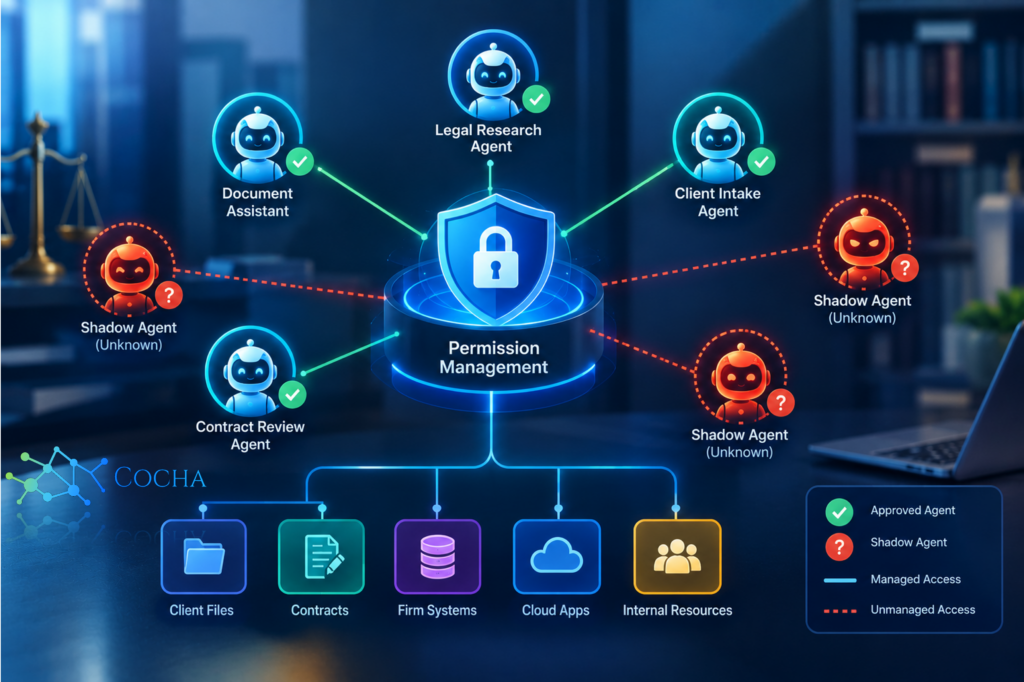
Here’s the question I’d ask after reading about this year’s breaches, if I ran IT at a firm: forget the human who got fooled for a second, what about everything else with login credentials? Every AI research tool, every drafting assistant, every automated workflow some associate set up without telling anyone, every integration between your practice management software and a third-party AI service.
Most firms genuinely don’t know the full answer. They know their official, sanctioned AI tools. They’re a lot fuzzier on the unofficial ones, the browser extensions, the trial accounts, the “I just wanted to see if this would help with discovery” experiments that quietly got access to a shared drive and never got cleaned up.
That’s shadow AI, and it’s a permission management problem before it’s anything else. You don’t fix it by banning tools, you fix it with a permission management solution that actually knows what’s out there and what it can touch.
Step 1: Find Every Agent and Automated Account
You can’t govern what you haven’t counted. Start with a real inventory, not a guess: every AI tool, bot, integration, and automated account with any kind of system access, sanctioned or not. Pull this from your identity provider logs, your SaaS management tooling if you have it, and honestly, from just asking practice group leads what they’re using that IT doesn’t know about.
This part is tedious and nobody loves doing it. It’s also the single highest value thing you can do this quarter, because every other step below depends on actually knowing what you’re managing. If you want a starting framework for what “agent security” actually covers at a law firm, specifically, this breakdown of AI agent security risks is a decent place to anchor the inventory conversation with partners who haven’t thought about it this way before.
Step 2: Stop Giving Firm-Wide Access by Default
Once you can see what’s out there, the next problem usually jumps out immediately: way too much of it has access to way more than it needs. A drafting tool used by the litigation group probably doesn’t need to see M&A documents. A client intake bot doesn’t need write access to billing systems.
Least-privilege scoping, by matter or by practice group rather than firm-wide, should be the default posture for any AI agent, not an exception you get around to eventually. This is slower to set up than just flipping on broad access for convenience. It’s also the difference between a compromised agent exposing one matter and a compromised agent exposing everything.
Step 3: Put a Permission Management Solution Behind It, Not a Spreadsheet
A lot of firms try to manage this in a spreadsheet somewhere, updated whenever someone remembers to. That falls apart fast, especially once you’re tracking dozens of agents across multiple practice groups with different access needs.
A real permission management solution gives you a single place to see what every agent and automated account can touch, flag permission creep when an account accumulates access it shouldn’t have, and revoke access quickly when something looks wrong instead of chasing down who owns which login. This isn’t a nice-to-have anymore. It’s the control that would have let a firm answer “what could this account actually see” in minutes instead of days.
Think about how that question played out at Seyfarth. The firm’s statement said its network wasn’t compromised, that this was contained to documents one employee sent by email after being deceived. Fine, but notice how much of the incident response hinged on being able to say precisely what was and wasn’t touched. That precision only exists if you already have visibility into access before something goes wrong, not after.
Step 4: Rehearse the “What Can This Thing Touch” Question
Build a habit, not just a tool. When a new AI feature shows up in software you already use, somebody should be asking what it can access before it gets turned on, not after a client asks why their documents showed up somewhere they shouldn’t have.
I’d suggest a short checklist for anyone evaluating new AI tools: what does it need access to, is that scoped correctly, who approved it, and when does someone review it again. Takes ten minutes per tool. Saves you from finding out the hard way that a convenient feature came with inconvenient access.
Where This Overlaps with Zero Trust
None of this is really new advice, if you squint. It’s zero trust applied to AI agents specifically: verify, scope tightly, assume breach is possible, and don’t extend trust just because something’s been running quietly for months without incident.
Firms that have already done zero trust work on their human users and devices have a head start here. The same philosophy, every access request verified, every permission scoped to what’s actually needed, applies just as much to the AI agent sitting between your document management system and a cloud AI provider as it does to an employee’s laptop.
What Skipping This Actually Costs
Here’s the math nobody wants to do until after an incident. A proper permission management solution, built out properly across every AI agent and automated account, costs real time and real budget. So does doing nothing, except you don’t see that cost until a breach notification letter, a regulator’s questions, or a client who finds out their matter data was reachable by three tools they’d never heard of.
Seyfarth is facing a proposed class action alleging the breach affected far more people than its own initial notification suggested: more than 56,000 people, according to the class action complaint (DeLong v. Seyfarth Shaw, N.D. Ill., filed September 24, 2026). I’m not saying a permission management solution would have stopped a human being fooled by a fake help desk call. It wouldn’t have. What it would do is make every other question after that moment answerable in hours instead of weeks: what did this account touch, what else looks like it, and what do we lock down right now.
That’s the actual value proposition, and it’s worth being honest about it rather than overselling it. Good access controls don’t prevent every bad decision a stressed employee makes under social pressure. They limit how far that one bad decision can travel.
Starting Monday
You don’t need to solve this all at once, and honestly, trying to would probably mean nothing gets finished. Start with the inventory. You cannot scope access you don’t know exists, and most firms are surprised by what turns up once they actually look.
From there, prioritize whatever has the broadest access first, not whatever’s newest or flashiest. A shadow AI tool quietly connected to your document management system is a bigger problem than an obvious, sanctioned chatbot everyone already knows about, and it’s exactly the kind of gap a decent permission management solution is built to catch.
Not sure what has access to what across your firm right now?
Request your free AI Readiness Snapshot and find out before this year’s breach wave becomes next year’s headline with your firm’s name on it. See what the Snapshot covers.
Sources
- DeLong v. Seyfarth Shaw LLP, N.D. Ill., class action complaint filed September 24, 2026 (Justia docket)
- Bloomberg Law, September 25, 2026 coverage of the Seyfarth class action alleging more than 56,000 people affected
- Above the Law, September 2026 coverage of the Seyfarth incident
- Seyfarth Shaw LLP, Notice of Data Event filed with the California Attorney General