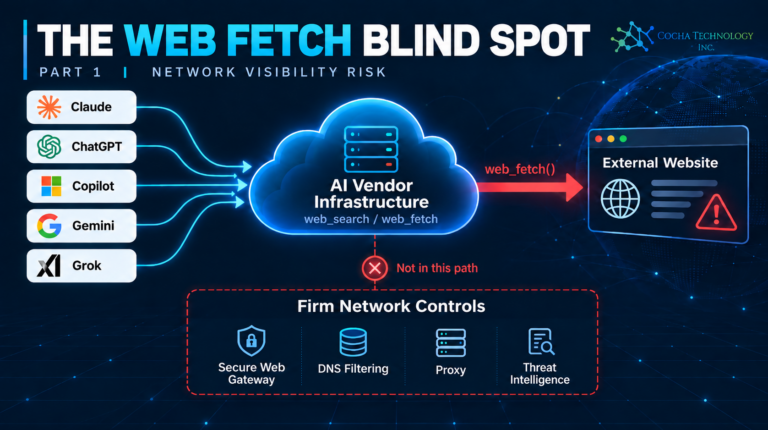
Short answer first. Our last piece showed that none of the five major AI labs document checking a fetched URL against a threat-intelligence database before an agent visits it. Having now gone lab by lab looking for an actual fix, there’s one control that’s documented to work everywhere a developer is willing to build it, one vendor-side product that does exactly what you’d want but only covers part of its own product line, and three vendors whose documentation simply doesn’t address the question yet. There is no setting in any of the five consumer or team apps that turns this on. There is a real architectural pattern that gets you there if you’re willing to own a small piece of custom code.
The one control that’s actually documented to work
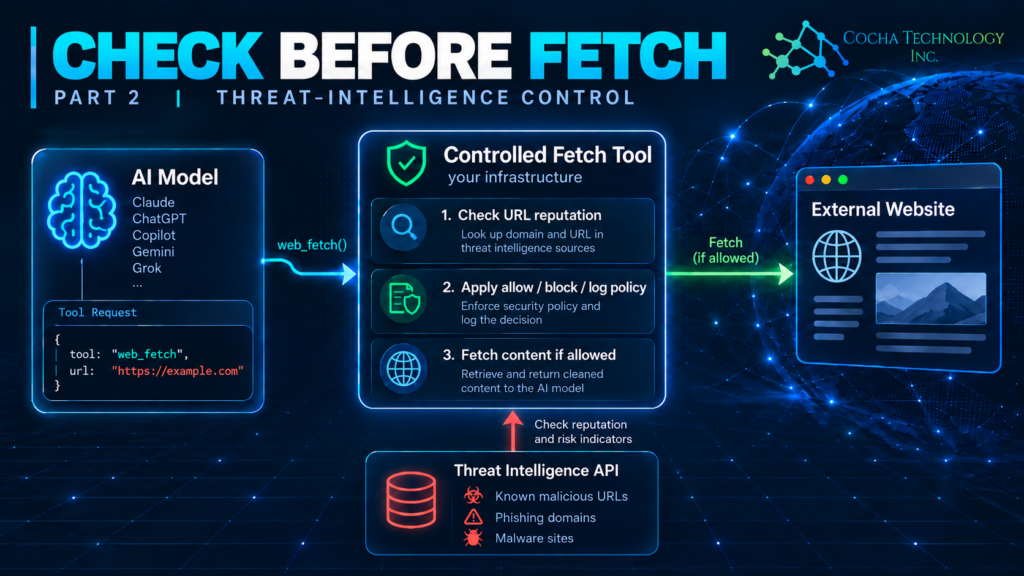
Anthropic, OpenAI, and Google all document a split between two kinds of tools a model can call. A server tool — Anthropic’s web_search and web_fetch, Google’s equivalent url_context and search grounding — runs on the vendor’s own infrastructure. A client tool (Anthropic’s term) or a function call (OpenAI’s and Google’s term for the same pattern) runs on the developer’s own backend: the model sends back a structured request, and your code executes it. Anthropic’s tool-use documentation states this plainly: client tools “run in your application,” and “your code executes the operation and sends back a tool_result.” Server tools, by contrast, “run on Anthropic’s infrastructure: you see the results directly without handling execution.”
That split is the whole answer to Steve’s question. If your own backend makes the HTTP request, your own backend can check the URL against a threat-intelligence feed first, the same way your secure web gateway would, before it ever fetches the page. Build a fetch_url tool instead of relying on the vendor’s built-in browsing tool, have your handler call something like Google Cloud Web Risk for commercial deployments or an enterprise URL-reputation API with the URL before fetching it, block or warn on a match, and only then make the request and hand the content back to the model. This isn’t a theory: it’s the documented, intended use of a feature that already exists in Anthropic’s, OpenAI’s, and Google’s developer platforms. The tradeoff is real too — you’re taking on the execution, the maintenance, and the security responsibility that the vendor’s built-in tool otherwise handles for you, and it only applies where you’re building a custom integration, not inside the consumer or team chat apps themselves.
Anthropic: no customer inspection point for web_fetch, but a real one for custom tools
Claude’s web_fetch and web_search are server tools. Anthropic’s own documentation gives you an admin-configured allow/block domain list and usage caps, nothing that checks a URL’s reputation. Claude Managed Agents — Anthropic’s own hosted-agent product — doesn’t change this. Its network sandbox runs entirely inside Anthropic’s cloud, not a customer’s VPC, and all outbound traffic goes through a JWT-authenticated proxy that Anthropic controls. Independent analysis of that sandbox (Pluto Security’s teardown of Managed Agents) found that Anthropic “terminates and re-signs all TLS traffic through the proxy” with its own certificate, that pointing the proxy’s environment variables at an external server doesn’t work, and that the container has no direct DNS and a firewall blocking direct outbound TCP — so the vendor’s proxy is the only path out, by design. There is no documented way to insert your own inspection into that path.
One approach, for a firm with development resources, is the client-tool pattern above: build a custom fetch tool instead of enabling web_fetch, and run the threat-intel check in your own handler before the content ever reaches Claude. For a firm just using Claude.ai or Claude Cowork without custom tool-calling, the only lever that exists today is the admin domain allowlist, which only covers sites you already knew to list.
OpenAI: a network control that solves a different problem
OpenAI’s documentation does describe something called “corporate network controls” for ChatGPT Enterprise, which sounds, on its name alone, like exactly what this piece is looking for. It isn’t. The control routes inbound access, not ChatGPT’s outbound browsing: an admin configures a custom HTTP header, ChatGPT-Allowed-Workspace-Id, that a company’s own network gateway injects, and ChatGPT checks the workspace a user is logging into against that list, filtering out personal or unapproved workspaces. It’s an access-control feature, enforced by the firm’s network as traffic comes in, not a check on what ChatGPT’s agent mode or Atlas browsing goes out and fetches. OpenAI’s documentation doesn’t mention threat intelligence, category filtering, or browsing safety anywhere in that article.
For ChatGPT’s actual browsing surfaces, the picture is architecturally different depending on which one you mean. Agent mode and the API’s browsing tool are server-executed, the same as Claude’s and Gemini’s equivalents, and OpenAI’s own help documentation already states (as our last piece covered) that existing link-safety measures “don’t eliminate all risks” and can be bypassed with a fresh domain and a valid certificate. ChatGPT Atlas, OpenAI’s standalone AI browser, is a locally-installed application with a substantial on-device footprint, including local inference-support components, which raises a real question about whether its network traffic might traverse a firm’s existing proxy the way a normal browser’s would. OpenAI’s own documentation doesn’t describe where Atlas’s agent-mode network requests actually terminate, so this piece isn’t going to guess; that’s a question for OpenAI’s enterprise documentation to answer, not one it currently does. Where OpenAI does offer the client-tool pattern — function calling in the API — the same Anthropic-style fix applies: build your own fetch function and check the URL yourself before the request goes out.
Google: same pattern as Anthropic, less documented
Gemini’s url_context and search grounding are server tools, same architecture as Claude’s and ChatGPT’s equivalents, and our last piece already found that Google’s own documentation describes an unexplained “content moderation check” on fetched URLs without saying what it evaluates or whether it draws on Google’s own Safe Browsing threat lists. Function calling is Gemini’s equivalent of a client tool — the same split Anthropic documents — so the same fix applies: a custom tool, executed by your own backend, checking the Safe Browsing Lookup API or an equivalent feed before the fetch happens. Google is a notable case here because it already operates the industry’s most widely used URL threat-intelligence product, Safe Browsing, alongside Web Risk, Google’s commercial-use URL reputation service. A firm building a custom Gemini integration has arguably the easiest path of the five to wiring in a real threat-intel check, precisely because Google already ships the check as a standalone product; it’s just not wired into Gemini’s own browsing tool today.
Microsoft: the one lab with a real threat-intel gateway for agents — with a gap
Microsoft is the exception that makes this worth a dedicated section. Its Global Secure Access product — part of Entra Internet Access, Microsoft’s own Security Service Edge — has a documented feature, titled in Microsoft’s own docs as securing a “Web and AI Gateway” for agents, that does what this piece set out to find. An admin enables traffic forwarding for a Copilot Studio agent, in the Power Platform Admin Center under Global Secure Access for Agents, and from that point the agent’s outbound traffic routes through Global Secure Access, where, per Microsoft’s documentation, an admin “can apply web content filtering, threat intelligence filtering, and other security policies” — including blocking categories like malware-associated “web repositories” and “illegal software,” and threat intelligence policies specifically described as protecting “agents against malicious destinations.”
That’s a real, product-documented threat-intelligence gateway sitting in front of an AI agent’s web traffic, which is more than any of the other four labs offer. The gap is in what it covers. Microsoft’s own documentation lists this feature’s scope as Copilot Studio agents with specific supported connectors, and explicitly excludes, in its “known limitations” section, Bing search transactions and “network requests to Large Language Model (LLM), either for orchestration or results enhancement.” Nothing in that documentation addresses Microsoft 365 Copilot’s own built-in web grounding — the feature our last piece already found has no documented threat-intelligence check of its own. The one lab with a working answer to this problem built it for custom agents created in Copilot Studio, not for the web grounding inside the flagship Copilot product most firms are actually running today.
xAI: the least documented of the five
Grok’s Live Search tool offers allowed_domains and excluded_domains lists, capped at five domains each — a narrower version of the allowlist pattern every other lab offers, with no content-moderation or safety check documented at all, as our last piece found. Checking xAI’s enterprise deployment documentation specifically for this piece turned up nothing that changes that picture: xAI’s enterprise docs describe proxy support and TLS inspection for its Grok Build CLI tool, honoring standard HTTPS_PROXY/HTTP_PROXY environment variables, but the documentation doesn’t say whether that applies to Live Search specifically, and doesn’t mention browsing or search traffic in its network requirements at all. Of the five labs, xAI’s public documentation says the least about this problem, in either direction. That’s not evidence the gap is worse at xAI than elsewhere; it’s evidence xAI hasn’t published enough for anyone outside the company to say.
Moving to Bedrock or Azure AI Foundry doesn’t fix this automatically
A firm with its own engineering team might assume that building on a hyperscaler’s own agent platform, rather than calling Claude’s or OpenAI’s API directly, comes with real network protection already built in. It doesn’t, by default, on either platform, though AWS and Microsoft get there differently, and the gap between them is worth knowing before anyone decides a cloud migration is the fix.
AWS’s Bedrock AgentCore can be deployed with no direct internet access at all: the agent’s tools run in a private VPC subnet, routed through a NAT Gateway and AWS Network Firewall before anything reaches the open internet. Network Firewall does the same domain allow/deny matching every vendor’s own allowlist does, reading the destination off the TLS Server Name Indication header, but it also offers managed rule groups that block known botnet and malware domains — the closest thing to an out-of-the-box threat-intelligence feed found anywhere in this research, on any platform. The catch is real: it’s reading headers, not decrypting payloads, so full inspection requires adding TLS inspection with Suricata rules on top, and a manipulated header can bypass domain-based matching.
Azure AI Foundry is the harder case. Its default managed virtual network supports only FQDN allowlisting through a managed Azure Firewall that a customer can’t configure beyond picking a SKU — Microsoft’s own documentation states plainly that “the firewall isn’t in your tenant or in your control,” so there’s no threat-intelligence or category filtering available on that path, full stop. Getting real content-category filtering in Foundry means bringing a custom virtual network and a separately licensed Azure Firewall Standard, or buying a third-party product: Aviatrix now sells a packaged “containment architecture” built specifically for this gap, because Foundry’s standard agent mode otherwise gives tool-call traffic what Microsoft’s own architecture blog calls “unrestricted egress to the internet.”
So the honest answer: AWS gets a firm closer to real protection by default than Azure does, but neither hyperscaler hands this over automatically. Migrating to either one is still a deliberate network-architecture decision, not a feature you turn on.
Your SASE, CASB, and endpoint tools are solving a different problem
It’s a reasonable instinct to look at the security stack a firm already owns — a SASE platform, a CASB, an EDR agent on every laptop — before building anything custom. For this specific gap, none of it reaches the traffic in question, and it’s worth being precise about why, because the reason is architectural, not a maturity gap any vendor is behind on closing.
When Claude, ChatGPT, Gemini, or Grok executes web_fetch or web_search, the request goes from the vendor’s own cloud servers straight to the destination site. It never touches a user’s desktop, browser, or corporate network, so there’s no packet for a SASE platform, a CASB, or an endpoint agent to intercept — the traffic simply isn’t present on any network those tools sit on. Cloudflare is a good example of how this gets confused: its AI Gateway is a reverse proxy for a company’s own backend calling an LLM provider’s API, a developer tool with no connection to anyone’s desktop, while Cloudflare One (its actual SASE product, built on the Gateway and WARP client) is genuinely strong at a related but different problem — shadow-AI visibility and DLP on what employees type into AI chat apps — and was independently rated the strongest of eight SASE vendors at desktop packet inspection in a recent comparison. None of that reaches a vendor’s own server-side browsing, for the same reason none of the other seven vendors in that comparison do either.
Endpoint products run into the identical wall from a different angle. Microsoft Defender for Endpoint’s Network Protection evaluates the destination of a connection — it reads the domain out of the TLS handshake and checks its reputation — but Microsoft’s own documentation is explicit that it never decrypts or reads the payload of an HTTPS request, so a malicious URL sitting inside an encrypted prompt is invisible to it by design, not by gap. SentinelOne, after acquiring Prompt Security, does have full visibility into prompt content across browsers and desktop apps, which is architecturally the right vantage point — but its own documentation names prompt injection, jailbreak detection, and data-leak prevention as what it checks for, not URL or domain reputation.
There is one narrow, real exception: a tool that’s executed locally rather than on a vendor’s servers — a locally-running MCP server, a client-side agent, a connector that runs on the user’s own machine — generates traffic an endpoint agent can actually see. That’s a genuinely different case from the vendor-hosted web_fetch this whole series is about, and it’s the only place in this research where “something on the laptop” turns out to be the right answer rather than an architectural dead end.
The three vendors who actually built this check
After a broad sweep of the AI gateway and MCP gateway market — more than 60 named products across developer-facing API gateways, dedicated LLM/AI security firewalls, MCP-specific gateways, hyperscaler offerings, and SASE vendors’ AI sub-products — exactly three have a documented, unqualified feature that checks a URL or domain embedded in prompt content against a threat-intelligence database or a custom category list, and every one of them belongs to a company that already ran a web threat-intelligence business before it entered AI security.
Palo Alto Networks’ Prisma AIRS has a “Detect Malicious URL” capability with Basic and Advanced (custom URL filtering) options, and its own API schema includes a prompt_detected.url_cats field confirming it inspects prompt content, not just model output. Pangea AI Guard has a “Malicious Entity detector” that calls Pangea’s own URL Intel and Domain Intel APIs, sourced from providers including CrowdStrike, DomainTools, and ReversingLabs. Google Cloud’s Model Armor, reachable as a policy inside Apigee’s AI Gateway, documents “malicious URL detection” that scans up to 256 URLs across both prompts and responses.
All three share the same architectural limitation as the custom-tool pattern earlier in this piece: they’re API-interception products, deployed in front of a company’s own application calling an LLM provider, not something that protects an employee typing into Claude.ai or ChatGPT.com directly. A handful of AI gateway frameworks — Portkey and LiteLLM among them — let a developer plug Prisma AIRS or Pangea in as a guardrail without building the integration from scratch, which lowers the lift but doesn’t change who needs to be running a custom-built application in the first place.
Three close calls are worth naming because they illustrate how easy this is to get wrong when evaluating a vendor’s marketing rather than its documentation. Microsoft Defender for Cloud has real AI.Azure_MaliciousUrl alerts that check both prompts and responses — but that capability lives in a separate security-monitoring product, not inside Azure API Management’s AI Gateway itself, so a firm would need to license and wire up both. CrowdStrike’s Falcon AIDR names “malicious URLs, IP addresses, and domains” explicitly, but its own documentation scopes this to AI outputs, not inbound prompts. And Zscaler’s AI Guard has an explicitly named “Malicious URL” detector — the closest-sounding match anywhere in the SASE category — whose own feature table marks it “Prompt: N/A, Response: Yes”: it checks links a model sends back to a user, not links a user or agent sends in, which is the inverse of what this piece has been looking for the whole time. The full market map, with every vendor checked and its documentation quoted, is in the appendix.
Where this leaves your firm
There’s a real difference between “no lab has solved this” and “no lab lets you solve this,” and the answer here is the second one, for firms with the engineering capacity to use it. Anthropic, OpenAI, and Google all document a client-tool or function-calling pattern where your own backend executes the fetch, which means your own backend can run the exact threat-intelligence check — Google Cloud Web Risk supports commercial URL reputation checks, and Prisma AIRS, Pangea AI Guard, and Google’s own Model Armor exist specifically to be wired into that pattern without a firm building the detection logic from scratch — that none of the labs’ server-side browsing tools run today. That’s a genuine control, not a workaround, and it’s the one piece of this problem a firm can actually close instead of just managing. Microsoft has gone further for agents built in Copilot Studio specifically, which is worth knowing if that’s part of your stack, but its own documentation is explicit that this doesn’t extend to Copilot’s own web grounding or to LLM orchestration traffic generally. Moving the workload to Bedrock or Azure AI Foundry doesn’t substitute for this decision either — AWS’s network containment gets closer to real protection by default than Azure’s does, but both still require a deliberate architecture choice, not a setting.
For firms without the engineering resources to build a custom tool, the honest answer is that today’s controls are limited to admin-configured domain allowlists, which cover only sites you already knew to list, and that gap is exactly the kind of thing AI agent security for law firms work has to account for directly rather than assume a vendor will close. It’s also worth being clear-eyed about what the rest of a typical security stack contributes here: a SASE platform, a CASB, or an EDR agent on every laptop is solving a real and adjacent problem — what an employee sends to an AI app, or what a locally-running tool connects to — not this one, because a vendor’s own server-side web_fetch call never crosses a network or an endpoint any of those products can see. The custom-tool pattern is a build decision, the same category of decision as the one behind local DLP for Claude, Copilot, and other AI assistants: a control that has to be built on your side of the relationship, because the vendor’s side doesn’t cover it, and in this case may never cover it inside a consumer chat app at all.
Quick answers
Can I just turn on a setting to make Claude, ChatGPT, or Gemini check URLs against a threat-intelligence feed? No. None of the three offers this as a setting in their consumer or team apps. It requires building a custom tool that your own backend executes, which only applies if you’re developing a custom integration against their APIs.
Is Microsoft’s Global Secure Access a real fix? For agents built in Copilot Studio with traffic forwarding enabled, yes — Microsoft’s own documentation describes real threat-intelligence and web-content filtering applied to that traffic. It explicitly does not cover Microsoft 365 Copilot’s own web grounding or Bing search transactions, per the same documentation.
What does OpenAI’s “corporate network controls” feature actually do? It restricts which ChatGPT workspaces a user can log into, enforced by a header your network injects on the way in. It has nothing to do with inspecting ChatGPT’s own outbound browsing traffic.
What’s the most practical fix for a firm without a development team? Turn on every admin-configurable domain allowlist your AI vendors offer, and treat that as a partial, allowlist-only control rather than a threat-intelligence check — because none of the five labs’ consumer or team products offer the latter today.
What’s the most complete fix for a firm that can build custom integrations? A custom fetch tool, built as a client tool (Anthropic) or function call (OpenAI, Google), that checks each URL against a feed like Google’s Safe Browsing API before fetching it. This is documented, vendor-supported architecture on three of the five platforms, and it’s the only approach found in this research that actually closes the gap rather than narrowing it.
Does moving our AI workloads to AWS Bedrock or Azure AI Foundry fix this for us? Not automatically. Bedrock AgentCore can be network-contained behind AWS Network Firewall with managed malware/botnet rule groups, which is closer to real protection than anything else found by default — but it’s still a deliberate VPC architecture decision. Azure AI Foundry’s managed network only allowlists by domain name; getting real category filtering means bringing a custom virtual network and your own firewall, or a third-party product.
Can our existing SASE, CASB, or antivirus/EDR vendor do this for us? No, and not because they’re behind — a vendor’s own server-side web_fetch call never touches your network or any endpoint, so there’s nothing for those tools to inspect. They solve the adjacent problem of what your people send to AI apps, which is worth having, but it’s a different control.
Is there any commercial product built specifically for this? Yes, exactly three, out of more than 60 checked: Palo Alto Networks’ Prisma AIRS, Pangea AI Guard, and Google Cloud’s Model Armor. All three require a custom-built application calling an LLM API — none of them protect a consumer chat app directly. The full list of what was checked and ruled out is in the appendix below.
Appendix: the AI and MCP gateway market, mapped
This appendix is the receipts for the claim above: every product category that could plausibly offer a URL/domain threat-intelligence check on prompt or MCP tool-call content, checked directly against each vendor’s own documentation rather than its marketing. A product is marked confirmed only where a vendor’s own docs name the capability; everything else is marked “not documented,” which is the default outcome across this market, not the exception. Three vendors with genuinely named but narrower or differently-scoped features are called out separately, since they’re the easiest to mistake for a full match.
AI/LLM API gateways (developer infrastructure that proxies a company’s own backend calls to an LLM provider): of 18 products checked — Kong AI Gateway, Portkey, LiteLLM, Cloudflare AI Gateway, Google Apigee, WSO2, Solo.io’s Gloo/kgateway, TrueFoundry, Helicone, Envoy AI Gateway, Tyk, Martian, Unify, Alibaba’s Higress, Requesty, OpenRouter, Humanloop, and LangSmith — only Apigee carries the capability, and only because it calls Google’s Model Armor; TrueFoundry and LiteLLM separately confirm this by listing Model Armor among their pluggable guardrails. Portkey notably offers both Prisma AIRS and Pangea as selectable partner guardrails, but its own native detection is a syntax-only “Valid URLs” check, not a security one. No other gateway in this group names a URL/domain/threat-intel feature anywhere in its own documentation.
AI security / LLM firewall platforms (dedicated “guardrail” products screening prompts and responses): of 20 vendors checked — including WitnessAI, Lasso Security, Protect AI, Aporia, Fiddler, Galileo, Arthur AI, Giskard, HiddenLayer, Vijil, Noma Security, Guardrails AI, and the NVIDIA NeMo Guardrails toolkit — the near-universal taxonomy is prompt injection, jailbreaks, PII leakage, and toxicity, which essentially never includes URL reputation. CrowdStrike’s Falcon AIDR names “malicious URLs, IP addresses, and domains… using integrated threat intelligence” (likely tracing to CrowdStrike’s 2025 acquisition of Pangea), but its documented scope is AI outputs, not inbound prompts. Lakera Guard, now part of Check Point AI Security, has a distinctly named “Malicious links detection” feature with no stated threat-intelligence source and no confirmed prompt-side coverage.
Dedicated MCP gateways (products governing agent-to-tool-server traffic specifically): of 14 products checked — Airia’s Secure MCP Gateway, Docker MCP Gateway, Solo.io’s Agent Gateway, Kong’s MCP Gateway, IBM’s Context Forge, Lasso Security, WSO2, Natoma.ai, SentinelOne/Prompt Security, Tyk, Cloudflare’s MCP Server Portals, Pomerium, Teleport, and Descope — every single one governs authentication and tool allow-listing, and not one documents a threat-intel check on URLs inside tool-call arguments or results. Netskope’s MCP Gateway (covered below) comes closest architecturally but isn’t in this category’s native product list.
Hyperscaler cloud offerings: Google and Microsoft split from AWS and IBM. Google’s Model Armor, covered above, is the clean confirmation. Microsoft’s capability — the AI.Azure_MaliciousUrl.ModelResponse, .UserPrompt, and .UnknownSource alerts — lives in Microsoft Defender for Cloud, a separate product from Azure API Management’s AI Gateway, which on its own has no URL/threat-intel feature at all. AWS’s Bedrock AgentCore Gateway, even with Bedrock Guardrails enforced at the gateway perimeter, documents content filters for harm categories, PII, and prompt-attack patterns but nothing for URLs; IBM’s Context Forge and watsonx guardrails show no URL/domain feature anywhere in their documentation.
SASE/CASB AI gateway sub-products: three vendors — Netskope, Fortinet, and Zscaler — have built a distinctly named AI or MCP gateway product separate from their general shadow-AI visibility features. Netskope’s MCP Gateway is the most content-inspection-forward product found in this entire research effort, with DLP and AI Guardrails policies explicitly reaching into “Tool call arguments” and “Tool call results” — but its documentation never names a threat-intelligence source behind those policies. Fortinet’s FortiAIGate and FortiWeb MCP module check for prompt injection and command injection but never connect to FortiGuard’s own threat-intel categories. Zscaler’s AI Guard has the most specifically-named detector in this group — “Malicious URL,” checking “domains categorized as malicious” — but its own feature table marks it “Prompt: N/A, Response: Yes,” the clearest counterexample in the whole market map: the right feature name, pointed at the wrong side of the conversation. Cato Networks, Check Point, and Versa Networks have no dedicated AI/MCP gateway product at all; their AI security investments are elsewhere (shadow-AI CASB controls, AI-datacenter infrastructure protection, and admin-automation tooling, respectively).
A few caveats on this research worth stating plainly: several findings rest on vendor documentation that was paywalled, redirected, or only reachable through a third-party integration page rather than the vendor’s own complete docs (WitnessAI’s guardrail pages, Protect AI’s and HiddenLayer’s deeper technical documentation, and Vijil’s product claims among them), and are marked lower-confidence rather than treated as a confirmed negative. CrowdStrike’s and Lakera’s exact feature wording came from integration pages and a defenses index, not a dedicated first-party detail page, so either could have more specific threat-intel sourcing language than what’s quoted here. Vendor documentation in this space changes quickly; treat this appendix as a snapshot as of this writing, and re-verify any vendor directly before a procurement decision rests on it.