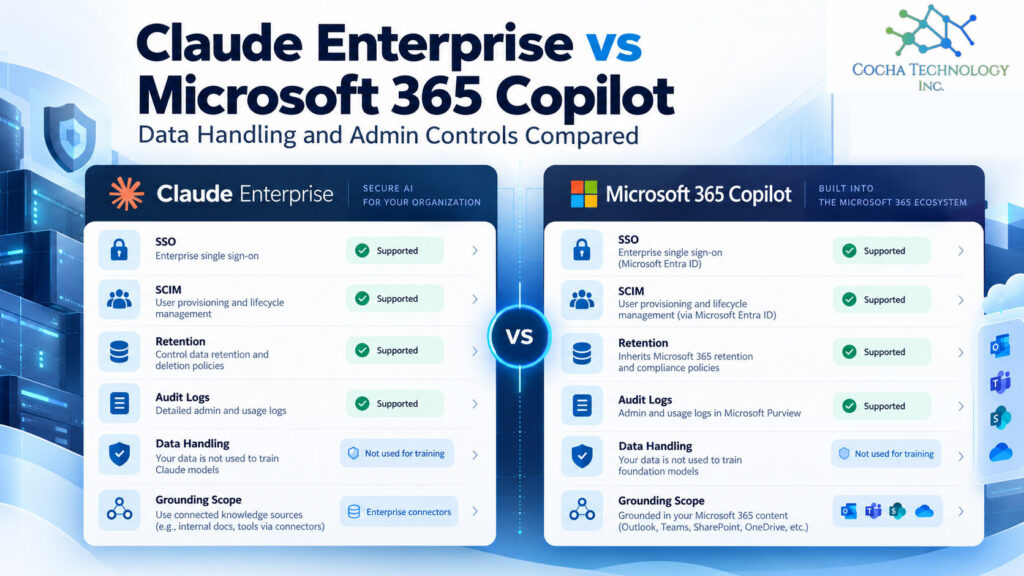
On admin controls, Claude Enterprise vs Microsoft 365 Copilot comes down to reach. Microsoft 365 Copilot gives an admin more controls on day one, because it rides on the identity, retention, audit, and DLP stack you already run in Microsoft 365. Claude Enterprise gives you a narrower reach, since it only sees what you connect, and it now ships the enterprise basics IT asks for: SSO, SCIM, audit logs, a Compliance API, and custom retention. Neither one fixes loose permissions. That part’s still yours.
Most comparisons skip the admin console, which is a little odd, because that’s where IT ends up living. If you want the broader picture, including which tasks fit which tool, start with our Claude vs Copilot guide. This one is for the person who’ll be asked to support both.
Cocha advises clients on both Claude and Microsoft products.
Claude Enterprise vs Microsoft 365 Copilot: admin controls at a glance
Prices and features below come from Anthropic’s and Microsoft’s own pages, read October 16, 2026. They change, so check again before you budget.
| Control | Claude Enterprise | Microsoft 365 Copilot |
|---|---|---|
| Price | $20 per seat per month, billed annually, plus usage at API rates. 20 seat minimum on self-serve plans (sales-assisted plans start at 50) | $30 per user per month paid yearly, or $31.50 paid monthly on an annual commitment. Needs a qualifying Microsoft 365 plan. Included in E7 |
| Single sign-on | Yes (Team has it too) | Microsoft Entra ID, the identity you already run |
| SCIM provisioning | Yes, Enterprise only | Not needed. Users already live in Entra ID |
| Role-based access | Yes, fine grained | Microsoft 365 and Entra admin roles |
| Training on your content | None by default on commercial plans | Prompts, responses, and Graph data aren’t used to train foundation models |
| Retention | Kept indefinitely unless an Owner sets a custom period | Microsoft Purview retention policies for Copilot prompts and responses |
| Audit logs | Yes, plus a Compliance API | Purview Audit records each Copilot interaction, included in Audit (Standard) |
| Legal hold and eDiscovery | Not documented on the pages we reviewed | Purview eDiscovery and holds |
| What it can reach | Only connectors an admin turns on | Anything the user can already view in Microsoft Graph |
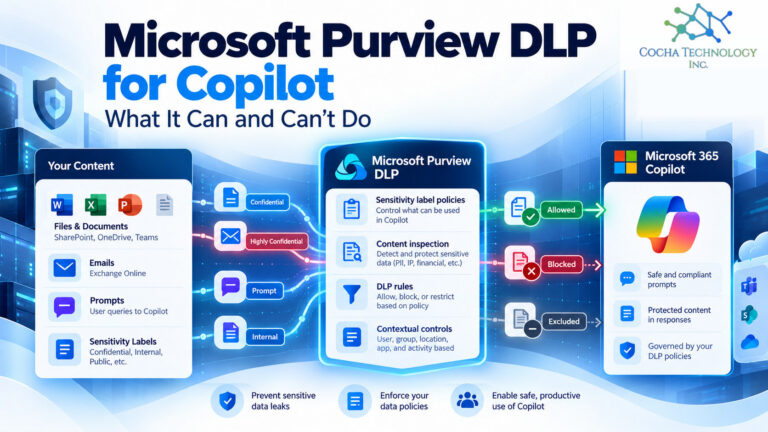
| Prompt level controls | Inference hooks can send prompts to your own security server first | Purview DLP with Copilot as a policy location |
| Network controls | IP allowlisting and network level access control | Your existing Microsoft 365 controls |
What stands out to me: Copilot wins on depth because it inherits years of Microsoft compliance tooling. Claude wins on blast radius because nothing is connected until somebody connects it. Those are different strengths, and I don’t think one cancels the other.
Data handling and training terms
This is the first question a managing partner asks, so let’s get it out of the way.
Microsoft states that prompts, responses, and data reached through Microsoft Graph aren’t used to train foundation models, including the ones behind Copilot. Interaction data stays inside the Microsoft 365 service boundary, and Microsoft says Copilot has opted out of the human review that Azure OpenAI abuse monitoring would otherwise allow. Optional user feedback can be used to improve the product, though not to train those models, and admins can manage feedback.
Anthropic’s pricing page lists model training as none by default on Team and Enterprise. Feedback is the usual exception: when someone rates a response, that conversation can be used, and Owners can turn rating off. Read the specific agreement your firm signed, though. A sales deck is not a contract.
One honest caution. No training doesn’t mean no storage. Both vendors keep your prompts and responses so people can see their history. Where that data lives, and for how long, is the next three sections.
Identity and provisioning
Copilot is easy here, almost unfairly so. Your people already sign in with Entra ID, so Copilot is a license assignment, not a new identity system. Joiners and leavers flow through the process you already have.
Claude Enterprise needs a little more setup, and the setup matters. SSO is on both Team and Enterprise. SCIM, which ties Claude accounts to your directory so a disabled user loses access automatically, is Enterprise only. So is domain capture, which pulls personal accounts that use your firm’s email domain into the managed organization.
That last one is quieter than it sounds. If an associate signed up for a personal Claude account with a firm address last spring, domain capture is how IT finds it and brings it under policy. We cover the Team gap in more detail in Claude Team vs Enterprise, but the short version is this: on Team, offboarding is a manual step someone can forget.
Retention, audit, and eDiscovery
Here’s where the two tools feel most different to an admin.
Copilot. Prompts and responses are stored with the rest of your Microsoft 365 content. You set retention in Microsoft Purview, search with Content search or eDiscovery, and holds suspend deletion the way they do for mail. Purview Audit writes a record for each interaction, and Microsoft says Copilot audit logs are included in Audit (Standard). Your legal hold process doesn’t need a new step. It needs Copilot added to the template.
Claude Enterprise. Anthropic’s retention article says conversation and project data is kept indefinitely unless an Owner sets a custom period, with a 30 day minimum. That setting covers chats and projects only. Anthropic says it doesn’t apply to Claude Design, Claude Tag, Claude Managed Agents, or other features built on Claude Code on the web, so check which features your people use before you assume one retention period covers everything. Two more details tend to surprise people. Shortening the window deletes anything outside it the moment you save. And deleted data can’t be recovered. Retention changes are themselves logged in the audit logs, which Owners can export, and the Compliance API gives you a programmatic feed for monitoring.
What I couldn’t find on Anthropic’s pages was a native legal hold. If your firm has litigation exposure, plan how you’d preserve Claude content on short notice before you need to, and get the answer from Anthropic in writing.
Grounding scope: Microsoft Graph vs connectors
Copilot grounds answers in Microsoft Graph, which means email, chats, meetings, and files the signed in user can already view. Microsoft is plain about it: Copilot surfaces only data a person has at least view rights to. It doesn’t invent access. It makes the access you already granted very easy to use.
Claude reaches your data through connectors that an admin turns on one at a time. Anthropic’s Microsoft 365 connector is read only, uses delegated permissions, and needs Entra admin consent before anyone can use it. It covers SharePoint, OneDrive, Outlook, and Teams.
One detail admins should know before they approve it. Anthropic’s connector security guide says SharePoint search needs the Sites.Read.All permission, and that limiting it to specific sites isn’t supported because the underlying search is tenant wide. So you can’t scope Claude to three SharePoint sites the way you might hope. What about Restricted Content Discovery? Microsoft documents it for organization wide search and Copilot, and neither vendor says it applies to Claude. A third party test published by Office 365 for IT Pros in April 2026 reported that it did stop Claude. That’s encouraging, but I’d test it in your own tenant before counting on it.
So the practical difference is scope by default. Copilot starts wide and you narrow it with SharePoint Advanced Management, Restricted Content Discovery, and labels. Claude starts narrow and widens as you approve connectors. In both cases, a messy SharePoint permission set stays messy. Our post on local DLP for Claude and Copilot covers where traditional DLP falls short once connectors are in play.
Claude models inside Copilot
This one confuses people, and fair enough.
Anthropic is now a Microsoft subprocessor. Per Microsoft Learn, Claude models are on by default for most commercial tenants and off by default in the EU, EFTA, and UK. They’re excluded from the EU Data Boundary, and they aren’t available in GCC, GCC High, DoD, or sovereign clouds. A global admin can turn Anthropic off, or limit it to named users and groups, in the Microsoft 365 admin center under Copilot, Settings, AI providers operating as Microsoft subprocessors.
When Claude runs inside Copilot, Microsoft’s Product Terms and Data Protection Addendum apply, and grounding still comes from Microsoft Graph. That is not the same as a Claude Enterprise deployment. Different contract, different admin console, different retention. There’s one more wrinkle. Microsoft also offers Anthropic models with Data Retention, which are off by default for all scenarios. Turn those on and Anthropic acts as an independent processor, stores most inputs and outputs for up to 30 days, and that data falls outside your Microsoft Product Terms and DPA. Leave it off unless you’ve decided otherwise on purpose. If someone in your firm says we already have Claude because it’s in Copilot, that’s the distinction to walk them through.
My take: make the subprocessor setting a deliberate decision and write down why. Defaults are decisions too, just not ones you made.
Running both without doubling your risk
Plenty of firms end up with both. That’s fine. The risk isn’t two tools. It’s two tools rolled out without one shared plan.
- Fix permissions once. Both tools inherit them. A cleanup done for Copilot pays off for Claude’s Microsoft 365 connector too.
- Name who approves new Claude connectors. Write it down. A partner connecting a new data source on a Friday afternoon shouldn’t quietly widen what Claude can see.
- Put both tools in your retention schedule and hold template. Copilot lands in Purview. Claude needs its own line.
- Turn on SCIM and domain capture. Stray personal accounts are an easy gap to miss.
- Decide the Anthropic in Copilot setting on purpose. Then review it when Microsoft changes the default.
- Use the prompt level controls you’re paying for. Purview DLP on the Copilot side, inference hooks on the Claude Enterprise side.
What this means by industry
Law firms. Ethical walls are the sharp edge. Neither tool knows a wall exists unless it’s enforced as a permission boundary, so test it with a pilot user who shouldn’t see a matter. ABA Formal Opinion 512 also asks lawyers to read and understand a tool’s terms and privacy policy, which makes the training and retention rows above more than an IT detail. Our checklist on whether Copilot is safe for law firms goes deeper. This isn’t legal advice.
Oil and gas. If engineering drawings or operational data sit in SharePoint sites shared broadly for field access, Copilot’s Graph scope can surface them fast. Start the permissions review there.
PE-backed companies. Expect AI questions in diligence and at exit. SCIM, exportable audit logs, and a written retention setting are the kind of evidence a buyer’s team asks for.
Medical device manufacturers. Audit trails matter for quality systems. Copilot logs into Purview alongside your other records. On the Claude side, Anthropic lists a HIPAA-ready offering only on Enterprise, so Team isn’t the plan for anything touching patient data.
Where this leaves your firm
If you’re Microsoft first and need governance that plugs into what you already run, Copilot is the easier admin story. If you want a second tool for heavier drafting and long documents, Claude Enterprise now has the controls to justify it, provided you buy Enterprise and not Team. Plenty of firms land on both.
Whatever you pick, do the permissions work first and write your decisions down. For the wider comparison by task and cost, see our Claude vs Copilot guide, and for current Microsoft numbers, our Microsoft Copilot pricing breakdown.
If you’d like a quick read on what either tool could reach in your tenant today, that’s what our AI Readiness Snapshot is for.
Quick answers
Does Claude Enterprise train on our data?
Not by default. Anthropic lists model training as none by default on Team and Enterprise. Rated feedback is the usual exception, and Owners can turn rating off.
Can Claude Enterprise connect to SharePoint?
Yes, through Anthropic’s Microsoft 365 connector. It’s read only, uses delegated permissions, and needs Entra admin consent. It sees only what the signed in user can already see.
Is Claude available inside Microsoft 365 Copilot?
Yes. Anthropic is a Microsoft subprocessor, and Claude models are on by default for most commercial tenants outside the EU, EFTA, and UK. That runs under Microsoft’s terms, not a Claude Enterprise agreement.
Which has better admin controls?
Copilot has deeper controls out of the box because it inherits Purview and Entra. Claude Enterprise has a narrower default reach and now covers SSO, SCIM, audit logs, and custom retention. The better fit depends on your stack.
Does Claude Enterprise have audit logs?
Yes. Audit logs and the Compliance API are Enterprise features. Team doesn’t include them.
How much does Claude Enterprise cost compared to Copilot?
As of October 16, 2026, Claude Enterprise lists at $20 per seat per month billed annually plus usage at API rates, with a 20 seat minimum on self-serve plans (sales-assisted plans start at 50). Microsoft 365 Copilot lists at $30 per user per month paid yearly on top of a qualifying plan. Usage based billing makes a direct comparison hard, so model your own usage.
Related Cocha guides
- Claude vs Copilot guide
- Claude Team vs Enterprise
- Is Microsoft Copilot safe for law firms?
- Microsoft Copilot pricing
- Local DLP for Claude and Copilot
- Inference hooks
- AI Readiness Snapshot