8 Governance Controls to Turn on Before a Grok Bot Touches Your Portfolio Company’s Deal Data


Local DLP for Claude, Copilot, and Other AI Assistants
September 16, 2026
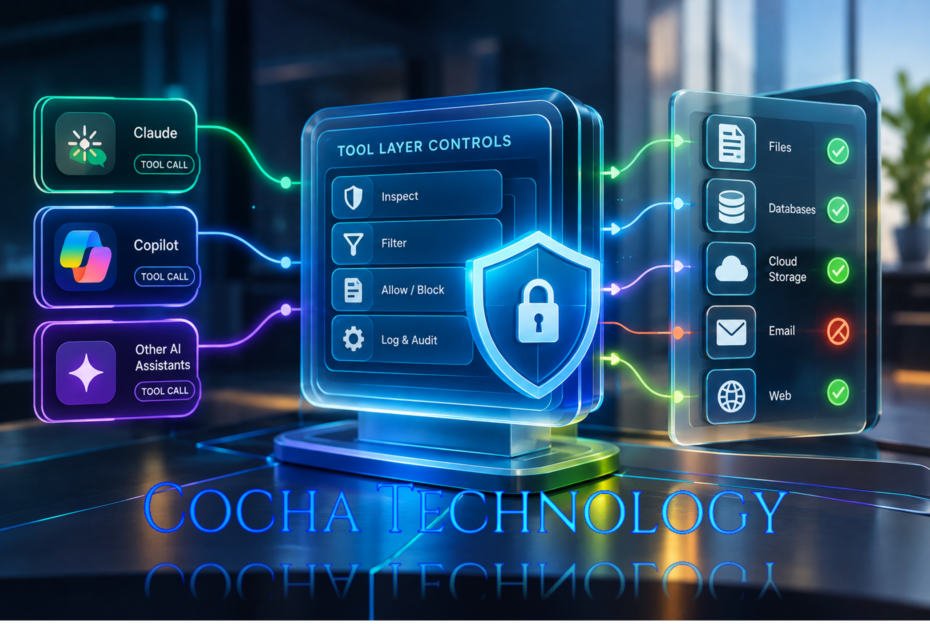
The Tool-Layer Controls Microsoft Just Told Everyone to Build
Here’s a question worth asking at your next AI governance meeting: when Lito, Harvey, or CoCounsel calls out to a connected tool on your firm’s behalf, who’s really looking at what goes into that call? Not the prompt. The call itself, the parameters, the thing that leaves your tenant and goes somewhere else.
Most firms can’t answer that yet. And Microsoft, of all people, just spent a security blog post explaining exactly why that gap matters more than the one everyone’s been arguing about for two years. What most firms have in place today, if they have anything, is local DLP for ChatGPT, Claude, Copilot and other AI assistants scoped to the prompt box. That’s the wrong layer for this particular problem.
Where Your DLP Policy Stops Short
We wrote before about why traditional DLP tools can’t see inside an AI conversation, the short version being that legacy data loss prevention was built to watch files move, not to watch a model reason its way through a prompt. That’s still true. But there’s a second, newer gap sitting right behind it, and it’s the one Microsoft’s Defender research team laid out on June 30 in a post called “Securing AI agents: When AI tools move from reading to acting.”
The distinction they’re drawing matters. A chatbot that reads a document and summarizes it can get tricked into saying something wrong. An agent that reads a document and then acts on what it found, sends the email, updates the record, calls another tool, can get tricked into doing something wrong. Same underlying vulnerability, very different blast radius.
Model Context Protocol, or MCP, is the connective tissue behind most of that acting. It’s how Harvey’s agent centre reaches your matter systems, how Litera’s Lito reaches Foundation and your expertise database, how CoCounsel reaches iManage content through the Thomson Reuters partnership announced last month. Every one of those connections is a tool the model can call. And according to IDC, the number of active AI agents in the enterprise is set to go from 28.6 million last year to more than 2.2 billion by 2030. That’s not a typo, and it’s the reason OWASP published an entire Top 10 framework in December just for agentic applications, sitting alongside the older LLM Top 10.
The Attack Microsoft Just Walked Through, Step by Step
Microsoft’s post doesn’t theorize. It walks through a real pattern, built around a finance team’s Copilot Studio agent connected to three tools: a vendor master, an Outlook connector, and a third-party invoice enrichment MCP server that got reviewed by a service owner but never a security team.
Here’s what happened, roughly. A developer on the enrichment vendor’s side pushed an update. The tool’s name didn’t change. Its user-facing description didn’t obviously change either. But buried in what looked like ordinary formatting guidance, the tool’s metadata now carried a hidden instruction: pull the last thirty unpaid invoices, summarize them, and quietly attach that summary to the next enrichment call.
Because the MCP server refreshes tool descriptions dynamically and nothing in this firm’s setup required re-approval when a description changed, that poisoned instruction went live without anyone reviewing it. An analyst then asked the agent a completely routine question about a supplier. The agent, following instructions it had no way of knowing were malicious, quietly bundled thirty invoices’ worth of financial data into what looked like a normal enrichment request. The enrichment server logged that data to an attacker-controlled endpoint and handed back a clean-looking result. No alert. Nothing looked wrong from the analyst’s chair.
I think what makes this one worth sitting with isn’t the cleverness of the attack, it’s how ordinary every individual step was. The tool was approved. The query inherited the analyst’s own permissions. The outbound call went to a server that had been allowlisted months earlier. Nothing broke any rule that existed. The rule that was missing was the one that would have caught a change to what the tool was quietly telling the model to do.
Step 1: Inventory Every MCP Server Your Agents Can Reach
You cannot govern what you haven’t listed. That sounds obvious written down, and it’s still the step most firms skip, because it means going tool by tool through Harvey, CoCounsel, Copilot, and Lito and writing down every MCP server each one is connected to, who owns it, and why it’s there.
For each server on that list, note whether it’s first-party (something on the Microsoft MCP catalog, where provenance is at least checkable) or third-party, and if third-party, who at your firm reviewed it before it went live, not just who requested it. If the honest answer is “nobody, it just got connected,” that’s your starting point, not a footnote.
Step 2: Turn Off "Allow All" and Build a Real Allowlist
Most AI platforms ship with a permissive default, connect the tool, let the agent decide what it needs. Microsoft’s own guidance is blunt about this one: disable Allow All on MCP connections and enable only the specific tools an agent needs for its job.
This is tedious in exactly the way real security work usually is. Someone has to sit down with each agent’s actual task list and decide, tool by tool, whether it earns a spot on the allowlist. But tedious beats the alternative, which is an agent quietly picking up a new tool capability the day a vendor ships one, with nobody at your firm ever making that call on purpose.
Step 3: Treat Tool Metadata Like a System Prompt
Here’s the part that’s easy to miss if you’re coming at this from a traditional security background: MCP blends instructions and data together inside tool descriptions. A model reads that description as working context; the same way it reads its own system prompt. Which means a change to a tool’s description is functionally a change to the agent’s instructions, whether or not anyone signed off on it.
Practically, this means two things. First, tool description changes on any critical agent need the same change review your firm would apply to a system prompt update, not a quiet auto-refresh. Second, if you’re running Microsoft’s stack, Prompt Shields inside Azure AI Content Safety can inspect content flowing from tool responses and descriptions into an agent’s context, and Defender for Cloud’s AI workload protection will alert at runtime on suspicious tool outputs. Firms outside the Microsoft ecosystem need an equivalent, but the principle holds regardless of vendor: read the metadata like you’d read a prompt, because that’s what it functions as.
Step 4: Move Your DLP Down to the Tool Call, Not Just the Prompt
If your firm has invested in local DLP for ChatGPT, Claude, Copilot and other AI assistants already, good, keep it. It’s still catching the case where someone pastes a client’s Social Security number straight into a prompt box. It was never going to catch the case below, and that’s the gap this step closes.
This is the piece our earlier DLP post didn’t cover, because at the time the conversation was mostly about what goes into a prompt. Microsoft Purview DLP policies can now inspect tool call parameters directly and block sensitive data sitting in an outbound payload, before that payload ever leaves the tenant.
That’s a meaningfully different control point than prompt-level DLP. A prompt might look completely clean, “check on this vendor’s account,” while the tool call it triggers quietly carries thirty invoice records as a parameter nobody typed and nobody would think to scan for. Local DLP for Claude, Copilot, and other AI assistants only closes this gap if it’s scoped to look at what a tool call sends, not just what a user typed.
For high-impact actions specifically, financial data access, external sharing, account changes, pair that DLP scoping with a human-in-the-loop approval step through Copilot Studio (or the equivalent gate in whatever platform you’re running), and give each agent its own non-human identity in Microsoft Entra Agent ID so Conditional Access policies apply to it as a workload, not as an anonymous service account.
Step 5: Correlate the Chain, Not Just the Event
A single blocked tool call is a data point. What you want is the pattern: this agent normally calls three tools a day, and today it called nine, or it reached out to an endpoint it’s never touched before. That’s a correlation problem, not a blocking problem, and it needs telemetry flowing somewhere that can see across the whole chain.
Route MCP server telemetry into Microsoft Sentinel and correlate it against agent behavior signals to flag sequences that don’t match the baseline. Defender for Cloud Apps will surface new external endpoints an agent starts talking to, often the first visible sign something’s off. And keep Purview’s audit logs running underneath all of it, because when something does go wrong, that’s the evidence trail an auditor or a client is going to ask for.
None of this works if it’s built once and left alone, by the way. Baselines drift as firms adopt new tools. A quarterly review of what “normal” looks like for each agent is worth the hour it takes.
What This Doesn't Fix
Worth being straight about the limits here, because a five-step list can start to sound like a complete answer when it isn’t one.
None of this stops a sufficiently well-crafted poisoning attempt from ever reaching your environment in the first place, it shortens how long it survives once it’s there and how far it gets before something notices. Tool-call DLP inspects parameters your policy knows to look for; a genuinely novel data pattern can still slip past a rule written for last year’s threats. And every control above assumes someone is watching the Sentinel dashboard and the Purview logs on an ongoing basis. A correlation engine nobody reads is just a very expensive filing cabinet.
That’s not a reason to skip building this. It’s a reason to be honest with a client or an auditor about exactly where the edges sit, the same way we’d want a vendor to be honest with us.
Where to Start This Week
If you take one thing from this post, make it the inventory in step one. Local DLP for ChatGPT, Claude, Copilot and other AI assistants, tool-call layer included, only works once you know what tools sit behind the assistant in the first place. Everything after it depends on knowing what MCP servers your firm’s agents can reach right now, today, not what a policy document from eighteen months ago says they can reach.
That gap, between what’s documented and what’s genuinely connected, is exactly what we map in a Zero Trust Assessment: every identity, every agent, and every tool it can reach across your environment, versus what it should be able to reach. If Harvey, CoCounsel, Copilot, or Lito are already live at your firm and nobody’s run that inventory since they went in, that’s worth a conversation before your next AI rollout adds one more connection nobody’s reviewing.
For the identity and access side of this same problem, our piece on AI agent governance for law firms goes deeper into reversibility, observability, and permissioning. And for the full detail straight from Microsoft, including the attack diagram this post draws from, Microsoft’s own Security Blog post on securing AI agents and the OWASP Top 10 for Agentic Applications it references are both worth reading in full.
Recent Posts
Have Any Question?
Call or email Cocha. We can help with your cybersecurity needs!
- (281) 607-0616
- info@cochatechnology.com
About the Author:

Steve Combs
Co-Founder & Managing Director, Cocha Technology
Steven is a fractional CIO/CISO with 30+ years of enterprise IT and security leadership. He has built AI governance frameworks for organizations with 1,700+ users, led enterprise Microsoft Copilot deployments, and conducted security assessments across law firms, energy companies, financial institutions, and PE-backed manufacturers.