What is data classification?
Data classification is the decision about how sensitive each kind of information is, and what has to happen to it as a result. Every firm has files that are confidential and files that aren’t. Without a scheme, nothing in its systems knows the difference. A data classification scheme fixes that with a short list of levels, a rule for what belongs in each, an owner who decides, and a default for anything new.
Three terms get mixed up here, so in one line each:
- Classification is the decision: this matter file is Confidential.
- Labeling is how that decision is recorded on the file or email so software can read it.
- DLP (data loss prevention) is the rule that acts on the label, such as blocking an external share.
Classification comes first. Labels and DLP rules only work if the scheme behind them makes sense. Inside a broader data governance framework, classification is the piece that tells every other control how careful to be.
Why it matters more once Copilot is on
Before AI assistants, an overshared folder mostly sat there. Someone had to know it existed and go looking. Microsoft 365 Copilot changes that, because it answers questions using whatever the user can already open.
Microsoft’s documentation describes how labels change that behavior. Copilot, Copilot Chat and Copilot agents recognize and use the sensitivity labels an organization applies. In a Copilot Chat conversation that draws on several items, the user sees the label with the highest priority, which is usually the most restrictive. For encrypted content, Microsoft says the user needs both VIEW and EXTRACT rights for Copilot to summarize or return it. EXTRACT is the copy right (Microsoft Learn, last updated November 9, 2026). Microsoft also says a DLP policy can stop Copilot from summarizing labeled files and emails, leaving only a link the user can open outside Copilot.
Two limits are worth knowing. Microsoft says labels applied to containers, such as a Team or a SharePoint site, aren’t inherited by the items inside them, so a chat summarized from a Confidential team won’t show that label in Copilot. And Copilot can use a file the user has open in an Office app no matter where it’s stored, including local drives, network shares or a USB stick (Microsoft Learn, last updated June 30, 2026).
So Copilot respects what the firm has classified and labeled at the item level. Everything else is protected only by permissions.
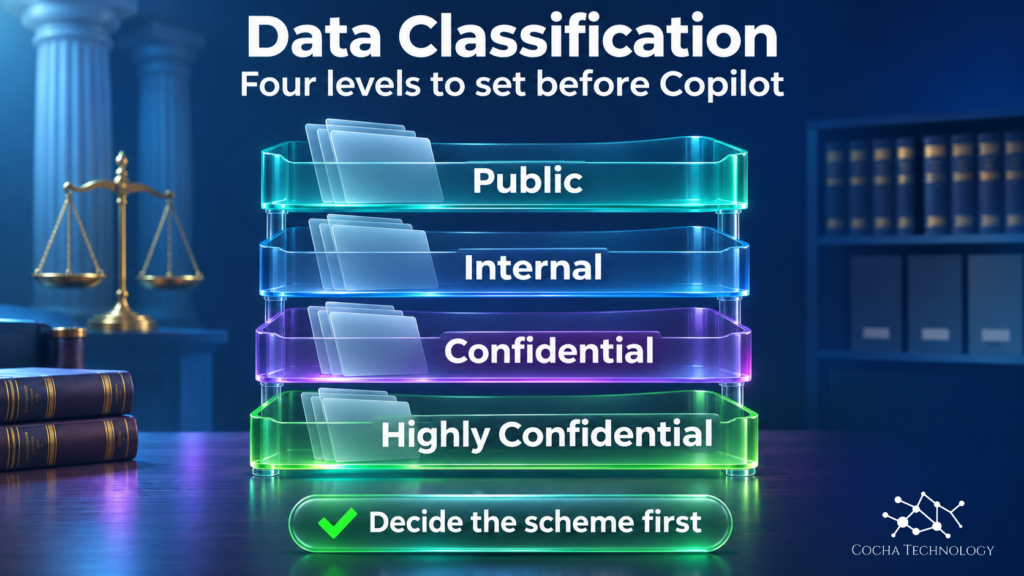
Data classification levels: a four level scheme for a small firm
This is Cocha’s recommended scheme for a firm of 10 to 300 people. It isn’t a formal standard, and many schemes use three to five levels. Four is enough to separate what matters without asking people to make fine distinctions every day.
Public. Information the firm has already published or would be comfortable publishing. Example: the firm’s website copy, a published article, a conference slide deck. Anyone may see it. Nothing special has to happen to it, but someone should still decide it’s public rather than assume it.
Internal. Day to day firm information that isn’t meant for outsiders but wouldn’t cause real harm if it got out. Example: the office holiday schedule, internal training materials, a template engagement letter with no client details. Everyone at the firm may see it. Keep it inside firm systems and don’t post it externally.
Confidential. Client and firm information whose exposure would cause real harm. Example: a client’s matter file, a draft contract, billing records, personnel files. Only people working on the matter or function may see it. It stays in approved locations, gets shared externally only through approved methods, and should carry a label that DLP and Copilot can act on.
Highly Confidential. The small set of information where exposure would be severe. Example: merger documents before announcement, sealed or privileged litigation material, client health or financial records, credentials. Only named people may see it. It should be encrypted, never shared by link, and excluded from AI summarization unless there’s a specific reason to allow it.
Federal practice uses a related idea. NIST’s FIPS 199 rates the potential impact of losing confidentiality, integrity or availability as low, moderate or high, defined as a limited, serious, or severe or catastrophic adverse effect. A small firm doesn’t need that formality, but the logic is the same: classify by the harm exposure would cause.
Who decides: owners, defaults and exceptions
IT shouldn’t decide what’s confidential. IT doesn’t know which matters are sensitive, and it shouldn’t have to guess.
The person responsible for the information decides. In a law firm that’s usually the responsible partner for matter files and the department head for firm records such as HR or finance. In other professional services firms it’s the engagement lead or practice owner. IT’s job is to enforce the decision: build the labels, set the defaults, configure DLP, and report on what’s out of line.
The default matters more than it looks. New content should start as Internal, not Public. If nobody chooses a level, the file should land at the level that keeps it inside the firm. Microsoft’s labeling tools support this. A label policy can set a default label for unlabeled documents and emails, and require a label before a file is saved or an email is sent. It can also require a justification when someone lowers a label.
Exceptions should exist, and they should be written down. A partner who needs to share a Confidential file with an outside expert should have an approved way to do it, with a record of who approved it.
A data classification policy you can copy
Keep the data classification policy to one page. Here’s a starting version a small firm can adapt with its own counsel and leadership.
Purpose. This policy sets how the firm classifies information so that client and firm data gets the protection it needs.
Scope. All information the firm creates, receives or stores, in any system, including email and AI assistants.
Levels. Public, Internal, Confidential and Highly Confidential, as defined in the attached table.
Owner. The responsible partner or department head decides the level for information in their area. IT enforces the decision and maintains the tools.
Default. New documents and emails are Internal unless the author chooses otherwise. Client matter files are Confidential from the day the matter opens.
Handling. Confidential and Highly Confidential information stays in firm approved systems. Highly Confidential information is encrypted and shared only with named people. Lowering a level requires a stated reason.
AI tools. Confidential and Highly Confidential information may be used only in AI tools the firm has approved for that level.
Exceptions. The information owner approves any handling exception. Record the approval, reason and date.
Review. This policy is reviewed every twelve months and after any significant change in systems. Next review date: twelve months from adoption.
The attached table is the four level scheme above.
Data classification tools: what can find sensitive data for you
Tools can find a lot of sensitive content for you, as long as the scheme tells them what to look for.
Microsoft’s Purview classifiers documentation describes the main types, as of September 29, 2026. Sensitive information types match patterns such as Social Security, credit card or bank account numbers. Named entities use dictionaries and patterns to find things like person names, addresses and medical terms. Exact data match finds specific values you supply, such as a list of client account numbers. Trainable classifiers recognize kinds of documents, either from Microsoft’s pretrained set or from samples you provide. Credential types detect credentials from supported services in content. Document fingerprinting recognizes variations of a template, OCR scans images, and on-demand classification scans files at rest that were never classified. Microsoft notes that the new Classifiers experience is in preview, alongside the existing one.
One sequencing limit: Microsoft’s trainable classifiers documentation says those classifiers only work on items that aren’t encrypted (read November 17, 2026). Plan discovery before encryption where you need those classifiers.
Other vendors offer discovery and classification tools that work across file shares and cloud storage outside Microsoft 365, and data security posture management products combine discovery with access analysis. Our page on DSPM covers that category. Which Microsoft features your plan includes varies, so check before you plan around auto labeling. Our guide on which Microsoft 365 tier includes which DLP is a good place to start.
When you’re ready to turn the scheme into labels, our sensitivity label taxonomy for law firms shows how the levels map to labels by matter type.
Rolling it out in order
Order matters more than speed.
Decide the levels. Agree the four levels, the owners and the default with firm leadership. This is a meeting, not a project.
Map where data lives. List the main locations: document management, SharePoint sites, Teams, file shares, email archives, and any cloud storage outside Microsoft 365. Note which ones hold Confidential or Highly Confidential material.
Fix permissions on the worst locations first. Labels don’t help if a Highly Confidential folder is open to the whole firm. Our SharePoint oversharing guide covers where to look.
Publish labels. Turn the levels into labels, set the default, and start with recommended labeling before you force anything. The sensitivity label taxonomy for law firms has the detail.
Add DLP. Once labels are in use, add rules that act on them. See Microsoft Purview DLP for Copilot.
Then Copilot. Turn on Copilot for the groups whose data is classified and whose permissions are clean. Watch how it behaves and expand from there.
Common information classification mistakes
Too many levels. A seven level scheme looks thorough and tends to get ignored. If people can’t pick a level in a few seconds, the scheme is too fine.
No default. Without one, most content stays unlabeled and protected by nothing but permissions.
Labels without permission cleanup. A label on a file in a folder everyone can open is a sticker, not a control.
Classifying everything by hand. It doesn’t scale. Set defaults, let tools find patterns, and save human judgment for the matters that need it.
When this becomes a Snapshot conversation
Before you set levels, it helps to know what you’re starting with. The free AI Readiness Snapshot shows who has access to what and how well your data is protected today. It’s a 60-minute working session followed by written findings and a 30-minute review. Read-only, no changes, no software. You’ll know where data classification needs to start in your firm before Copilot reaches the files.
See who can open what before you set your levels.
Quick answers
What are the four levels of data classification?
The scheme we recommend for small firms is Public, Internal, Confidential and Highly Confidential, sometimes called Restricted. It’s a recommendation, not a formal standard. Many schemes use three to five levels. Four separates what matters without asking people to make fine distinctions on every document they save.
What is the difference between data classification and information classification?
They’re the same practice under two names. Information classification is the wording in security standards: ISO/IEC 27001:2022 lists a control called classification of information, with labeling as a separate control that follows it. Data classification is the more common term in IT and product documentation.
Who should own data classification at a small firm?
The people responsible for the information decide its level: responsible partners for matter files, department heads for firm records. IT enforces those decisions by building labels, setting defaults and configuring DLP. IT shouldn’t be guessing which client matters are sensitive, and partners shouldn’t be configuring label policies.
Does Microsoft 365 Copilot respect data classification?
Copilot respects sensitivity labels and the user’s permissions. It shows the highest priority label in chats that draw on several items. For encrypted content, the user needs both VIEW and EXTRACT (copy) rights for Copilot to summarize or return it. Data that isn’t labeled is protected only by permissions, so classification has to come first.
What tools do data classification?
Microsoft’s classifiers find sensitive information types, named entities, exact values, document types through trainable classifiers, credentials and template variations. Third party discovery and DSPM tools cover storage outside Microsoft 365. Our sensitivity label taxonomy for law firms shows how classification becomes labels.
Primary sources
All pages read Tue 11/17/2026.
- Microsoft Learn, Learn about sensitivity labels. Last updated October 29, 2026. Supports: one label per item; label order sets priority; default label, justification to lower a label, mandatory labeling. Also: Copilot recognizes labels, shows the highest priority label in chats that reference several items, and returns data from encrypted items only with the EXTRACT usage right.
- Microsoft Learn, Considerations to manage Microsoft 365 Copilot for security and compliance. Last updated June 30, 2026. Supports: container labels are not inherited by items; Copilot can use a file open in an Office app wherever it is stored; DLP can stop Copilot summarizing labeled items.
- Microsoft Learn, Microsoft Purview classifiers overview. Last updated September 29, 2026. Supports: sensitive information types, named entities, exact data match, trainable classifiers, credentials, document fingerprinting, OCR and on-demand classification. The new Classifiers experience is in preview.
- NIST, FIPS 199, Standards for Security Categorization of Federal Information and Information Systems. Published February 2004; publication page https://csrc.nist.gov/pubs/fips/199/final. Supports: confidentiality, integrity and availability; low, moderate and high potential impact defined as a limited, serious, or severe or catastrophic adverse effect.
- ISO/IEC 27001:2022 Annex A, 5.12 Classification of information and 5.13 Labelling of information. Control names confirmed through a published Annex A listing, https://www.isms.online/iso-27001/annex-a-2022/5-12-classification-of-information-2022/. The standard itself is paywalled. Supports FAQ 2 only.
- Microsoft Learn, Data protection and auditing for Microsoft Copilot. Last updated November 9, 2026. Supports: both VIEW and EXTRACT needed for Copilot to summarize or return encrypted content; highest priority label on multi-item responses.
- Microsoft Learn, Learn about trainable classifiers. Supports: trainable classifiers only work with items that aren’t encrypted. This restriction is not generalized to every Purview classifier.