The short answer
Copilot vs ChatGPT usually gets framed as a contest between models. For a firm, the difference you live with every day sits somewhere else: where each tool reads from, and who controls that.
If your firm runs on Microsoft 365 and your permissions are clean, Copilot fits the work. If people need a standalone assistant, or you don’t run Microsoft at all, ChatGPT Business or ChatGPT Enterprise fits. Plenty of firms will land in the middle, with Copilot Chat as the baseline everyone gets and paid seats decided role by role.
Neither choice is wrong. Picking one without knowing what it will be able to see is.
Below are the plans side by side, how each vendor handles training and admin controls, the costs as of November 2026, and the step most firms skip.
The difference that matters: where each one reads your data
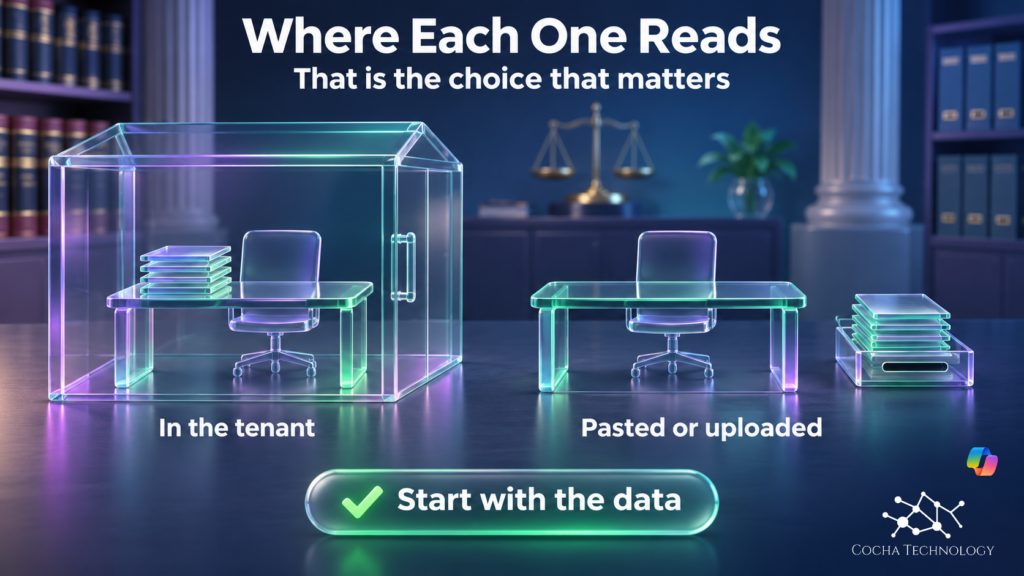
Paid Microsoft 365 Copilot works inside your tenant. It reaches mail, files, chats and meetings through Microsoft Graph. Microsoft’s privacy documentation says it only surfaces organizational data that the individual user has at least view permission to (Microsoft Learn, read November 17, 2026). That is the whole security model. Copilot doesn’t add new access. It inherits the access you already granted and makes it fast and searchable.
Copilot Chat works differently. Microsoft describes it as the standalone baseline experience included with eligible Microsoft 365 licenses, one that primarily uses web data and has limited use of organizational content. It sees firm content when someone hands it over: a pasted paragraph, an uploaded file, or a document open in Teams or Outlook. Microsoft also says Copilot Chat can’t use organizational data through Microsoft Graph. Only the paid license pulls it in automatically (Microsoft Learn, read November 17, 2026).
ChatGPT Business and ChatGPT Enterprise sit outside the tenant entirely. They see what staff paste, upload or connect through apps an administrator allows. Nothing flows in on its own.
Here is a hypothetical that shows why this matters. Say a shared folder holds a client’s engagement files, and over the years half the office has been given access to it, mostly by accident. With paid Copilot, anyone in that half can ask a question and get an answer drawn from those files, because Copilot is doing exactly what the permissions allow. With Copilot Chat or ChatGPT, the same files only reach the assistant if a person deliberately pastes or uploads them.
Two different failure modes. Copilot’s risk is the permission you forgot about. ChatGPT’s risk is the paste nobody should have made.
Copilot vs ChatGPT side by side: four plans compared
The table reflects vendor documentation read on November 17, 2026. Microsoft uses three license labels on its Copilot overview page: Copilot Chat (Basic), Microsoft 365 Copilot (Basic) and Microsoft 365 Copilot (Premium). The paid column here is the Premium license.
| Plan | Copilot Chat (Basic) | Microsoft 365 Copilot (Premium) | ChatGPT Business | ChatGPT Enterprise |
|---|---|---|---|---|
| Where it works | Copilot Chat on the web. Also Teams and Outlook, with content the user has open. | Inside Outlook, Teams, Word, Excel, PowerPoint and Copilot Chat | Standalone ChatGPT workspace | Standalone ChatGPT workspace |
| What firm data it sees | Web data. Also content the user pastes, uploads or has open. | Anything the user can already open in Microsoft 365, through Microsoft Graph. | What staff paste, upload or connect through enabled apps | What staff paste, upload or connect through enabled apps |
| Training on your data | Microsoft says prompts, responses and Graph data aren’t used to train foundation LLMs. | Same statement from Microsoft | OpenAI says not by default | OpenAI says not by default |
| Admin controls | Microsoft 365 admin and Purview controls, which vary by plan. | Permissions, sensitivity labels, Purview Audit, retention, DLP for Copilot. | MFA, member, admin and owner roles, GPT controls, SAML SSO, basic analytics | Everything in Business plus SCIM, role-based access controls, spend controls, user analytics |
| Data residency | EU Data Boundary safeguards for EU users, per Microsoft. | EU Data Boundary safeguards for EU users, per Microsoft | Not listed for Business on OpenAI’s business data page | Available to eligible Enterprise customers, per OpenAI |
| Starting price, as of November 2026 | Included with eligible Microsoft 365 plans. | Copilot Business add-on from $18.00 user/month paid yearly (promotional) | $20 user/month billed annually, $25 monthly, two-seat minimum | Through OpenAI sales |
Each row comes from that vendor’s own documentation about its own product. Vendor pages that compare themselves against a rival are worth reading, as long as you read them as what they are.
Data handling and training
Both vendors say they don’t train on your business data, and both put it in writing.
Microsoft’s statement is that prompts, responses and data accessed through Microsoft Graph aren’t used to train foundation LLMs, including those used by Microsoft Copilot. OpenAI’s statement is that by default it does not use data from ChatGPT Enterprise or ChatGPT Business, including inputs and outputs, for training or improving its models (both read November 17, 2026). Note the words by default, and note the plan names. Consumer accounts are a different conversation, which is one reason a firm wants staff on a business plan and off personal logins. For what OpenAI says about personal accounts versus business plans, see our guide is ChatGPT safe for business.
So training is rarely the real exposure. Two other things are.
The first is permissions, and it only applies to paid Copilot. Microsoft’s own architecture documentation says plainly that if content is already overshared, Copilot can surface it to anyone who has access (Microsoft Learn, read November 17, 2026). The tool is behaving correctly in that case. The folder isn’t.
The second is what staff paste. A ChatGPT workspace with strong admin settings still holds whatever a tired associate dropped into it at 11 p.m. Same for Copilot Chat. No vendor control stops a person from choosing the wrong document, which is why the written rule about which data goes where matters as much as the plan you buy.
Admin controls compared
Microsoft’s controls are the ones your tenant already has, extended to Copilot. Copilot respects SharePoint and OneDrive permissions. It honors Purview sensitivity labels and encryption, and for encrypted content the user needs both VIEW and EXTRACT rights before Copilot will summarize it. Purview Audit logs Copilot interactions automatically: who used it, when, and which files or sites it touched. The audit records don’t hold the prompt text, and Microsoft points to eDiscovery or DSPM for AI for that. Retention policies apply, and a DLP policy for Copilot can stop it from summarizing labeled files and emails (Microsoft Learn, read November 17, 2026). What you can switch on depends on your Microsoft 365 plan, so check licensing before you count on a control. Our Copilot security checks walk through the ones that matter most.
OpenAI’s controls live in the ChatGPT admin console. Its business data page lists, for Business, multi-factor authentication, Member, Admin and Owner roles, GPT controls to turn third-party GPTs on or off, SAML single sign-on and basic analytics. Enterprise includes everything in Business and adds SCIM provisioning and deprovisioning, role-based access controls with custom roles by group, centralized spend controls, user analytics, and Microsoft Intune support on iOS and iPadOS. The page also describes Enterprise Key Management and data retention controls for qualifying organizations (OpenAI, read November 17, 2026).
The practical gap: Business suits a small team with one admin. Once you need automatic deprovisioning when someone leaves, or group-based limits on who can use which connected tool, you’re looking at Enterprise.
If Claude Enterprise is also on your shortlist, we compare Claude Enterprise and Microsoft 365 Copilot admin controls separately.
What each one is better at
This is about where each tool sits. Which one writes better is a different argument, and not one we’d settle for you.
Copilot is built into the apps your people already have open. It drafts a reply inside Outlook using the thread in front of it, summarizes a Teams meeting the user attended, and works on a Word document or Excel workbook without anyone exporting it. For a firm whose work lives in Microsoft 365, that removes the copy and paste step, and with it one of the easier ways for client data to land somewhere it shouldn’t.
ChatGPT is a standalone workspace. It doesn’t care whether your documents live in Microsoft 365, Google Workspace or a practice management system, and staff can organize work into projects and custom GPTs that don’t depend on any one suite. For firms that aren’t Microsoft shops, or for roles whose work happens mostly outside Office apps, that independence is the point. So the Microsoft Copilot vs ChatGPT question often has a different answer for the litigation team than for marketing.
What it costs as of November 2026
Microsoft’s business pricing page listed these on November 17, 2026. Microsoft 365 Business Premium with Copilot is $32.00 user/month paid yearly, or $38.40 paid monthly. Microsoft 365 Business Standard with Copilot is $23.50 paid yearly, or $28.20 monthly. The Microsoft 365 Copilot Business add-on shows as originally $21.00, now starting from $18.00 user/month paid yearly, or $25.20 paid monthly.
That $18.00 is a promotion. Microsoft’s terms say it runs July 1 through December 31, 2026, needs an annual commitment, and applies to the first year only. The add-on is for existing customers on an eligible Microsoft 365 business plan. Some advanced AI features are billed by usage on top of the seat price.
On the ChatGPT side, OpenAI’s ChatGPT Business help article listed Standard seats at $20 per user per month billed annually, or $25 monthly, with at least two seats per workspace (read November 17, 2026). ChatGPT Enterprise is priced through OpenAI sales.
Our Copilot pricing breakdown and Copilot licensing guide go deeper on the Microsoft side.
Five questions to decide
Where does the work live? If drafts, email and matter files sit in Microsoft 365, Copilot works where your people already are. If they sit across several systems, a standalone assistant may fit better.
How clean are your permissions? Be honest here. Paid Copilot will find every folder that was shared too widely years ago. If you don’t know the answer, find out before you license seats.
What may staff paste? Every option here accepts pasted and uploaded content. Decide which categories of client data are allowed in which tool, and write it down.
Who administers it? Copilot runs through the Microsoft 365 admin center and Purview your IT lead already uses. ChatGPT adds a second admin console, with its own users, roles and logs to watch.
Do you need data residency or SCIM? OpenAI lists both against Enterprise, not Business. Microsoft’s EU Data Boundary commitments apply to Copilot, though Microsoft notes that models provided by Anthropic as a subprocessor are currently excluded from it. If either requirement is firm, it narrows the Microsoft 365 Copilot vs ChatGPT choice quickly.
Running both on purpose
Many firms will end up with Copilot Chat for everyone, paid Copilot for some roles, and ChatGPT for a few people. That can work, as long as it’s deliberate. The control is an acceptable use policy that names which tool may handle which kind of data, so nobody has to guess. Our AI acceptable use policy template is a starting point.
When this becomes a Snapshot conversation
The step most firms skip comes before the purchase: finding out what Copilot would surface once it’s switched on. Cocha’s free AI Readiness Snapshot is a 60-minute working session followed by written findings and a 30-minute review. It’s read-only. We make no changes and install no software. You come away knowing where your permissions stand before you settle the Copilot vs ChatGPT question, or decide to run both.
See what Copilot would surface in your tenant before you pick a side.
Quick answers
Copilot vs ChatGPT: is Copilot better than ChatGPT?
Neither is better in general. It depends on where your work lives. If your firm runs on Microsoft 365 and permissions are clean, Copilot fits because it works inside Outlook, Teams, Word and Excel. If people need a standalone assistant, or you don’t use Microsoft, ChatGPT Business or Enterprise fits better.
Is Copilot Chat the same as Microsoft 365 Copilot?
No. Microsoft describes Copilot Chat (Basic) as included with eligible Microsoft 365 licenses, working mainly from web data and using firm content only when the user provides it. Microsoft 365 Copilot (Premium) is a paid add-on license that pulls work data automatically through Microsoft Graph, limited to what each user can already open.
Does ChatGPT train on my business data?
OpenAI says that by default it does not use data from ChatGPT Business or ChatGPT Enterprise, including inputs and outputs, to train or improve its models. That commitment covers the business plans, not personal accounts. Staff using free or personal ChatGPT logins for firm work fall outside it, which makes it a policy question.
Can Copilot see files I should not see?
Copilot only surfaces content the user can already open. The catch is that many users can open more than they should, through old shares and broad groups. That’s why permissions come first. Our SharePoint oversharing guide covers how to find and close those gaps before rollout.
ChatGPT vs Copilot: can a firm use both?
Yes. Many firms will run Copilot Chat for everyone and add paid Copilot or ChatGPT seats by role. What makes that safe is a written rule naming which tool may handle which kind of client data, plus an owner for each admin console. Without the rule, people will guess.
Primary sources
All pages read Tue 11/17/2026. “Page date” is the update date in each page’s metadata where one is shown.
- Microsoft Learn, Data, Privacy, and Security for Microsoft Copilot. Page date November 4, 2026. Supports: prompts, responses and Microsoft Graph data aren’t used to train foundation LLMs. Copilot only surfaces organizational data users have at least view permission to; EU Data Boundary safeguards; Anthropic models currently excluded from the EU Data Boundary.
- Microsoft Learn, Microsoft Copilot overview. Page date November 16, 2026. Supports: license names Copilot Chat (Basic), Microsoft 365 Copilot (Basic) and Microsoft 365 Copilot (Premium). Copilot Chat included with eligible Microsoft 365 licenses, primarily web data. Organizational content only when the user provides it or has it open in Teams and Outlook. Basic licenses can’t use organizational data via Microsoft Graph; Premium grounds in Graph.
- Microsoft Learn, Data protection and auditing for Microsoft Copilot. Page date November 10, 2026. Supports: overshared content can be surfaced; sensitivity labels and VIEW plus EXTRACT rights; Purview Audit records without prompt text; eDiscovery and DSPM for AI; retention; DLP for Copilot.
- Microsoft, Microsoft 365 Copilot plans for business. (the /copilot/pricing/business URL redirects here). Supports: Business Premium with Copilot, Business Standard with Copilot and Copilot Business add-on prices; promotion window and terms; usage-based billing for select advanced AI features.
- OpenAI, Business data privacy, security, and compliance. No page date shown. Supports: no training by default on ChatGPT Business and ChatGPT Enterprise data; Business and Enterprise feature lists; data residency for eligible Enterprise customers and not Business; EKM and retention controls for qualifying organizations.
- OpenAI Help Center, ChatGPT Business overview. Page shows updated 4 days ago. Supports: Standard seat prices of $20 billed annually and $25 monthly; two-seat minimum; Enterprise for larger deployments.