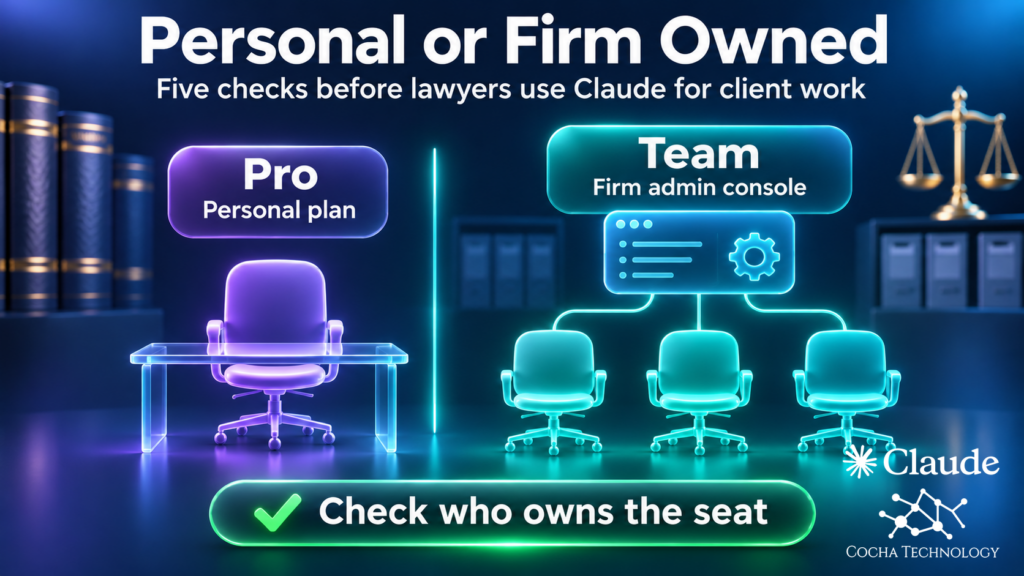
Choosing between Anthropic’s Claude Team plan and Pro looks like a usage question until you ask who owns the account. A partner or associate bought Pro on a personal card because it was faster than an IT ticket. Now client work may be moving through an account the firm can’t see, configure or shut off. Here are five checks that separate a personal Pro account from a firm-owned Claude Team seat. The Team versus Enterprise decision stays with the page we already wrote for it. Everything below comes from Anthropic’s own pages, read on November 15 and 17, 2026.
Claude Team vs Pro: the short answer
Pro is a personal plan. Anthropic’s help center describes it as a paid plan for individual consumers and sends organizations to Team and Enterprise. Team is the organizational plan. It comes with an owner, admins and central billing and administration, and it supports 2 to 150 seats. For a law firm the difference is control.
Max and Ultra are individual plans too, so Claude Team vs Max is the same ownership question with bigger usage limits. In a Claude Pro vs Team plan comparison, usage is the least important column. Current plan details are on Anthropic’s pricing page.
Check 1: Who owns the account
A Pro account belongs to a person. It sits on whatever email address they signed up with, the card is theirs, and so is the chat history. A Team seat belongs to the organization. An owner buys it, admins assign it, and Anthropic’s seat rules say each seat is for one named individual who can’t share the login.
The part IT misses is the departure. Removing a Team member cuts access immediately and frees the seat. It doesn’t delete their account or data, and re-adding the same email address brings their history back. Provisioning adds a wrinkle. Anthropic says just-in-time provisioning never removes members automatically. Unassign someone in your identity provider and they can’t sign in, yet they stay in the member list and keep their seat until an admin removes them. Team still needs a leaver step on your offboarding checklist.
Team can also verify your email domain and block new personal accounts on it. Anthropic’s help center calls the setting Restrict organization creation, and it appears under Security on the Organization and access page once the domain is verified. It stops new accounts only. Team admins can’t claim or migrate existing ones the way Enterprise admins can.
A Pro account never shows up on that checklist at all. Our ABA Formal Opinion 512 IT controls article covers the control side of that gap, and your own counsel decides what the opinion means for your firm.
A personal Pro account sits outside firm administration, so IT can’t see it or manage it. The free AI Readiness Snapshot reviews AI tool use and governance in a 60-minute working session. Request it with your name, work email and firm.
Check 2: Data privacy and training terms, and who sets them
On Pro, the setting belongs to the user. Anthropic’s consumer privacy page says it uses chats and coding sessions to improve its models if the user chooses to allow it, and the toggle sits in each person’s own privacy settings. The pricing page lists model training as an opt-out on the individual plans. The consumer page adds that conversations flagged for safety review can be used either way. If a user allows training, Anthropic says it may keep the data in de-identified form for up to five years. Nobody at the firm administers that toggle for a personal account.
Team falls under Anthropic’s commercial terms. The commercial privacy page says Anthropic doesn’t use inputs or outputs from its commercial products to train its models by default. The pricing page lists no model training on your content by default as a Team feature. The one exception is feedback, and an owner can turn that off with the Rate chats setting.
We make no claim about what training would expose. On Pro the answer varies by person, and on Team the default is set for the whole organization. Our write-up on the Claude Pro privacy policy change covers Anthropic’s consumer policy update.
Check 3: Who controls connectors and the desktop app
Connectors are the quiet risk. The pricing page lists them on every plan, Pro included, so a lawyer on a personal account can link a work mailbox or document library to a workspace the firm doesn’t administer. The same page shows No under Pro for admin controls for remote and local connectors. Team lists those controls, along with central billing and administration and enterprise deployment for the Claude desktop app. Pro’s card lists none of the three. Anthropic’s Cowork article adds two Team owner switches, for cloud sessions and the built-in browser, both on by default.
One date matters if you adopt Team. Anthropic says the combined chat and Cowork experience (Chat and Cowork unified in admin settings) turns on by default for Team organizations on December 1, 2026 unless an owner keeps it off. Decide before then rather than inheriting it.
Our Claude Enterprise deployment runbook covers the order of operations for connectors. Check each step against the Enterprise-only list in Check 5 before using it on Team.
Check 4: Identity, provisioning and spend
Team includes single sign-on, and you choose between two provisioning modes: invite only, or just-in-time. SCIM, which adds and removes users automatically as your directory changes, is Enterprise only, and Anthropic’s article says it isn’t available for Team plans. Pro shows No for single sign-on.
For a firm on Entra, Team means a verified domain, an Entra enterprise application set up for SAML, and an Owner or Primary Owner role in Claude. Anthropic’s Entra page lists an Entra ID P1 or P2 license as required for SCIM, which only matters on Enterprise. One warning: before you save, assign every user to the Anthropic app in your identity provider, because anyone unassigned at that moment is deprovisioned.
Spend is the other half. Team lists spend controls, which let an owner set caps for the organization and for individual users where available. Pro shows No for organizational spend controls. Expense reports show who has been reimbursed for Pro.
Single sign-on, provisioning and leaver steps decide who still has access after someone departs. The free Snapshot reviews Microsoft 365 permissions and data access, then closes with written findings and a 30-minute review.
Check 5: What Team still does not give you
Team is a real step up from Pro, but it isn’t the full control set a regulated firm often wants. The pricing page shows No for Team on audit logs, the Compliance API, SCIM, custom data retention and inference hooks, and Yes for Enterprise. It lists IP allowlisting among what Enterprise adds to Team.
| Control | Team | Enterprise |
|---|---|---|
| Audit logs | No | Yes |
| Compliance API | No | Yes |
| Inference hooks | No | Yes |
| SCIM provisioning | No | Yes |
| Custom data retention | No | Yes |
| IP allowlisting | No | Yes |
Anthropic’s Enterprise page also describes network-level access control, which blocks access to personal or non-corporate Claude instances from enterprise networks. That control speaks most directly to this post, and it’s Enterprise.
Audit logs and the Compliance API give a law firm an activity record after the fact. Inference hooks work earlier. They send the conversation transcript to an AI security server that your organization or its vendor runs, which returns an allow or deny verdict before the model runs. Team does neither job. Whether Team plus a written policy is enough is the decision our Claude Enterprise vs Team pricing and controls comparison walks through. One boundary settles it early. Team tops out at 150 seats, so a larger firm is choosing Enterprise anyway.
What to do about the Pro accounts already in use
Ask, don’t accuse. The partner who bought Pro was trying to get work done, and an accusation pushes usage out of sight. Send everyone one short question: are you using any AI tool for firm work, and on which account? Our guide on how to detect shadow AI covers finding what the question misses.
Then offer a Team seat as the path. Anthropic says a person whose personal account uses the same email address as the organization can migrate voluntarily on Team. Chats, projects, files and memory can move. Custom skills and connections to apps don’t, the move can’t be reversed, and the personal account closes. Anthropic also says your organization can access what moves, which is worth telling people up front. If the personal account sits on a different email address, the earlier chats stay in that personal account.
Last, put the rule in writing. Our AI acceptable use policy template gives you the structure. The decisions that matter are which accounts are approved for client work and who approves a new one. One Pro account is a reason to ask about the wider pattern of shadow AI.
FAQ
What is the difference between Claude Team and Claude Pro?
Pro is an individual consumer plan tied to one person’s own account, card and privacy settings. Team is an organizational plan with an owner, admins, central billing and administration, single sign-on, admin controls for connectors, and no model training on content by default. For a firm, the difference is who controls the account. Usage is secondary.
Is Claude Pro safe for client work?
Whether it’s appropriate is a decision for your firm’s own policy and counsel, so we won’t answer yes or no. Here is what IT gets. On Pro there’s no firm-owned administration, no single sign-on, no admin controls for connectors, and a training setting each user controls. Team changes those, but it doesn’t settle the policy question.
Does Claude Team train on our data?
By default, no. Anthropic’s commercial privacy page says it doesn’t use inputs or outputs from commercial products to train its models by default. Feedback is the exception. If someone uses the thumbs up or down button, or otherwise allows it, Anthropic may use that conversation. Owners can switch the button off with the Rate chats setting.
Can we move our attorneys from Pro to Team?
Anthropic’s help center says a person whose personal account uses the same email address as your organization can migrate voluntarily on Team. Chats, projects, files and memory can move, but not everything does, the move can’t be reversed, and the personal account closes. Review Anthropic’s list of what moves before anyone starts, and don’t promise attorneys their history.
When does a firm need Enterprise instead of Team?
When you need audit logs, the Compliance API, inference hooks, SCIM, custom data retention or IP allowlisting, or when you have more than 150 users, the Team seat limit. Our Claude Team vs Enterprise comparison for law firms walks through that decision.
What are Standard and Premium seats on the Claude Team plan, and what are the usage limits?
They’re the two Team seat types, and a firm can mix them. Anthropic’s help center says Standard seats include 1.25x the Pro plan’s per-session usage and Premium seats include 6.25x, and both have a weekly usage limit across all models. Only Admins and above can see which seat each person holds. Current rates are on Anthropic’s pricing page.
What is the minimum number of users for a Claude Team plan?
Two. Anthropic’s help center says Team plans require a minimum of two members and support up to 150 seats. A lawyer working alone on Pro is on a personal plan by design, so the ownership checks above still apply. Past 150 seats, see our Claude Team vs Enterprise comparison.
Where this leaves your firm
The free AI Readiness Snapshot is a 60-minute working session followed by written findings and a 30-minute review. It’s read-only, makes no changes to your environment and installs no software. It looks at Microsoft 365 permissions, data access and the governance around AI tools, so it shows where AI tools touch your firm before you choose a plan. It isn’t a review of any Claude plan.
Claude Team vs Pro is a smaller decision than the one underneath it, which is who owns the accounts where client work happens. If you can’t answer that today, start with the free AI Readiness Snapshot.
Sources
All pages read November 15, 2026, and sources 2 and 8 again on November 17, 2026. Where a page shows its own update date, that date is given. Anthropic’s pricing, Enterprise and developer documentation pages show none.
- Claude plans and pricing: Plan names. Pro and Team feature columns for single sign-on, central billing, connector controls, desktop app deployment, spend controls and model training. Team versus Enterprise table for audit logs, Compliance API, inference hooks, SCIM and custom data retention. IP allowlisting and network-level access control listed under Enterprise. No date on the page.
- What is the Team plan?: Team contents; central admin and billing; spend caps; 150 seat limit; minimum of two members; Standard and Premium seat usage and weekly limits (read again November 17, 2026). Page showed “Updated over a week ago” on November 17.
- What is the Enterprise plan?: Audit logs, SCIM, custom data retention and Compliance API as Enterprise features. Page date September 1, 2026.
- What is the Pro plan?: Pro described as a paid plan for individual consumers. Page showed “Updated over 2 weeks ago.”
- Set up JIT or SCIM provisioning: Provisioning modes; JIT never removes members automatically; SCIM not available on Team; deprovisioning warning when saving. Page date October 15, 2026.
- Manage members on Team and Enterprise plans: What happens when a member is removed; JIT and SCIM availability. Page showed “Updated over a week ago.”
- What happens to a user’s data when they are removed from a Team or Enterprise organization?: Removal doesn’t delete the account or data; history returns on re-add with the same email. Page showed “Updated over 3 weeks ago.”
- Purchase and manage seats on Team plans: Each seat is for one named individual; Standard and Premium seat types can be mixed; only Admins and above see each user’s seat type (read again November 17, 2026). Page showed “Updated over a month ago.”
- Move your personal Claude account to a Team or Enterprise organization: Voluntary migration; what moves and what doesn’t; same email requirement; one-way move; organization can access what moves. Page showed “Updated this week.”
- Claim and migrate accounts on your domain: Domain claiming is Enterprise only; Team can verify a domain and block new personal accounts. Page showed “Updated this week.”
- Use Claude Cowork on Team and Enterprise plans: Team owner toggles for cloud sessions and the built-in browser. Page showed “Updated this week.”
- Set up and manage the new unified Claude experience for your Team organization: December 1, 2026 default date on Team. Page showed “Updated this week.”
- Microsoft Entra ID SSO setup: Entra prerequisites; P1 or P2 license required for SCIM. Page date August 4, 2026.
- Is my data used for model training? (consumer): Consumer plans: training only if the user allows it, plus safety-flagged conversations. Page date March 16, 2026.
- How do I change my model improvement privacy settings?: Where each user changes the setting. Page date August 3, 2026.
- How long do you store my data?: Up to five years, de-identified, if a user allows training. Page date July 1, 2026.
- Is my data used for model training? (commercial): No training on commercial products by default; feedback exception; Owners can disable the thumbs feedback button. Page date August 18, 2026.
- Claude Enterprise: Network-level access control against personal or non-corporate Claude instances. No date on the page.
- Inference hooks: What inference hooks do; Enterprise only. No date on the page.
- IP allowlist: IP allowlisting for Claude Enterprise organizations. No date on the page.
- Set up single sign-on (SSO): The Restrict organization creation toggle appears under Security once the domain is verified. Page date October 13, 2026.
- Manage user feedback settings on Team and Enterprise plans: Owners and Primary Owners can change the Rate chats setting. Page date March 16, 2026.