A vendor or a partner says the firm should turn on the MCP protocol (Model Context Protocol, or MCP), or adopt A2A. The instinct is to frame it as A2A vs MCP and pick a winner. The official documentation for both points the other way. The two do different jobs, and the useful question for law firm IT is what each one lets an agent reach and who it acts as when it does. Whether the firm hears it as MCP vs A2A or the reverse, that control question comes first. Before that, the plain one: what is MCP?
What is MCP?
MCP is an open-source standard for connecting AI applications to external systems. The official docs name three kinds: data sources such as local files and databases, tools such as search engines and calculators, and workflows such as specialized prompts. They compare it to a USB-C port for AI applications. One of their examples fits a firm closely: enterprise chatbots that connect to multiple databases across an organization, so users can analyze data in chat. That reach is what the checks below are about.
MCP protocol vs A2A: what law firm IT is really comparing
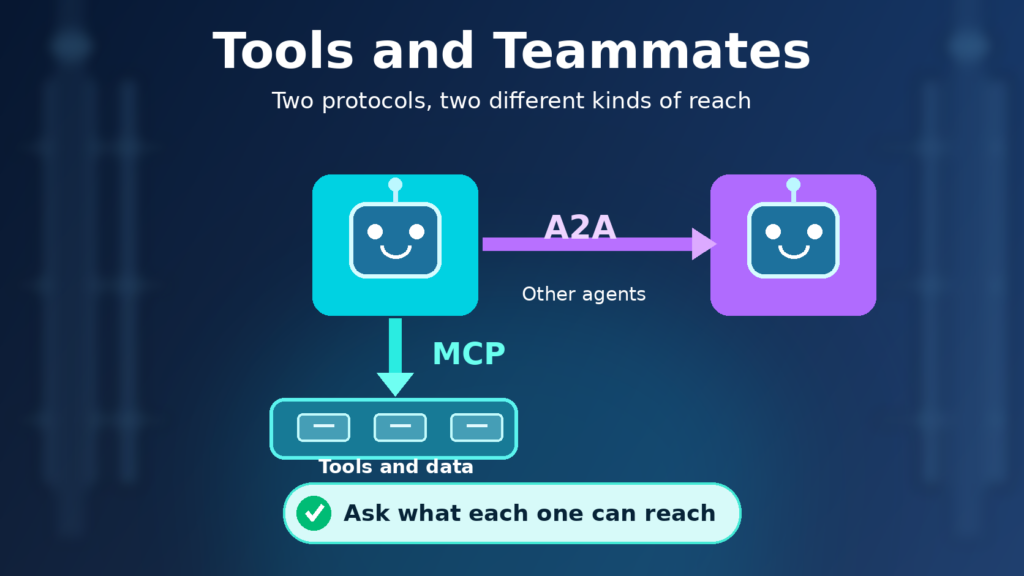
One protocol connects an AI application to things: files, databases, search tools, workflows. The other connects an agent to other agents. That’s the whole distinction, and it matters because the risks differ. A new tool connection widens what one agent can read or change. A new agent connection widens who the agent can hand work to, and what that other agent might do with it.
This is written for the IT lead, COO or managing partner at a firm where someone has started asking for one or both. It sticks to what the protocol owners document, names no winner, and stays away from roadmap predictions. It reflects the MCP and A2A documentation as read on November 15, 2026. Each check below is a question to answer before either path touches a matter system.
Check 1. What each protocol is, in its owners' own words
MCP’s own documentation calls it an open-source standard for connecting AI applications to external systems. It lists data sources such as local files and databases, tools such as search engines, and workflows such as specialized prompts, and it compares itself to a USB-C port for AI applications. In the specification, hosts are the LLM applications that initiate connections, clients are connectors inside the host, and servers provide context and capabilities.
The tool piece is the part to remember. The specification says tools represent arbitrary code execution and must be treated with appropriate caution, and that hosts must obtain explicit user consent before invoking any tool. A firm’s configuration decides how that consent shows up in practice.
What is A2A protocol? Its official documentation describes an open standard for communication between AI agents, one that gives agents built by different developers, frameworks and vendors a common language so they can work together. The Agent2Agent protocol, as its official name goes, was originated by Google and donated to the Linux Foundation, so searches for the Google A2A protocol land on the same standard. An agent advertises itself through an Agent Card, a JSON document describing its identity, capabilities, endpoint, skills and authentication requirements.
Neither description ranks the other. The A2A documentation says outright that the two address distinct but highly complementary needs.
Know what each protocol can reach before enabling
A tool connection or an agent handoff reaches whatever access sits behind it, and that starts with the permissions your users already have. The free AI Readiness Snapshot reviews that access in a 60-minute working session. Request it with your name, work email and firm.
Check 2. How they fit together
The A2A project’s comparison page uses direction as the picture. MCP is vertical: it deepens a single agent, and every MCP connection hands that agent another tool, resource or skill. A2A is horizontal: it reaches across a boundary to agents that may belong to another team, another department or a partner organization. In the page’s words, A2A connects the agents to each other, and MCP connects each agent to its own tools.
An illustration, not a client story. Suppose a firm builds an agent that helps with document review. When it opens a document from the document management system through a tool connection, that’s the MCP side. When it hands a question about a conflicts check to a different agent that another team runs, that’s the A2A side. Same agent, two kinds of reach, and the checks that apply to each are not the same checks.
The comparison page also draws a line in purpose. A2A is about agents partnering on tasks, while MCP is more about agents using capabilities. Law firm IT can borrow that line. A tool call is a capability being used. A handoff is a piece of work leaving the agent’s hands.
MCP vs API: what changes for law firm IT
The API is still there underneath. MCP’s architecture overview lists API calls as an example of a tool a server can expose, and API responses as an example of a resource. So an MCP server often sits in front of systems that already have APIs. What changes is who picks the call. A client can list a server’s tools, hand them to a model, and run the ones the model calls, and the overview says those listings can change. Approving an MCP server means approving whatever it exposes now and later, not one integration a developer wrote. Remote servers can use standard HTTP authentication, including bearer tokens and API keys, which is where Check 3 picks up.
Check 3. Identity: who the agent acts as
This is the check that decides whether a log entry means anything later. When an agent calls a tool or another agent, something has to say who is acting.
On the MCP path, a firm can run calls as the signed-in lawyer or under a shared service credential. The two give very different answers about what the agent can reach and who the audit trail names. Our MCP gateway article argues for designing toward the signed-in lawyer and sets the two patterns side by side.
On the A2A path, the enterprise documentation says authentication is delegated to standard web mechanisms. It relies mainly on HTTP headers and standards such as OAuth 2.0 and OpenID Connect, and the server advertises its requirements in its Agent Card. A2A payloads don’t carry user or client identity themselves, because identity is established at the transport layer. The specification says an A2A server must authenticate every incoming request, and the enterprise guidance says authorization can be applied per skill, with least privilege as the principle. Guidance on Agent Cards points the same way: a card that contains sensitive information must be protected with authentication and authorization.
What the documentation leaves open is whose identity a call carries. It says authorization should be applied based on the authenticated identity, which could represent an end user, a client application, or both, and that authorization logic is specific to the agent’s implementation. So whether a call arrives as the lawyer or as a shared application credential is a deployment decision, and the protocol won’t make it for you. Ask each vendor which one their product does, and get the answer in writing.
Know whose identity your agent carries into matters
A call that runs as the signed-in lawyer carries that lawyer's permissions, so those permissions have to be right. The free Snapshot reviews Microsoft 365 permissions and data access, then closes with written findings and a 30-minute review.
Check 4. Data reach and approval
The two protocols grow an agent’s reach in different directions, and approvals should follow that. Per the A2A comparison page, adding MCP connections lets an agent do more on its own. Adding A2A relationships lets it work with agents outside its own boundary. The A2A project describes itself as a standard for opaque agentic applications, and its documentation says a remote agent’s internal workings, memory and tools stay hidden from the client. So a firm may not be able to see inside the agent on the far end. You can control what you send. You can’t inspect what the other agent does with it.
One question is what systems and data a new connection exposes. The other is whose agent is on the far end and what it will do with what it receives.
A pilot can go well on a narrow set of connections, and then the connections multiply. Treat each new one as a decision. Our article on MCP connector expansion gates covers approving a new connection after a pilot, and the same habit applies to a new agent handoff.
Document stores deserve extra attention, because an agent that can reach them inherits whatever the signed-in person can reach. If permissions on those stores are loose, a clean protocol design doesn’t fix that. Firms looking at where access is wider than it should be can start with our data security posture management guide.
Check 5. What to write down before either path touches matter systems
Write four things before enabling anything: who owns the agent, which systems it can reach, how a bad call would be noticed, and who reviews that. Our AI agent governance article goes through those questions, so they aren’t repeated here.
The protocol-specific part is one more line in the same record: whether the connection is a tool connection or an agent handoff. The MCP specification says clients should log tool usage for audit purposes, which is guidance for the tool path. For a handoff, the A2A enterprise guidance says to log details on both client and server and to audit significant events such as task creation. Different protocols, same discipline. If nobody can say where the record is, the connection isn’t ready.
When protocol choice becomes a Snapshot conversation
If a practice group wants agents connected to matter systems and the firm can’t yet answer these five checks, a short review beats a long debate about protocols. The free AI Readiness Snapshot is a 60-minute working session followed by written findings and a 30-minute review. It’s read-only, makes no changes to your environment and installs no software. The Snapshot reviews Microsoft 365 permissions, data access and the governance around AI tools, which is where the identity and data-reach checks above land. It is not a review of any MCP or A2A product.
FAQ
What is MCP in agentic AI?
In agentic AI, MCP is the vertical link. Each MCP connection gives one agent another tool, resource or skill, while A2A is the horizontal link from one agent to other agents. The specification treats tools as arbitrary code execution and says hosts must get explicit user consent before invoking one.
A2A protocol vs MCP: what is the difference?
MCP connects AI applications to external systems such as data sources and tools. A2A is an open standard for communication between agents. The A2A documentation calls the two distinct but highly complementary, with MCP described as vertical, reaching down to tools, and A2A as horizontal, reaching across to other agents.
Does choosing MCP mean a firm does not need A2A, or the reverse?
No. The A2A project’s own comparison describes the protocols as complementary, not alternatives. A firm may use one, both or neither, depending on what its agents need to do. We don’t predict where either goes, and the useful question is what each path lets an agent reach.
How does this relate to an MCP gateway?
A gateway sits on the MCP path, where it can apply controls such as allowlisting, tool blocks, logging and rate limits. It doesn’t answer the question of which protocol role a use case needs. Our MCP gateway article covers what a gateway can and can’t do.
What should IT write down before enabling either protocol?
The owner, the systems the agent can reach, how a bad call would be noticed, and who reviews it. Add whether the connection is a tool connection or an agent handoff. Our AI agent governance article walks through the core questions in detail.
When is the free AI Readiness Snapshot the right next step?
When someone is asking to connect agents to matter systems and you can’t say what each connection would reach or who it would act as. The free AI Readiness Snapshot is a 60-minute working session followed by written findings and a 30-minute review. It’s read-only, changes nothing in your environment and installs no software.
A2A vs MCP: the question to settle first
A2A vs MCP isn’t a contest to settle. The better prompt is to ask what each path lets an agent reach, who the agent acts as, and what approval comes first. If those answers are unclear, the free AI Readiness Snapshot is a reasonable place to start.
Sources
Official MCP and A2A documentation, each with the date the page or its repository shows, checked November 15, 2026. MCP pages show a dateModified in their page metadata. A2A pages show no date, so the date given is the last change to that page’s source file in the A2A GitHub repository.
- What is the Model Context Protocol (MCP)?: MCP as an open-source standard for connecting AI applications to external systems; data sources, tools, workflows; the USB-C comparison; the enterprise chatbot example. Page date November 9, 2026 (spec version 2026-07-28). Read again November 17, 2026.
- MCP specification, version 2026-07-28: Hosts, clients and servers; tools as arbitrary code execution; explicit user consent before tool invocation. Page date November 9, 2026.
- MCP specification: Tools, version 2026-07-28: Clients should log tool usage for audit purposes. Page date November 9, 2026.
- MCP architecture overview: Tools as executable functions, including API calls. Resources, including API responses. Clients list tools and run the ones the model calls, and listings can change. HTTP authentication with bearer tokens and API keys. Read November 17, 2026. The page shows no update date.
- A2A Protocol home: Open standard originated by Google and donated to the Linux Foundation. Site published November 13, 2026.
- What is A2A?: An open standard for communication between AI agents, common language across frameworks and vendors. Last changed October 2, 2026.
- A2A and MCP: Detailed Comparison: Distinct but highly complementary; MCP vertical and A2A horizontal; agents partnering on tasks versus agents using capabilities. Last changed September 10, 2026.
- Core Concepts and Components in A2A: Agent Card contents; remote agents are opaque, with internal workings, memory and tools hidden. Last changed September 10, 2026.
- Enterprise Implementation of A2A: Authentication through standard web mechanisms; no identity in payload; server must authenticate every request; per-skill authorization; least privilege; logging and auditing. Last changed September 5, 2025.
- Agent Discovery in A2A: Agent Cards with sensitive data must be protected with authentication and authorization. Last changed August 12, 2026.
- A2A Protocol Specification, latest released version 1.0.0: Server must authenticate every incoming request; authorization based on the authenticated identity and the server’s own policies. Last changed November 11, 2026.
- a2aproject/A2A on GitHub: An open protocol enabling communication and interoperability between opaque agentic applications. Repository last updated November 13, 2026.