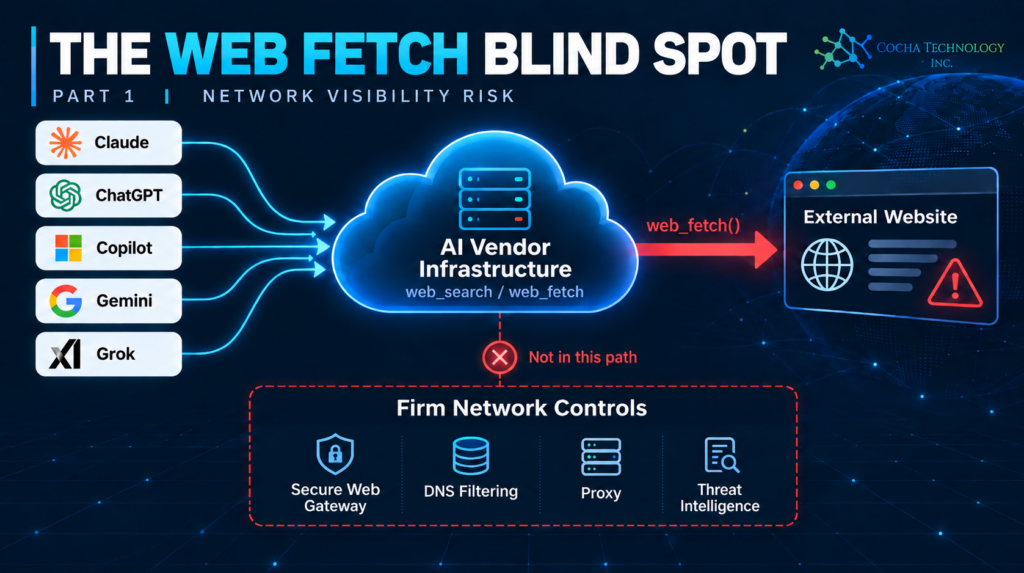
Short answer first. Claude, ChatGPT, Microsoft 365 Copilot, Gemini, and Grok can all read live web pages on a user’s behalf, through tools usually called web_search, web_fetch, “browsing,” or “grounding.” Every one of those tools runs on the vendor’s own infrastructure, not through your firm’s network. That means the URL never touches your secure web gateway, your DNS filtering, or your proxy’s threat-intelligence feed, the exact systems built to stop a user from landing on a known phishing or malware site. Having read what each vendor actually publishes about these tools, none of the five majors documents checking fetched URLs against a threat-intelligence database the way an enterprise web filter does. What they document instead is narrower, and in some cases unrelated to whether a site is dangerous at all.
What “web search” and “web fetch” actually do
These are two different tools that get talked about as one thing. Web search lets the model issue a query and get back a list of results, similar to a search engine API. Web fetch (also called browsing, grounding, or URL context depending on the vendor) lets the model retrieve the actual content of a specific URL and read it. Both run as server-side tool calls: Anthropic’s, OpenAI’s, Google’s, and xAI’s servers make the outbound HTTP request, not the user’s laptop and not your firm’s network egress.
That architecture is exactly why your existing web filter doesn’t see it. A secure web gateway or CASB inspects traffic as it leaves your network. A web_fetch call never leaves your network, because it was never on it: the request goes from the vendor’s cloud directly to the destination site, and only the resulting content comes back to you, already rendered as text in the chat. Your DNS filtering, your proxy’s category blocks, your SSL inspection — none of it sits in that path, because none of it was ever in a position to.
What each lab says it checks — in their own words
Here’s what each vendor’s own documentation says about safety controls on these tools, as of this writing:
| Vendor / tool | What it documents | What it doesn’t mention |
Anthropic — web_search / web_fetch | Admin-configured allowed_domains/blocked_domains lists (opt-in, set by your org, not pre-populated with known-bad sites); max_uses caps; an explicit warning that “enabling the web fetch tool in environments where Claude processes untrusted input alongside sensitive data poses data exfiltration risks”; Claude cannot fetch a URL that appears only in its own output, to limit exfiltration | Threat intelligence, Safe Browsing, malware or phishing screening of fetched content |
| OpenAI — ChatGPT agent / Atlas browsing | A blocklist covering “certain websites” across the virtual browser and connectors; Enterprise/Edu admins can block specific domains; “watch mode” requiring user supervision on sensitive sites; explicit statement these measures “don’t eliminate all risks” | Any description of how the blocklist is built, or a malware/phishing reputation check on arbitrary sites a user or agent navigates to |
| Google — Gemini URL context | “The system performs a content moderation check on URLs to confirm they meet safety standards,” returning an "unsafe" status on failure | What the moderation check actually evaluates, or whether it draws on Google’s own Safe Browsing threat lists — the docs don’t say |
| Microsoft — 365 Copilot web grounding | Queries sent to Bing over a secure connection without tenant identifiers; “Responsible AI (RAI) safety checks” coordinated through the process | Whether RAI checks apply to retrieved web content specifically; any mention of Bing Safe Browsing, SmartScreen, or malicious-site screening of search results |
| xAI — Grok Live Search | allowed_domains / excluded_domains lists, capped at five domains each, for scoping which sites are searched | Any content moderation, safety check, or malware/phishing screening of fetched pages at all |
The pattern across all five: domain allow/block lists that a firm has to populate itself, usage caps that control cost rather than risk, and safety language that’s either about a different problem (data exfiltration, for Anthropic) or left undefined (Google’s unexplained “safety standards,” Microsoft’s unspecified “RAI checks”). None of the five documents matching a fetched URL against a live, continuously updated catalog of known-malicious domains the way a security product would.
What a real threat-intelligence check looks like, for comparison
It’s worth being precise about what’s actually missing, because “threat intelligence” gets used loosely. Google’s own Safe Browsing product (a completely different Google team and product from Gemini’s URL context tool) maintains refreshed, hashed lists of unsafe web resources, covering phishing and deceptive sites and hosts of malware or unwanted software, and lets any client check a URL or its hash against those lists before visiting it. Palo Alto Networks describes the same category of control from the enterprise side: a URL filtering database that tags sites by category, including malware and phishing, built from “threat analytics and intelligence to block both known and unknown threats,” refreshed continuously from a cloud master database alongside a local cache for low latency.
That’s the bar an enterprise web filter clears before letting a browser load a page. None of the five AI vendors’ own documentation claims their web_search or web_fetch tools clear that same bar, and in Google’s case specifically, it’s notable that the company that built Safe Browsing doesn’t say Gemini’s URL context tool uses it.
The control gap, proven in the wild
This isn’t a theoretical gap. Zscaler published a proof-of-concept in 2025 against ChatGPT’s agent mode that it called an “AI-in-the-middle” attack. The setup: an attacker gets a malicious prompt in front of a user, through a shared prompt link or social engineering, that instructs the agent to present an attacker-controlled domain as “the official IT authentication portal.” The agent went there “without hesitation.” When it reached a login page, it asked the user to take over the browser and enter credentials, which the user then handed directly to the phishing site.
Two details from that writeup matter for a firm’s own risk model. First, OpenAI’s existing link-safety controls, the ones that flag known sites and warn about suspicious pages, “can be circumvented by adversaries using custom infrastructure with a valid SSL certificate,” meaning a freshly registered domain with a normal certificate sails through. Second, and this is the part that should change how security teams think about the problem, Zscaler notes that network and endpoint controls “will probably not be effective against this threat” because “the phishing activity does not actually occur on your endpoint or network.” The firm’s own secure web gateway, the thing that would normally catch a known phishing domain in its URL category database, never sees the traffic, because the fetch happened on OpenAI’s infrastructure, not the firm’s.
Separately, Brave’s security research team found that Perplexity’s Comet browser could be made to act on hidden instructions embedded in a web page’s text, and later that it could execute commands hidden inside an image when a user took a screenshot. Researchers at UCL found that an AI browser’s inability to reliably distinguish a user’s instructions from text on an untrusted page it’s reading is the mechanism behind most of this, whether the goal is credential theft, email exfiltration, or clipboard hijacking that silently swaps a copied link for a malicious one. OpenAI’s own CISO, asked about this class of problem, called prompt injection “a frontier, unsolved security problem.” That’s not a vendor being evasive; it’s an accurate description of where the industry actually is.
What this means for your firm
None of this requires an attacker to compromise your network. It requires getting a malicious prompt or a booby-trapped web page in front of someone using an AI tool that can browse, whether that’s a paralegal asking Claude to pull up “the court’s e-filing portal,” an engineer asking Copilot to summarize “the latest NERC advisory,” or anyone asking any assistant to look something up and just open what it finds. If that page is new enough, or convincingly enough disguised, there’s a real chance none of the five tools above would stop the fetch, and your SWG, DNS filtering, and SSL inspection, however well configured, never get a chance to weigh in, because the request never routed through your network in the first place. This is also why a conventional zero trust network review won’t surface this particular gap on its own: it assesses what happens to traffic on your network, and this traffic never arrives there to be assessed. Finding this gap takes a review of how the AI tools themselves are configured, not just how your network is.
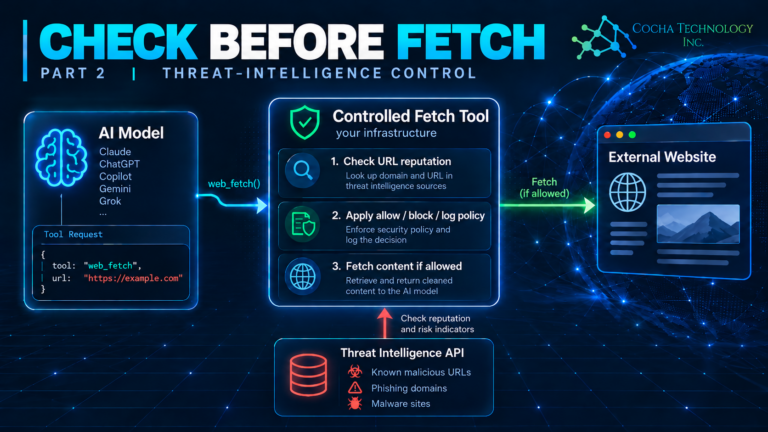
This is the same architectural point behind why DLP won’t protect agents like Claude and Copilot: a control built to inspect traffic on your network doesn’t help once the traffic is happening somewhere else entirely. The fix isn’t a better web filter. It’s treating agentic web access as a new, ungoverned egress point that needs its own controls, not an assumption that your existing perimeter tools still apply. That starts with knowing which of your AI tools have web_search or web_fetch enabled at all, since several of the vendors above ship it on by default and only let an admin turn it off, not harden what it checks.
Where this leaves your firm
The vendors aren’t hiding this. Anthropic states the residual risk directly in its own docs. OpenAI’s CISO calls prompt injection unsolved. What’s missing isn’t candor from the labs, it’s a firm-side control that assumes their candor is the whole risk picture. A domain allowlist you configure yourself is a real control, and worth turning on wherever a tool offers it, the same way local DLP for Claude, Copilot, and other AI assistants is a real control for the data side of this problem. But an allowlist only covers sites you already knew to list. It does nothing for the brand-new, convincingly-named domain an attacker stood up yesterday, which is exactly the kind of site a threat-intelligence feed exists to catch in real time and exactly the kind of site none of these tools checks against one. Firms running AI agents with web access, especially for agent security for law firms handling matters where a convincing phishing page could do real damage, should treat that gap as a known, standing risk to manage, not a surprise to discover after the fact. The follow-up piece covers what an actual control looks like, lab by lab.
Quick answers
Does Claude check websites against a threat intelligence database before fetching them? No. Anthropic’s documentation describes admin-configured allow/block domain lists and data-exfiltration safeguards, not a malware or phishing reputation check.
Does ChatGPT warn me before visiting a dangerous website? It warns when a URL isn’t recognized by its public-web index, and lets Enterprise/Edu admins block specific domains, but its own documentation says these measures “don’t eliminate all risks,” and a 2025 Zscaler proof-of-concept showed the check can be bypassed with a freshly registered domain and a valid SSL certificate.
Can my firm’s web filter block what an AI agent fetches? Generally no, once the agent’s web_search or web_fetch tool is enabled. The request is made from the vendor’s infrastructure, not your network, so your secure web gateway, DNS filtering, and SSL inspection never see the traffic to filter it.
Which AI vendor documents the strongest web-fetch safety control? Based on current public documentation, Google’s Gemini is the only one of the five that states a safety check exists at all (a “content moderation check” returning an “unsafe” status), though it doesn’t disclose what the check evaluates or whether it draws on Google’s own Safe Browsing data.
What should a firm actually do about this? Inventory which AI tools have web browsing enabled, turn on every admin-configurable domain allowlist available, and treat agent web access as a new, ungoverned network egress point rather than assuming your existing web filter already covers it.