An AI acceptable use policy rollout works when three things happen together: people know which tools they’re allowed to use, the approved tools are good enough that nobody needs a workaround, and IT can see when the policy isn’t being followed. Writing the policy is maybe a fifth of the job. The rest is rollout.
If you need the document itself, start with our free AI acceptable use policy template. It’s editable and includes a law firm addendum. This post picks up where the template stops: how you launch it, train people, wire it to real controls, and keep it current.
Why most AI policies stall
I’ve seen a lot of AI policies that were well written and almost completely ignored. The pattern is usually the same.
The policy lands as an email attachment. It bans the tools people already like and doesn’t offer a replacement. Nobody checks whether anyone’s following it. Six months later, it describes tools that have changed twice.
Here’s a composite to make that concrete. It’s built from patterns that come up a lot, not from any one firm. Picture a 60-attorney firm. The policy goes out by email on a Monday. It bans consumer AI tools and tells everyone to use the firm’s Copilot licenses instead. By Wednesday a few associates are back on personal ChatGPT accounts, because nobody set Copilot up for the drafting work they do every day. Nobody reports it. Nobody asks for an exception either, since the policy never said who approves a tool. Months later, IT spots the traffic during an unrelated review. Now the firm is starting over, and people are a little more careful about what they admit to.
A ban on its own doesn’t stop AI use. It just stops people from telling you about it. That’s how shadow AI grows: not out of bad intent, mostly out of deadlines.
So the goal isn’t a stricter document. It’s a policy that’s easier to follow than to ignore.
Who owns it
Pick one owner. Not a committee, one named person, with a small group behind them.
In a law firm that’s often the general counsel or a risk partner, working with IT and the CIO. In a midmarket company it might be the CIO, CISO, or head of compliance. What matters is that someone can answer a question about the policy within a day, and someone has the authority to approve a new tool.
Write down three decisions before launch:
• Who approves a new AI tool or connector, and how fast you’ll answer a request.
• Who handles a reported mistake, like client data pasted into the wrong tool.
• Who reviews the policy, and when.
The NIST AI Risk Management Framework puts governance first for a reason. Roles and accountability come before controls. It’s a voluntary framework, not a rule, but it’s a sensible order of operations.
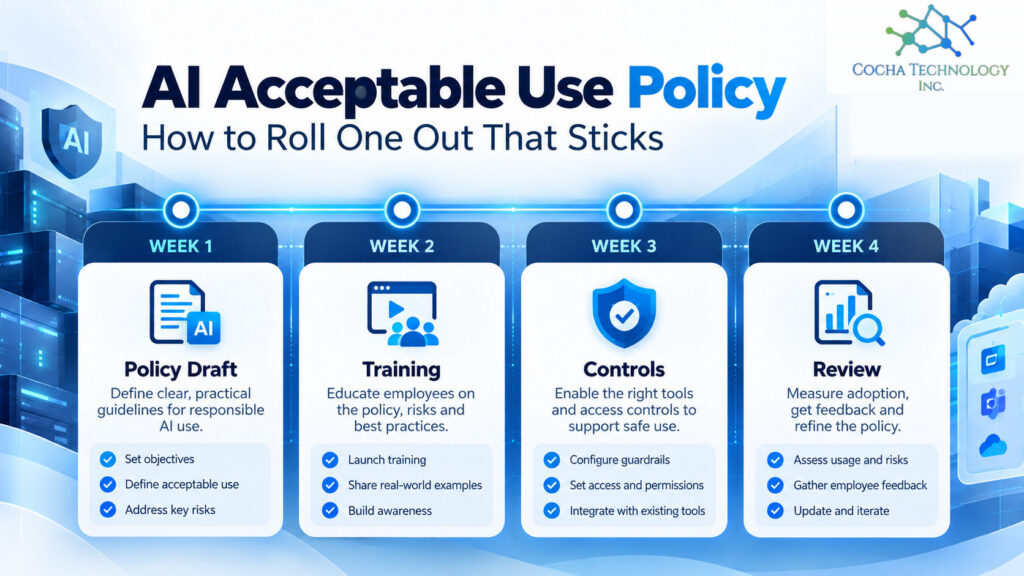
Your AI acceptable use policy rollout in 30 days
Here’s a rollout I’d use for a firm of 25 to 300 people. Stretch it if you’re bigger. Don’t compress it much if you’re smaller, because the slow part is people, not paperwork.
| Week | What happens | Done when |
|---|---|---|
| 1 | Find out what’s already in use. Run discovery, ask a short anonymous survey, talk to a few heavy users | You have a list of tools people use today |
| 2 | Decide approved, replace, or block for each tool. Adapt the template to match | Every tool on the list has a decision |
| 3 | Launch with leaders first, then everyone. Short training. Collect acknowledgments | Leaders have signed and the all hands session is done |
| 4 | Turn on the technical controls that back the policy. Open the request channel | Controls are live and the first requests are answered |
Week 1 matters more than people think. If your approved list ignores the tool half the office already uses, the policy is dead on arrival. Our guide on how to detect shadow AI walks through seven checks using tools most Microsoft 365 shops already own.
Training people will sit through
Keep it under 30 minutes. Seriously. Nobody remembers slide 40.
What I’d cover:
• The approved list. Which tools, for what, and where to find them.
• Data in, data out. Which kinds of information can go into which tool. Use real examples from your work, not abstract categories.
• Personal accounts. Why a personal ChatGPT or Claude account isn’t the same as the firm’s, even if the screen looks identical.
• Notetakers and extensions. The two places shadow AI hides most often.
• Checking the output. AI drafts are drafts. Someone accountable reviews them.
• What to do after a mistake. Who to tell, and that telling early is the right move.
Then make leaders go first. If partners or executives skip the training, everyone notices. A short acknowledgment, signed after training, gives you a record that people saw the policy.
Match the policy to real controls
A policy that says don’t use unapproved AI tools, with nothing behind it, is a suggestion. Each line in the policy should map to a control, even a light one.
Policy line
The control that backs it
Use only approved AI tools
Discovery and app controls on the network and endpoints
No personal AI accounts for firm work
Managed enterprise plans, SSO, and domain capture where the vendor offers it
Approved connectors only
A named approver for new connectors and admin consent in Entra ID
Keep sensitive data out of AI tools
DLP policies and sensitivity labels
Notetakers need approval
Meeting platform settings that limit third party bots
Report mistakes quickly
A simple reporting channel and a no blame first response
You don’t need every control on day one. You do need to know which lines are backed and which aren’t yet, and be honest about the gap. If the approved tool is clunky or missing a feature people need, fix that first. A good sanctioned option does more to cut shadow use than any block list.
Enforcement without scaring people underground
This is the part firms get wrong in both directions. Too soft and the policy means nothing. Too harsh and people hide their use, which is worse.
What I’d recommend:
- Make the first report safe. If someone pastes something they shouldn’t have and tells you within a day, treat it as a fix, not a discipline case. You want that call.
- Escalate repeat or deliberate violations. Use the same process you’d use for any other policy breach.
- Fix the cause. If ten people keep using the same unapproved tool, that’s a signal about your approved list, not ten character flaws.
- Answer tool requests fast. A week is reasonable. A quarter isn’t. Slow approvals create shadow AI.
- Look at the data monthly. Discovery results, DLP hits, and requests tell you whether the policy is working.
Review cadence
AI tools change faster than most policies. I’d review the approved list monthly and the full policy at least twice a year, plus any time a major vendor changes its terms or a new tool category shows up. Agents and AI features inside software you already pay for are the current example. Date every version, and keep the old ones.
For law firms specifically
Law firms carry duties most companies don’t, and the rollout should reflect them.
ABA Formal Opinion 512, issued July 29, 2024, covers competence, confidentiality, client communication, and fees when lawyers use generative AI. It also says lawyers with managerial authority must establish clear policies on the firm’s permissible use of generative AI, and make sure the lawyers and staff they supervise are trained on it (Rules 5.1 and 5.3). In plain terms, the policy and the training are part of how a firm shows it’s supervising this, not just paperwork.
A few things I’d add to the law firm rollout:
• Client consent and engagement letters. Opinion 512 says boilerplate engagement letter language isn’t enough for informed consent where consent is required. Decide when you’ll ask, and how.
• Ethical walls. Make sure your AI tools honor walls as permission boundaries, not just as a memo. Our checklist on whether Copilot is safe for law firms covers how to test that.
• Client guidelines. Some outside counsel guidelines now address AI use. Build a way to flag matters with stricter terms.
• Texas firms. The Texas Professional Ethics Committee issued Opinion 705 on generative AI in February 2025. Read it alongside 512.
The template’s law firm addendum covers privilege, consent, walls, supervision, and retention in more detail. This isn’t legal advice.
Oil and gas, PE-backed, and medical device
Oil and gas. Field teams are where shadow AI shows up first, often a photo or a data export dropped into a consumer app for a quick summary. Train on that exact example, and make sure the approved tool works on a phone.
PE-backed companies. Operating partners increasingly want one policy pattern across the portfolio. A dated policy, signed acknowledgments, and a monthly report up to the sponsor are the kind of evidence that holds up in diligence.
Medical device manufacturers. Quality and regulatory teams will want AI use that touches design or quality records documented like any other process change. Bring them in during week 2, not after launch.
Where this leaves your firm
Start with what’s already in use, not with the policy text. Pick one owner. Approve good tools before you block bad ones. Keep training short, make the first report safe, and look at the data every month.
If you don’t have a draft yet, our free AI acceptable use policy template will get you most of the way there.
And if you’d like a quick read on which AI tools are already touching your data, and which policy lines aren’t backed by a control yet, that’s what our AI Readiness Snapshot is for.
Quick answers
What should an AI acceptable use policy include?
Approved tools, which data can go into which tool, prohibited uses, rules for personal accounts, extensions and notetakers, human review of output, incident reporting, training, and a review schedule. Our free template covers all of these.
How do you roll out an AI policy?
Find what’s already in use, decide approved, replace, or block for each tool, launch with leaders first and short training, then turn on the controls that back the policy. Thirty days is a realistic target for a midsize firm.
Should we ban ChatGPT at work?
A ban without a sanctioned alternative usually pushes use out of sight. Most firms do better approving an enterprise AI tool and blocking personal accounts for firm work.
How do you enforce an AI acceptable use policy?
Back each policy line with a control, make the first self report safe, escalate repeat or deliberate violations through your normal process, and review discovery and DLP data monthly.
How often should an AI policy be updated?
Review the approved tool list monthly and the full policy at least twice a year, or sooner when a vendor changes its terms.
Do law firms need an AI policy?
ABA Formal Opinion 512 makes supervision and training part of a lawyer’s duties when generative AI is used, and a written policy is the practical way to show both. This isn’t legal advice.
Related Cocha guides
- Free AI acceptable use policy template
- Shadow AI guide
- How to detect shadow AI
- Is Copilot safe for law firms?
- AI Readiness Snapshot