
Microsoft 365 E3 vs E5 vs E7: Which License Does Your Firm Need for Copilot?
August 19, 2026
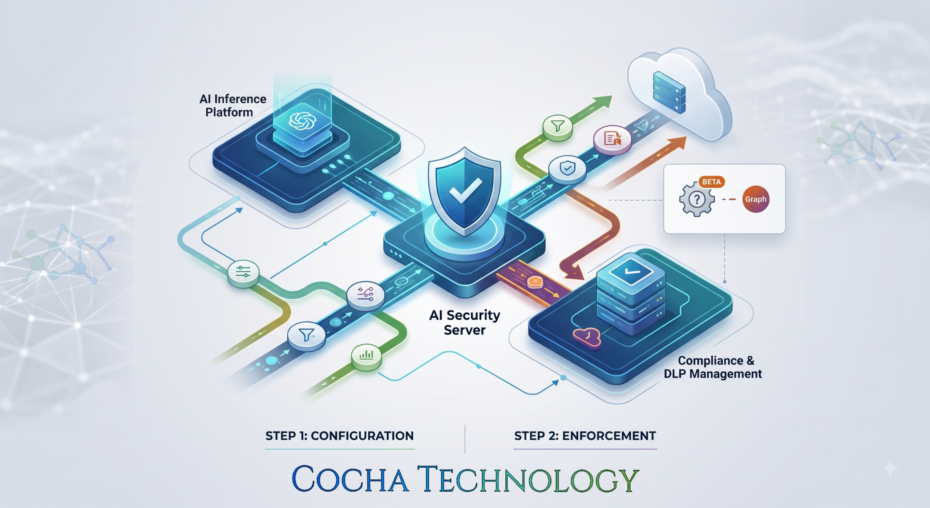
We wrote recently about Anthropic’s inference hooks, the feature that lets a Claude Enterprise organization route every prompt through its own AI security server for an allow or deny verdict before the model sees a word of it. Good control. Real control, the first genuinely inline one most firms have had access to.
But here’s what that post didn’t cover, and what a few readers asked about directly: how do you build the thing, for real? Not the concept, the server. And more specifically, how do you avoid building a whole DLP engine from scratch when your firm probably already has one sitting inside Microsoft 365, mostly unused for this purpose?
That’s what this post walks through: a reference pattern for standing up an AI security server that reuses Microsoft Purview’s sensitive-information types instead of reinventing data classification. There is one important caveat up front: the Graph `processContent` API used by this pattern is currently in beta, and Microsoft says beta Graph APIs aren’t supported for production applications. Treat this as a design and pilot pattern until Microsoft publishes a production-supported endpoint.
Strip away the vendor names and the AI security server is a small piece of infrastructure with one job. Anthropic sends it a prompt. It has a few seconds to answer allow or deny. That’s the whole contract.
The part firms get stuck on is what happens inside that window. Do you write custom regex rules to catch Social Security numbers and privileged terms? Maybe, for a first pass. But your firm’s Purview tenant likely already has Sensitive Information Types configured, maybe sensitivity labels too, maybe a whole DLP policy set built around exactly this kind of content. Rebuilding that logic a second time, in a different system, with different rules that drift out of sync over time, is a genuinely bad use of an engineering budget.
The pattern below has the AI security server act as a thin translator. It receives the governed Claude transcript, sends the applicable text and metadata to Microsoft Graph’s data-security API, and converts Purview’s response into the “allow-or-deny” format Anthropic expects. You can reuse your tenant’s Sensitive Information Types and custom classifiers, but you must create a separate DLP policy scoped to the Entra-registered application and configured for application enforcement. A general SharePoint, Exchange, or endpoint DLP policy does not automatically apply to this path.
Here’s the full path a prompt takes, start to finish.
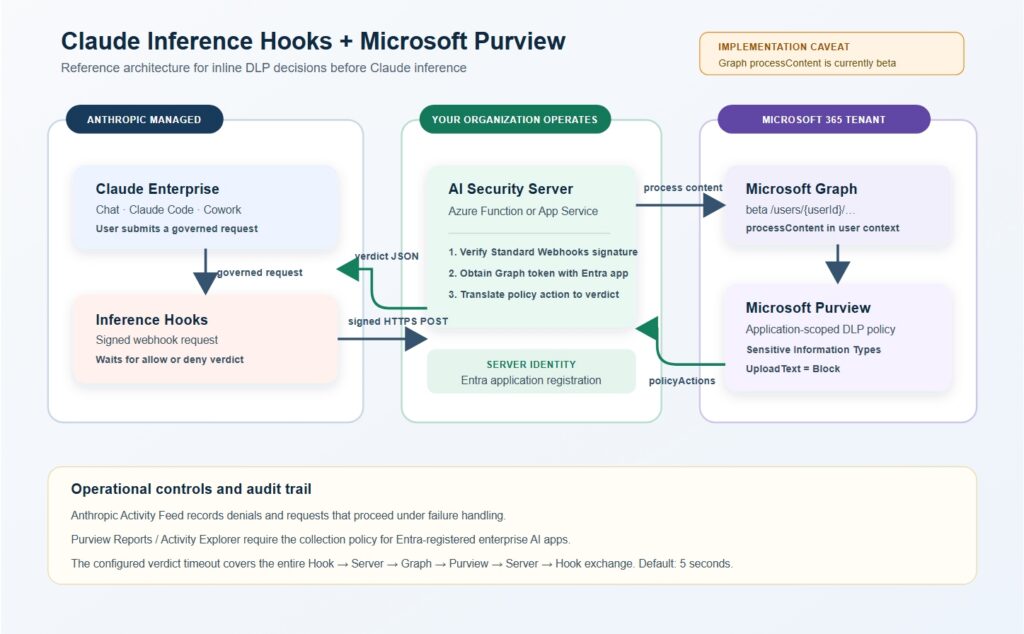
A user submits a prompt inside Claude Enterprise, whichever surface they’re using. Anthropic’s inference hooks intercept it before inference runs and send a signed HTTPS request to your AI security server. Your server, something you host, not something Anthropic hosts, calls Microsoft Graph’s beta `processContent` endpoint with the applicable transcript text and context. Purview evaluates it against the application-scoped DLP policy you create for this integration and returns policy actions. Your server translates those actions into Anthropic’s verdict schema and sends it back, all inside a five second window by default.
Two things worth noting here before we get into the steps.
To see the related enterprise-AI interaction in Purview’s reports and Activity Explorer, you must also enable the Purview collection policy for Entra-registered enterprise AI apps.
Treat the two systems as complementary audit records, not as a guaranteed one-for-one duplicate event stream.
A short list, worth confirming before you write a line of code.
Claude Enterprise, with a user account holding the `organization:manage` permission (Admin, Owner, or Primary owner roles carry this by default). A Microsoft 365 tenant with Microsoft Purview, and specifically the pay as you go billing model enabled, which is a real requirement for managing Entra registered AI app interactions, not an upsell you can skip. An Azure subscription to host the server itself, unless your firm already runs a compute platform you’d rather use. And someone on your team, internal or a vendor, who owns this thing operationally once it’s live. This isn’t a set it and forget it deployment.
Everything Purview knows about this integration flows from an Entra ID app registration owned by your AI security server. It is not Claude’s identity. Claude calls your endpoint; your server obtains a Microsoft Graph token and invokes Purview in the context of the applicable user.
In the Azure portal, register a new app, something like “Claude Enterprise AI Security Server” as the name. Note the Application (client) ID once it’s created, you’ll need it twice: once when you scope a DLP rule to it, and once when your server identifies itself to Microsoft Graph.
Grant the app the Microsoft Graph `Content.Process.User` application permission as the least-privileged starting point, or `Content.Process.All` only when required. Both require admin consent. With application permissions, call the `/users/{userId}/dataSecurityAndGovernance/processContent` path; the `/me` path is delegated-only.
If your firm hasn’t already enabled pay as you go billing in Purview, do that now, it’s a prerequisite specifically for managing AI interactions from Entra registered apps like the one you just created.
Then take stock of what you’re protecting against, for real. Most firms have built-in Sensitive Information Types covering Social Security numbers, credit card numbers, and similar structured data already active. Fewer firms have built custom sensitive-information types or classifiers for the things that matter more in legal work: matter numbers, client names tied to privileged engagements, settlement figures, or language patterns specific to certain practice groups. If those don’t exist yet, this is the point to build them. Microsoft documents prompt blocking for Entra-registered AI apps as based on Sensitive Information Types; do not assume a sensitivity label alone creates this inline block decision.
This is where Purview learns to treat Claude prompts as something it should inspect.
Support for this today runs through Security & Compliance PowerShell. Create a DLP Policy scoped to the Entra application with the `Applications` workload and `Application` enforcement plane, then create a `New-DlpComplianceRule` under it. Pick the Sensitive Information Types and match thresholds, and use the application action `-RestrictAccess @(@{setting=”UploadText”;value=”Block”})`. That is what produces the block action your server receives from `processContent`.
Test this rule against sample content before connecting anything live. Feed it a string with an obvious Social Security number and confirm the policy fires. Feed it something clean and confirm it doesn’t. Cheap insurance against a misconfigured rule either blocking every prompt or blocking nothing, both of which have burned firms rolling out DLP tooling before
Now the actual server. An Azure Function works well here, mostly because it’s cheap to run, scales without much thought, and fits naturally alongside an Entra app registration and Graph API calls. A small App Service works too if your team prefers a more conventional deployment.
The server needs an HTTPS endpoint with a real TLS certificate, reachable from Anthropic’s infrastructure. When a request lands, the first job is confirming it genuinely came from Anthropic. Inference hooks sign each request per the Standard Webhooks specification, using a secret your organization generates inside the Claude Enterprise admin console. Verify that signature before doing anything else with the payload. Skipping this step means anyone who finds your endpoint URL can send fake allow or deny traffic into your pipeline, which defeats the entire point of the control.
Once the signature checks out, pull the transcript text from Anthropic’s request body and pass it to Microsoft Graph.
The current call is a `POST` to the Graph beta `processContent` endpoint, with the content in `contentEntries`, conversation metadata, and a content category of `ai`. Purview responds with a `policyActions` array. An empty array means no configured policy action was returned. A `restrictAccessAction` entry with `restrictionAction` set to `block` means the application-scoped DLP rule from step three fired. Also handle `processingErrors`, non-200 responses, and timeouts as explicit failure paths; they are not allowing verdicts.
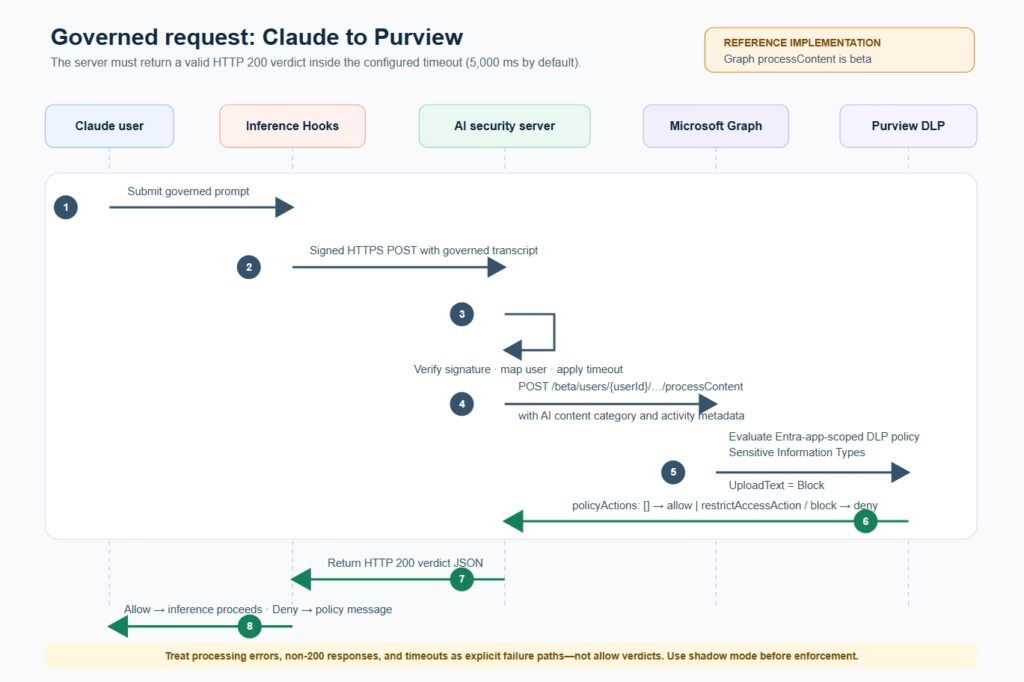
Translating that into Anthropic’s verdict format is genuinely the easy part. An empty `policyActions` array becomes `{“action”: “allow”}`. A block action becomes `{“action”: “deny”, “deny_reason”: “…”}`, where the reason should be short and specific enough that the user understands what triggered it without you exposing the exact sensitive data pattern that matched. Something like “This prompt appears to contain client Social Security number data, which is blocked from AI tools under firm policy” does the job without oversharing the rule’s internals.
Watch your timing budget here. The default verdict timeout is five seconds, and that clock covers everything from the moment Anthropic’s request lands to the moment your response leaves your server, which includes the full Graph API round trip. If your Azure region and your Microsoft 365 tenant’s home region are far apart, or if Purview is under load, this budget gets tighter than it looks on paper. Test it under realistic conditions, not just from a developer laptop with a fast connection.
Back in the Claude Enterprise admin console, this is where the two sides finally connect.
Generate your Standard Webhooks signing secret if you haven’t already, register your AI security server’s endpoint URL, and set the verdict timeout to match what you tested in step five. Anthropic’s configuration guidance covers the failure modes, shadow mode, and percentage rollout controls. Then decide on failure handling: if your server is unreachable, times out, or errors, does the request get blocked or allowed through uninspected? For a law firm, blocking on failure is generally the safer default, even though it means an outage in your server becomes an outage in Claude access for everyone. Because this particular Purview enforcement call is beta, document the availability tradeoff and use shadow mode plus a limited rollout before choosing “fail closed” for broad production use.
Don’t flip this on for the whole firm at once. Anthropic built in a shadow mode specifically for this reason, where verdicts get computed and logged but nothing gets blocked yet. Run it in shadow mode for at least a couple of weeks. Pull the logs. See what would have been denied, and whether those denials make sense or whether your Purview rule is catching things it shouldn’t.
From there, move to a percentage rollout, maybe ten percent of governed requests, before going to full enforcement. Keep an eye on both logging surfaces during this whole process, Purview’s Activity Explorer and Anthropic’s Activity Feed side by side, because discrepancies between the two are usually the first sign something’s misconfigured.
Worth being honest about the edges here, because a pitch deck version of this architecture tends to gloss over them.
Verdicts are binary. This integration can tell your AI security server to block a request, but nothing in the hook protocol rewrites or redacts it. A request with one sensitive line buried in an otherwise clean paragraph gets blocked whole, not scrubbed and passed through. Anthropic’s current response-side enforcement isn’t available yet, so this setup checks content entering Claude, including governed tool results where applicable, not model output. Attachments reach the server as extracted text and metadata rather than raw bytes, so image-only content, such as a screenshot of a sensitive document, is outside this control’s inspection envelope.
None of that makes this setup not worth building. It closes a real gap that existed a month ago and did not before. But knowing exactly where the edges sit matters more than the architecture diagram does, if you’re the one explaining this control to a client or an auditor next quarter.
This kind of inline control is exactly the sort of thing we look at directly in a Zero Trust Assessment, what your AI tools can reach today versus what they should, and whether anything like this stands between that access and the data it shouldn’t touch. If you’re building this yourself and want a second set of eyes on the configuration, or if standing up an AI security server isn’t something your team has bandwidth for right now, that’s a conversation worth having before your firm’s next AI tool rollout, not after.
For the broader context on why binary allow or deny controls matter even with their limits, our earlier piece on why traditional DLP tools can’t see inside an AI conversation is worth reading alongside this one. The two problems, and the two fixes, sit right next to each other.
Full technical detail on the inference hooks side of this lives in Anthropic’s own developer documentation, and the Purview side is documented directly in Microsoft’s guidance for Entra registered AI apps. Both are worth bookmarking, since both products are still moving fast, and today’s configuration steps may not be exactly tomorrow’s.
Call or email Cocha. We can help with your cybersecurity needs!
About the Author:

Co-Founder & Managing Director, Cocha Technology
Steven is a fractional CIO/CISO with 30+ years of enterprise IT and security leadership. He has built AI governance frameworks for organizations with 1,700+ users, led enterprise Microsoft Copilot deployments, and conducted security assessments across law firms, energy companies, financial institutions, and PE-backed manufacturers.