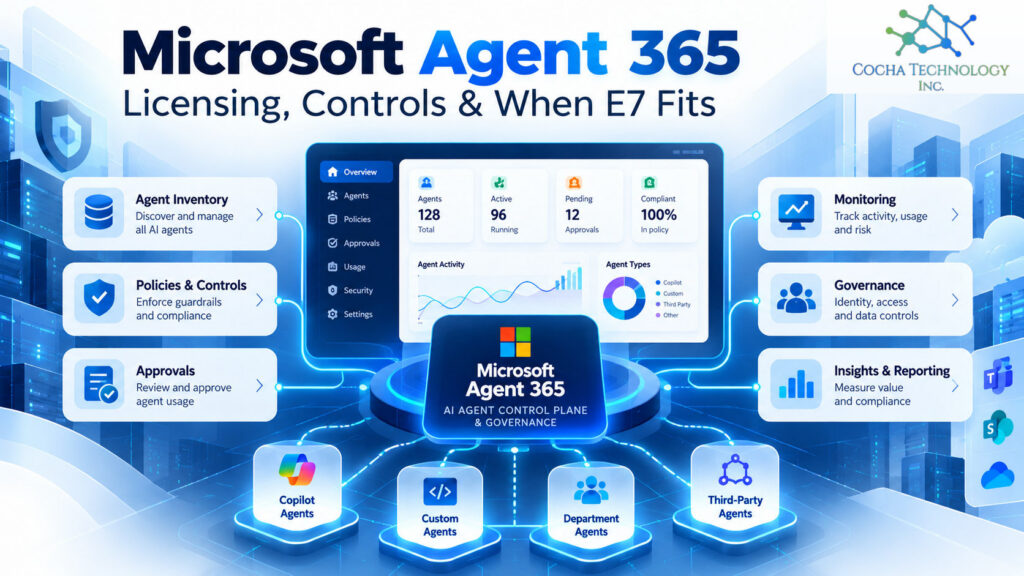
Microsoft Agent 365 is Microsoft’s control plane for AI agents: one place to inventory them, decide who can use them, watch what they do, and apply Entra, Purview, Defender, and Intune controls to them. It became generally available May 1, 2026. It costs $15 per user per month paid yearly on its own, and it’s included in Microsoft 365 E7.
Whether you need it depends on how many agents you have, not how many people. If your firm has a handful of Copilot Studio agents and no real plan for them, the basic registry you already get may be enough to start. If agents are multiplying across teams, Agent 365 is how Microsoft wants you to govern them. For how it fits next to E3, E5, and Copilot, see our Microsoft 365 licensing guide.
What Agent 365 does
Microsoft’s service description groups the features into five areas:
| Area | What it covers |
|---|---|
| Registry | An inventory of agents, plus actions like approve, block, deploy, delete, assign, and reassign owner, with automated lifecycle rules |
| Access control | Policy templates, access packages that scope what an agent can reach, sponsor driven lifecycle policies, conditional access for agents with delegated access, and control over which tools and MCP servers agents can use |
| Visibility | Telemetry and monitoring of agent activity |
| Interoperability | Syncing agents from other platforms into the registry, and Graph API access to the registry |
| Security and compliance | Purview audit, eDiscovery, DLP, and label inheritance; Defender detection and threat hunting; Entra conditional access and traffic monitoring; Intune device compliance and blocking unsanctioned local agents |
Agents created in Copilot Studio get a Microsoft Entra Agent ID automatically and show up in the registry. That’s the piece I like most. It gives each agent an identity you can govern, the same way you’d govern a person.
The catch is that management is split across the Microsoft 365 admin center, Entra, Purview, Defender, and Intune. That’s not unusual for Microsoft, but plan for more than one console.
What it costs and who needs a license
Per Microsoft’s Agent 365 page, read October 16, 2026:
| Option | Price, per user per month, paid yearly |
|---|---|
| Agent 365 on its own | $15.00 |
| Microsoft 365 E7, includes Agent 365 | $99.00 |
| Microsoft 365 E7 without Teams | $90.45 |
It’s licensed per user, not per agent. Microsoft recommends a license for every user who interacts with, owns, manages, or sponsors an Agent 365 managed agent. To buy Agent 365 on its own, Microsoft’s Product Terms require a prerequisite license: Microsoft 365 A5, E5, or G5, Business Premium, the Microsoft Defender and Purview Suites, or the Defender and Purview Suite for frontline workers.
The per user recommendation matters for budgeting. Ask your reseller exactly who has to be licensed in your setup before you size the purchase.
What you get without paying extra
Microsoft 365 Enterprise, Business, Education, and Frontline plans include the basics: the registry inventory, basic governance actions, lifecycle automation rules, and syncing agents from external platforms. The access control, visibility, and security features need Agent 365 or E7.
So you can start with an inventory today, at no extra cost. I’d do that before buying anything. You’ll learn how many agents you have and who owns them, which is the input for every other decision here.
Agent 365 on its own vs inside E7
E7, which Microsoft calls The Frontier Suite, bundles E5, Microsoft 365 Copilot, and Agent 365, plus Entra Suite and additional Defender, Intune, and Purview capabilities. Microsoft says E7 is priced below buying those pieces separately. That’s Microsoft’s claim, and your own math depends on your discounts and how many seats need each piece.
Here’s how I’d think about it:
• E3 plus Copilot, no Agent 365. Few agents, early days. Use the free registry and revisit in six months.
• E5 plus Copilot plus Agent 365 for a subset. Agents are spreading, but only some teams build or sponsor them. License those people.
• E7. You’d buy E5, Copilot, and Agent 365 for most people anyway, and you want one SKU.
Our E3 vs E5 vs E7 post and Microsoft Copilot pricing breakdown cover the rest of that decision.
Non-Microsoft agents
Agent 365 governs Microsoft and third party agents, but not all equally. Agents published through Microsoft 365 channels with an Entra Agent ID appear automatically. Microsoft says agents built outside those environments need additional steps, and external platforms can be synced into the registry. Defender and Intune can also find and block unsanctioned local agents on managed devices.
What Microsoft doesn’t spell out is how far the full set of controls extends to an agent synced in from somewhere else. If you run Claude agents, or anything built outside Microsoft’s stack, test what you can see and control before you count on it. A registry entry isn’t the same as enforcement, and our post on why DLP alone won’t protect agents explains why that gap matters.
Confirmed vs still unclear
| Confirmed by Microsoft | Still unclear, ask in writing |
|---|---|
| GA May 1, 2026, for commercial customers | Exactly which users must be licensed in your setup |
| $15 per user per month paid yearly on its own | How much control applies to synced third party agents |
| Included in Microsoft 365 E7 | Your real price under your agreement and discounts |
| Basic registry included in Enterprise and Business plans | Feature availability in GCC, where many features aren’t available yet |
| Copilot Studio agents get an Entra Agent ID automatically | How the split consoles map to your admin roles |
On government clouds: Microsoft says that as of October 1, 2026, Agent 365 meets all FedRAMP High controls reviewed by its third party assessor, with final authorization still pending.
Questions to ask your reseller
- Which of our users have to be licensed, and which are only recommended?
- Which of our agents will show up automatically, and which need extra steps?
- What controls apply to agents synced in from other platforms?
- What do we get with Agent 365 alone versus inside E7, at our pricing?
- Which features aren’t available in our cloud yet?
- Which admin roles do we need across the Microsoft 365 admin center, Entra, Purview, Defender, and Intune?
Get the answers in writing. Some of this is still settling.
By industry
Law firms. Agents that touch matter data need the same scrutiny as a new hire: an identity, a sponsor, a defined scope, and an audit trail. Agent 365 gives you most of that structure. Ethical walls still have to be enforced in permissions. Our post on AI agent governance for law firms covers the wider picture.
Oil and gas. Agents built by operations teams to pull reports or summarize field data are the ones to inventory first. Sponsor based lifecycle rules help when the builder moves on.
PE-backed companies. An agent registry and an owner for each agent are easy evidence for diligence. If you’re standardizing across a portfolio, the free registry is a cheap first step.
Medical device manufacturers. Agents that touch design or quality records should be treated like any other validated process change. Audit logs and an owner per agent make that easier.
Where this leaves your firm
Start with the free registry and find out what agents you have. Give each one an owner. Then decide whether the paid controls are worth it, and whether E7 is simpler than buying Agent 365 separately. For the full licensing picture, see our Microsoft 365 licensing guide.
If you’d like a quick read on which agents and AI tools are already touching your data, that’s what our AI Readiness Snapshot is for.
Quick answers
What is Microsoft Agent 365?
Microsoft’s control plane for AI agents. It inventories agents, controls their access, monitors what they do, and applies Entra, Purview, Defender, and Intune controls to them. It became generally available May 1, 2026.
How much is Agent 365?
$15 per user per month, paid yearly with an annual commitment, as of October 16, 2026. It’s also included in Microsoft 365 E7.
Is Agent 365 included in E5?
No. E5 and other Microsoft 365 plans include only the basic registry features. The full product needs an Agent 365 license or E7. Buying it on its own requires a prerequisite license such as Microsoft 365 E5 or Business Premium.
Do I need E7 to get Agent 365?
No. You can buy Agent 365 on its own for eligible Microsoft 365 subscriptions. E7 includes it along with E5 and Copilot.
Does Agent 365 govern non-Microsoft agents?
Partly. Third party agents can be registered or synced in, and Defender and Intune can find unsanctioned local agents. Microsoft says agents built outside its environments need extra steps, so test the controls you need.
Who needs an Agent 365 license?
Microsoft recommends one for every user who interacts with, owns, manages, or sponsors a managed agent. Confirm the exact requirement for your setup with your reseller.
Related Cocha guides
- Microsoft 365 licensing
- E3 vs E5 vs E7
- Microsoft Copilot pricing
- AI agent governance
- AI Readiness Snapshot