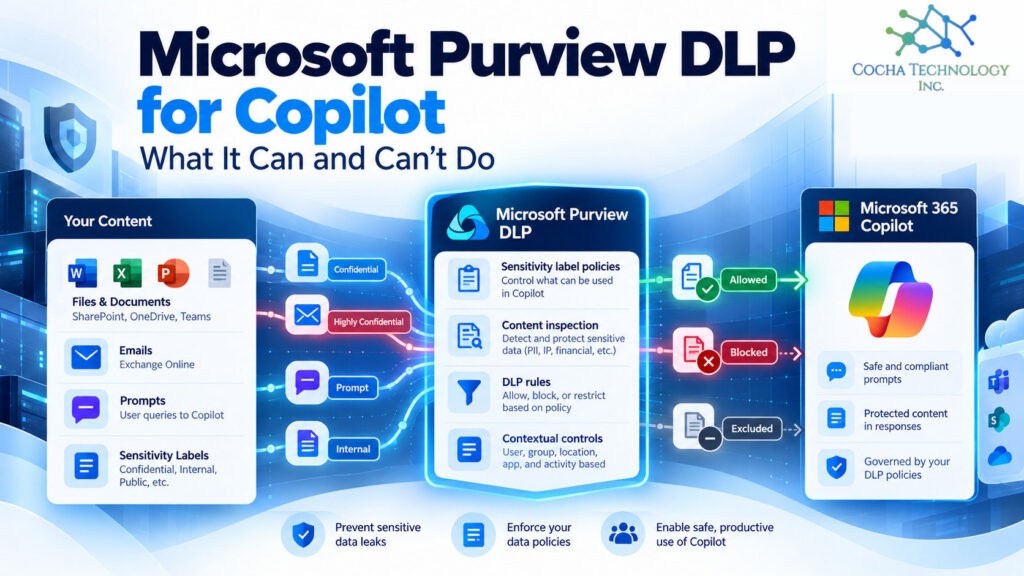
Microsoft Purview DLP can do real work for Copilot. It can block prompts that contain sensitive information, stop Copilot from searching the web on those prompts, and keep files and emails with chosen sensitivity labels out of Copilot’s answers. But the label based part needs Microsoft 365 E5, E7, or a Purview add-on, it only works on content you’ve labeled, and it doesn’t scan files people upload into a chat.
So it’s a useful control. It’s not a force field. If you want the broader picture of how Microsoft Purview DLP works across email, endpoints, and Teams, start there. This post is just the Copilot piece.
Everything below is from Microsoft’s own documentation, read October 16, 2026.
Four things Microsoft Purview DLP can do
Microsoft’s DLP for Microsoft 365 Copilot and Cowork page lists these controls:
| Control | What happens | Where it works |
|---|---|---|
| Block sensitive prompts | If typed prompt text matches a sensitive information type, Copilot doesn’t respond and doesn’t use the prompt for internal or web search | Microsoft 365 Copilot, Copilot Chat, Cowork, and Copilot in Word, Excel, and PowerPoint |
| Block web search | On a matching prompt, Copilot can’t use the web, but can still answer from permitted internal data | Microsoft 365 Copilot, Copilot Chat, and Cowork |
| Exclude labeled content | Files and emails with chosen sensitivity labels aren’t processed or used in responses | Microsoft 365 Copilot, Copilot Chat, Cowork, and Copilot in Word, Excel, and PowerPoint |
| Exclude external email | Email from senders outside your accepted domains is left out of grounding and summaries | Microsoft 365 Copilot and Copilot Chat |
One detail that trips people up: excluded labeled items can still show up as citations. Copilot won’t use the content, but it may still tell the user the file exists.
What’s still in preview
Two of those controls are marked preview: blocking sensitive information types in prompts, which Microsoft says is still rolling out to all tenants, and the external email exclusion. Check whether your tenant has them before you promise anyone they’re on. Preview features can change, and that’s fine, but plan for it.
What it can’t do
This is the part I’d want any managing partner or CIO to read twice.
• It doesn’t scan uploaded files. Prompt checks look at the text someone types, not a file they drag into the chat.
• It only knows about labels you applied. An unlabeled privileged memo is invisible to a label based rule.
• Email coverage starts in 2025. Label based exclusion applies to email sent on or after January 1, 2025. Older mail isn’t covered.
• Calendar invites aren’t supported for label based exclusion.
• It doesn’t fix access. Copilot only shows what a user could already open. DLP can exclude items from answers, but it doesn’t remove oversharing.
• Mid session labels lag. In Word, Excel, and PowerPoint, the policy is checked when a file opens, so a label added mid session takes effect on the next open.
• Some setup limits. The Copilot location is only in the Custom template, choosing it turns off all other locations in that policy, a single rule can’t combine sensitive information types and labels, admin units aren’t supported, and changes can take up to four hours.
None of that makes the control weak. It just means it sits on top of good labeling and good permissions, not in place of them. Our post on why DLP alone won’t protect agents like Claude and Copilot goes further into that.
Which license you need
The Copilot DLP page itself doesn’t name a license. Microsoft’s Purview service description does.
| Plan | DLP to safeguard prompts | DLP to restrict Copilot from processing files and emails |
|---|---|---|
| Business Basic, Standard, Premium | Yes | No |
| Microsoft 365 E3 | Yes | No |
| Microsoft 365 E5 | Yes | Yes |
| Office 365 E5 | Yes | Yes |
| Purview Suite, or E5 Information Protection and Governance add-on | Yes | Yes |
Microsoft notes that DLP for prompts is available to all users of Microsoft Copilot and Copilot Chat. Microsoft 365 E7 includes E5, so it’s covered too. For how the plans compare more broadly, see our guide to E3 vs E5 vs E7 for Copilot.
The practical read: on E3 or Business Premium, you can catch sensitive data typed into prompts, but you can’t tell Copilot to stay away from labeled files without an upgrade or add-on.
Labels come first
Every label based rule keys off a label someone or something applied. If your labels are a plan rather than a practice, start there.
I’d keep the label set small, five or six at most, with names people understand. Use defaults and auto labeling where your license allows it. Then pick the one or two labels Copilot should never use, usually something like highly confidential or privileged.
Your first Copilot DLP policy, step by step
- Decide what you’re protecting. One or two labels, and the sensitive information types that matter most to you.
- Create a policy from the Custom template and choose the Microsoft 365 Copilot and Copilot Chat location.
- Build separate rules for labels and for sensitive information types, since one rule can’t do both.
- Start in simulation mode. Microsoft supports it for this location. Let it run long enough to see real matches.
- Review the matches with the people who own the data. Look for false positives that would frustrate users.
- Turn it on for a pilot group, then wait for the policy to take effect. Changes can take up to four hours.
- Test it. Ask Copilot about a labeled file the tester can open. It shouldn’t use the content.
- Write down what you decided and when you’ll review it.
Where DSPM fits
DLP enforces rules when data is used. Data security posture management finds where sensitive data sits and who can reach it. For Copilot, you want both: data security posture management tells you what to label and what’s overshared, and DLP keeps labeled content out of answers. Our DSPM vs DLP post covers the order of operations.
What about Claude and other AI tools?
The Copilot location covers Microsoft’s Copilot experiences. For third party AI sites in a browser, Microsoft documents a different set of protections in Purview for other AI apps: Endpoint DLP on onboarded Windows devices can warn or block sensitive data pasted into sites like ChatGPT, and Edge policies can block sensitive prompts in AI apps. Those need devices onboarded to Purview, the Purview browser extension for most features, and pay as you go billing. That page doesn’t name Claude specifically, so test before you assume coverage.
Claude models running inside Copilot are a different case. Microsoft scopes the Copilot DLP location by Copilot experience, not by model, so I’d expect the same controls to apply when someone picks Claude inside Copilot. Microsoft doesn’t say so in as many words, though, so confirm it in a pilot.
By industry
Law firms. Privileged and matter specific labels are the natural candidates for exclusion. Ethical walls still need to be permission boundaries, though. DLP keeps labeled content out of answers, but it won’t stop someone opening a file they can already reach.
Oil and gas. Engineering drawings and operational data are often unlabeled. Start with sensitive information types and a small label set for the files that would hurt most if summarized broadly.
PE-backed companies. Deal and board material is the obvious first label. A dated policy and simulation results are good diligence evidence.
Medical device manufacturers. Design history and regulatory files are strong label candidates. If you handle patient data, keep it out of AI tools unless your compliance team has signed off.
Where this leaves your firm
Purview DLP is worth turning on for Copilot. Just be clear about what it is: a layer that keeps labeled content and sensitive prompts out of Copilot, sitting on top of labels and permissions you still have to get right. Check your license, label first, test in simulation, and write down what you decided. For the full picture beyond Copilot, see our guide to Microsoft Purview DLP.
If you’d like a second set of eyes on what Copilot could reach in your tenant today and what your DLP would catch, that’s what our AI Readiness Snapshot is for.
Quick answers
Does Purview DLP work with Copilot?
Yes. You can block prompts containing sensitive information, block web search on those prompts, and exclude files and emails with chosen sensitivity labels from Copilot’s responses. Some of these controls are still in preview.
Which license do I need for DLP for Copilot?
Prompt protection is available to all users of Microsoft Copilot and Copilot Chat. Restricting Copilot from processing labeled files and emails needs Microsoft 365 E5, Office 365 E5, the Purview Suite, or the E5 Information Protection and Governance add-on. E7 includes E5.
Can DLP stop Copilot from summarizing labeled files?
Yes, with a policy that excludes chosen labels. The content won’t be used in responses, though the file can still appear as a citation.
Does Purview DLP scan files uploaded to Copilot?
No. Microsoft says prompt checks look at the typed prompt text, not uploaded files.
Does Purview DLP cover Claude?
The Copilot location covers Copilot experiences, and Microsoft scopes it by experience rather than model, so test it with Claude models inside Copilot too. For third party AI sites in a browser, Endpoint DLP and Edge policies offer separate protections, but Microsoft’s page doesn’t name Claude, so test first.