VMware Azure Migration Security Assessment: 5 Critical Scans Before You Cut Over
June 5, 2026
Most VMware Azure migration projects don’t fail because the virtual machines won’t boot or the data won’t sync. They fail—often silently—because security is treated as the final “check-the-box” activity before go-live. By the time the IT Director or CTO realizes the infrastructure is exposed, the cutover has already happened, the data is live, and the “attack surface” has shifted from a private data center to the public cloud.
At Cocha Technology, my partner Steve and I have been in the room when that realization hits. It’s a gut-wrenching moment. You’ve spent months planning the technical move, but you haven’t accounted for the fundamental shift in how security operates once you leave the on-premises nest. If you are currently feeling the pressure of the VMware Broadcom pricing changes, speed is likely your top priority. But as we often say, unsecured speed is just a fast way to get into trouble.
What Changes When You Leave the VMware Nest?
For decades, on-premises VMware environments provided a sense of security through physical and network isolation. If a server was sitting in your rack, behind your physical firewall, it was “safe” by default. You owned the perimeter.
When you execute a VMware Azure migration, you are moving into a Shared Responsibility Model. Azure provides a secure foundation, but the way you configure your specific environment is entirely on you. On-prem, network isolation was a byproduct of the hardware. In Azure, you have to build that isolation deliberately through Virtual Networks (VNets), Network Security Groups (NSGs), and Private Links.
Many teams treat Azure like it’s just “someone else’s data center.” This mindset is the primary driver of vmware azure migration security failures. In the cloud, “Internal” doesn’t mean “Private” unless you’ve explicitly configured it to be so.
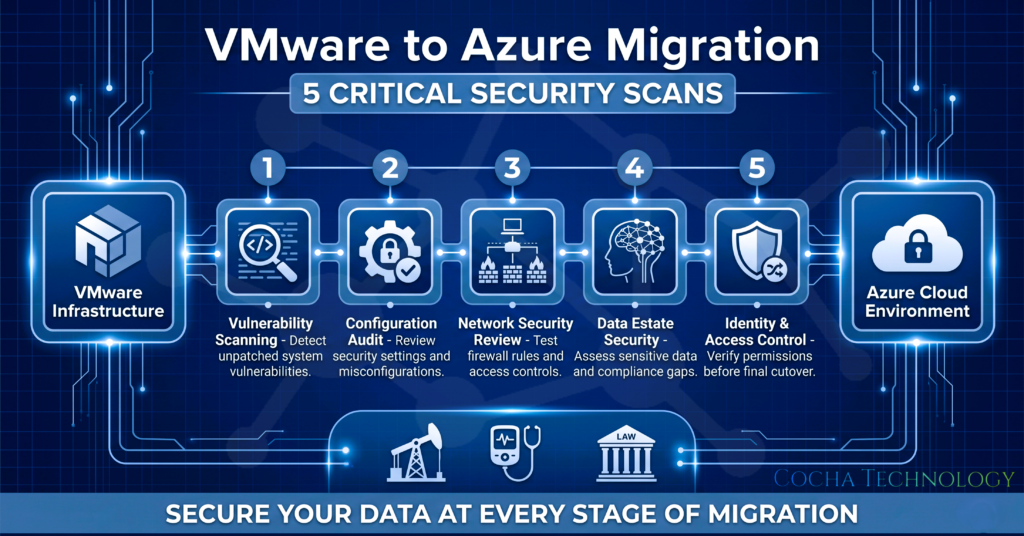
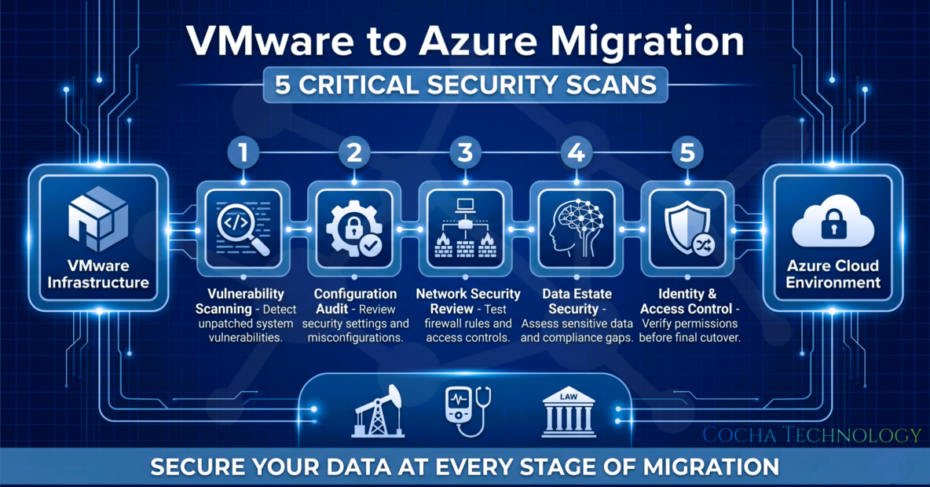
5 Critical Scans for Your VMware Azure Migration Security
Before you pull the trigger on your final cutover, you need to perform a comprehensive security assessment. Here are the five areas where we see the most “migration debt” accumulate.
1. Identity and Access Management (IAM)
In your VMware environment, access was likely managed through a local Active Directory. In Azure, Entra ID (formerly Azure AD) is the gateway to everything.
What to check: Audit the “Contributor” and “Owner” roles assigned during the migration phase.
What “Bad” looks like: Migration service accounts with Global Admin rights that are still active after the data has moved.
What “Good” looks like: A “Least Privilege” model where only essential personnel have access to the production resource groups, and Multi-Factor Authentication (MFA) is enforced for every single login.
2. Network Security Groups (NSGs) and Firewall Rules
NSGs are your first line of defense in Azure. During a migration, it is tempting to open “any-to-any” rules to ensure the migration tools can communicate.
What to check: Scan for any NSG rules that allow inbound traffic on sensitive ports (like 3389 for RDP or 22 for SSH) from “Any” source.
What “Bad” looks like: Leaving RDP open to the entire internet because “we needed to troubleshoot the VM setup.”
What “Good” looks like: Just-In-Time (JIT) access enabled, where ports are only opened when needed and only for specific, authorized IP addresses.
3. Storage Account Configurations
Your data is the crown jewel. In Azure, storage accounts (Blobs, Files, Queues) are often the target of misconfiguration.
What to check: Ensure “Public Access” is disabled and “Require Secure Transfer” (HTTPS) is enabled.
What “Bad” looks like: A storage account containing legacy database backups that is inadvertently set to “Public” during the migration sync.
What “Good” looks like: All storage accounts are restricted to specific VNets using Private Endpoints, ensuring the data never touches the public internet.
4. Encryption Posture
While Azure encrypts data at rest by default, your specific compliance needs might require more.
What to check: Verify that all disks (OS and Data) moved during the VMware Azure migration are using Azure Disk Encryption or Customer-Managed Keys (CMK) if required.
What “Bad” looks like: Migrating legacy VMware disks that were never encrypted on-prem and assuming the cloud will “just handle it” without verifying the policy.
What “Good” looks like: Automated Azure Policies that prevent any VM from being created or moved if it doesn’t meet your encryption standards.
5. Monitoring and Logging Coverage
If a breach happens during the transition, will you even know?
What to check: Ensure that Diagnostic Settings are enabled for all migrated resources and that logs are flowing into a Log Analytics Workspace or a Sentinel instance.
What “Bad” looks like: Completing a cutover and realizing two weeks later that you have zero visibility into who has been accessing the new SQL database.
What “Good” looks like: A centralized dashboard that provides real-time alerts for configuration changes and failed login attempts across the entire Azure footprint.
Why Security Assessment Precedes the Migration Plan
A common mistake I see is teams building a massive migration timeline and slotting “Security Review” into the final week. This is a recipe for disaster. If you wait until the end to scan, you are essentially inheriting “technical debt” on day one in Azure.
A pre-migration security assessment is a prerequisite to a clean migration. It actually saves time. It is much easier to fix an identity hierarchy or a network segment while the data is still in a “test” state than it is to try and re-architect your VNets while your users are actively using the system. At Cocha Technology, we provide tailored Azure migration services that bake these assessments into the early stages of the project.
What Broadcom Customers Are Getting Wrong
We are currently seeing a massive influx of Broadcom/VMware customers rushing toward the exit. I get it—the pricing changes have put a lot of IT budgets in a vice. But this urgency is causing dangerous shortcuts.
Steve has seen several “rushed” migrations recently where the “Lift and Shift” tool worked perfectly, but the security posture was a nightmare. Teams are so focused on getting out of the VMware licensing costs that they are leaving the virtual back door wide open. Speed is a competitive advantage, but unsecured speed is a liability.
Don’t let the pressure of a licensing renewal force you into a suboptimal vmware azure migration security posture. It’s better to take an extra week to scan and secure than to spend six months explaining a data breach to your board of directors.
Get Your VMware Migration Assessment
Migration is a high-stakes move, but it doesn’t have to be a gamble. By performing these five critical scans, you can ensure that your move to Azure is not just a change of location, but an upgrade in your total security posture.
If you are ready to move but want to ensure you aren’t migrating your vulnerabilities along with your data, we can help. Our VMware Migration Assessment is designed to provide you with a clear roadmap of exactly what needs to be fixed before that final cutover.
Contact Cocha Technology for your VMware Migration Assessment today
Recent Posts
Have Any Question?
Call or email Cocha. We can help with your cybersecurity needs!
- (281) 607-0616
- info@cochatechnology.com
About the Author:

Steve Combs
Co-Founder & Managing Director, Cocha Technology
Steven is a fractional CIO/CISO with 30+ years of enterprise IT and security leadership. He has built AI governance frameworks for organizations with 1,700+ users, led enterprise Microsoft Copilot deployments, and conducted security assessments across law firms, energy companies, financial institutions, and PE-backed manufacturers.