What Is Cloud Misconfiguration? The 6 Most Dangerous Gaps in M365 and Azure Environments
June 12, 2026
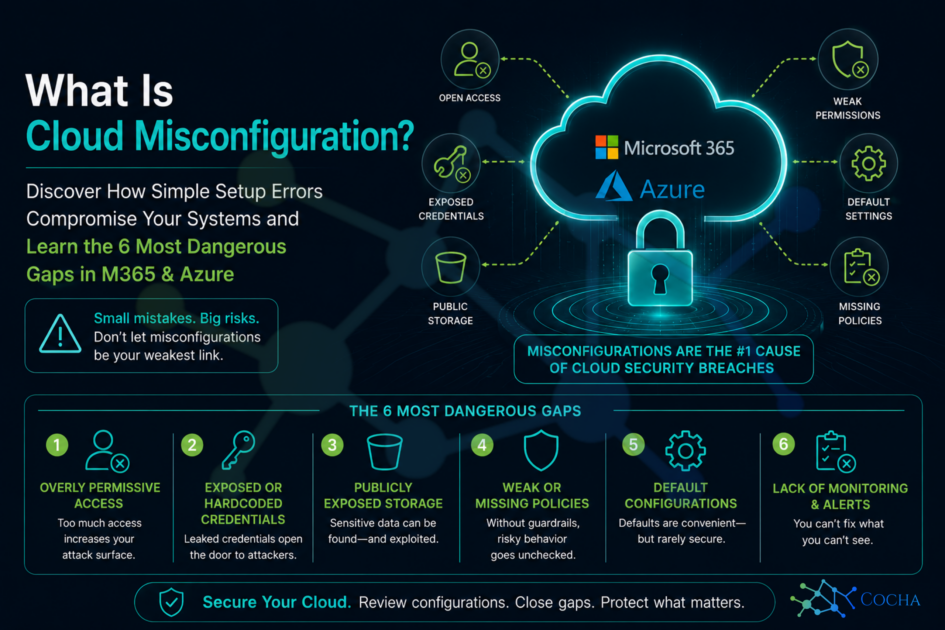
When most business owners and IT directors think about cyber threats, they picture highly sophisticated global syndicates writing complex code to crack into their networks. They imagine movie-style “zero-day” exploits that take weeks to engineer.
But out here in the real world, the truth is far more ordinary. Most devastating data breaches don’t start with a genius hack; they start with a setting someone accidentally got wrong or simply left at its factory default.
At Cocha Technology, my partner Steve and I look under the hood of corporate cloud networks every single week. Time and again, we find that the front door isn’t locked because a hacker picked it—it is unlocked because the configuration rules left it wide open. If you’ve ever wondered exactly what cloud misconfiguration is and how it impacts your business safety, you are looking at the leading cause of modern cloud breaches.
What Cloud Misconfiguration Actually Means
To understand the core issue, we need a clear definition. When we talk about cloud security misconfiguration, we mean any cloud resource, asset, or account that is set up in a way that creates unintended exposure or unauthorized access.
It is incredibly important to realize that a misconfiguration in cloud computing is not a software bug. It is not a flaw in Microsoft’s or Amazon’s code. It is entirely a human decision, an oversight, or a reliance on a generic setup wizard that didn’t take your specific organizational security into account.
Why is this so common? It boils down to a few basic realities:
- Convenience Over Security: Out of the box, cloud providers design their default settings to favor smooth onboarding and easy connectivity. They want things to “just work” for you right away. Unfortunately, “easy to connect” often means “easy to exploit.”
- Rushed Timelines: Technical teams are constantly moving fast to meet migration goals, deploy new applications, or provision access for remote workers.
- The Ownership Vacuum: In many business structures, there isn’t a dedicated person continuously auditing settings. If nobody explicitly owns the review process, configurations naturally drift over time.
This isn’t a sophisticated, high-tech threat. It’s a mundane, everyday vulnerability built on overlooked checkboxes and missed steps.
M365 vs. Azure: Two Completely Different Misconfiguration Surfaces
One of the most dangerous structural mistakes we see teams make is treating Microsoft 365 (M365) and Azure as if they are the exact same ecosystem with the same rules. While they are both hosted by Microsoft, they present two entirely distinct attack surfaces.
Organizations frequently manage them under a single broad IT policy, which leaves major blind spots.
The Microsoft 365 Surface
M365 is your collaboration layer. It’s where your employees live every day, handling email, chat, and document storage. Because it is highly user-facing, the configuration risks here center around human collaboration:
- Permissive OneDrive and SharePoint external sharing links that don’t expire.
- Weak global guest access settings that let outsiders navigate your tenant.
- Total lack of Data Loss Prevention (DLP) parameters, allowing confidential corporate text to be copied freely.
The Azure Surface
Azure, on the other hand, is your infrastructure layer. It’s the engine room containing your virtual machines, primary corporate databases, and proprietary software builds. Misconfigurations here are architectural and deeply technical:
- Unrestricted storage accounts holding bulk backups.
- Over-permissive Identity and Access Management (IAM) infrastructure roles.
- Open network firewalls and missing activity logs.
To protect your business footprint, you must treat these environments as separate entities that require unique, tailored security guardrails.
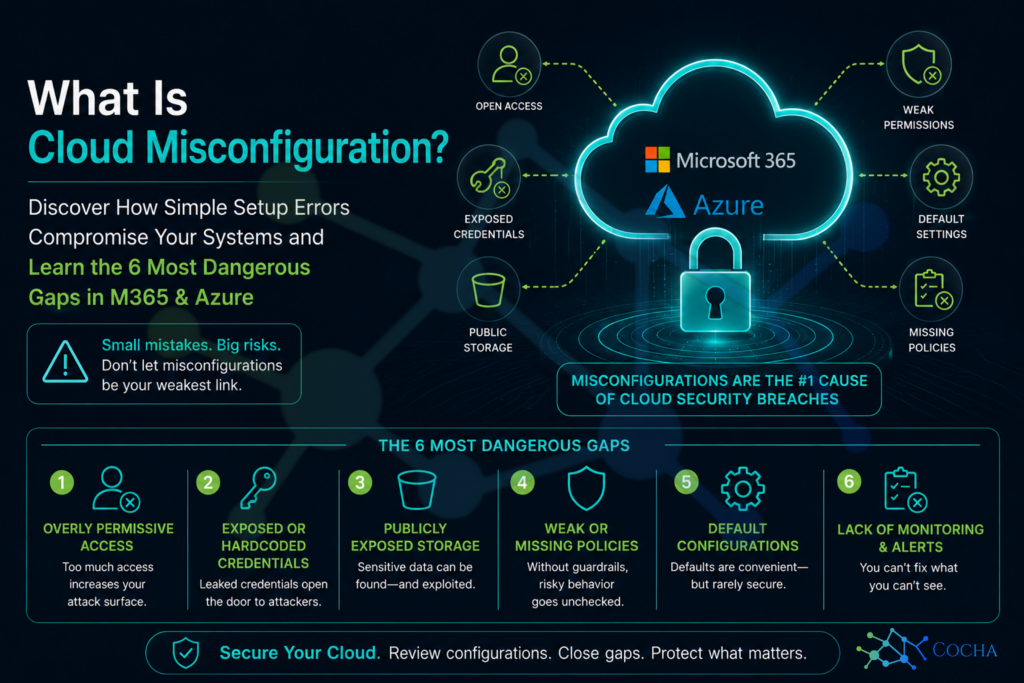
The 6 Most Dangerous Gaps in Your Cloud Environments
Through our security audits at Cocha Technology, we’ve seen specific patterns emerge. If you want to close the most critical windows of exposure, these are the six areas you need to audit immediately.
1. Public-Facing Storage Accounts
This happens when cloud storage repositories—like Azure Blob storage or SharePoint document libraries—are configured to allow anonymous, public internet access.
- Why it gets missed: A developer or admin needs to quickly test if an external vendor can download a file, so they switch the storage profile to “Public” for a moment and simply forget to switch it back.
- The real-world consequence: Automated hacker scripts constantly crawl the web looking for open directories. If sensitive customer logs or internal financial sheets sit in a public folder, they will be found, scraped, and posted on extortion sites.
2. Overprivileged Accounts
This is the practice of giving everyday user accounts or system service accounts high-level administrator or contributor rights to handle basic, low-risk tasks.
- Why it gets missed: Troubleshooting permission errors is annoying and slows down productivity. Giving an account global control instantly makes things work without errors, so it becomes a bad shortcut.
- The real-world consequence: If a regular staff member clicks a phishing link and their account is compromised, the attacker instantly inherits those administrative rights. They don’t have to hack the network—they already have the keys to the entire house.
3. Missing MFA on Privileged Accounts
Multi-Factor Authentication (MFA) is the most effective baseline control available, yet many administrative or service access accounts still operate without it.
- Why it gets missed: Organizations often exclude older accounts or specialized service accounts from global MFA rules because they fear an automated background script will break if it hits an authentication prompt.
- The real-world consequence: Attackers use automated password-spraying tools to guess credentials. Without MFA standing in the way, a single guessed password can give an outsider total control over your production environment.
4. Disabled or Incomplete Audit Logging
Cloud platforms track who logs in, what files are touched, and what settings are changed, but those features only work if you actively turn them on and route them to a secure location.
- Why it gets missed: Advanced logging can add nominal storage costs, and teams often assume that Microsoft or Google is tracking and saving everything by default. They aren’t.
- The real-world consequence: If an incident occurs, your security team will be blind. You won’t be able to tell what data was stolen, how long the bad actor was inside, or how they broke in, making remediation incredibly difficult and expensive.
5. Unencrypted Data at Rest
This occurs when virtual machine disks, databases, or storage drives are spun up without explicit data-at-rest encryption is enabled.
- Why it gets missed: There is an old, lingering assumption that cloud providers encrypt everything natively behind the scenes. While they offer the capability, the configuration and management of encryption keys frequently require manual action.
- The real-world consequence: If an attacker gains access to your underlying cloud storage architecture, they can directly download your hard drive images and read every line of text in plain text, completely bypassing your application firewalls.
6. Legacy Authentication Protocols Still Enabled
Legacy protocols (like basic IMAP or POP3) are older communication styles that do not support modern security workflows like MFA or conditional access policies.
- Why it gets missed: Organizations often leave these protocols turned on globally across their M365 environment because an old multi-function office scanner or a legacy accounting application still requires them to send automated emails.
- The real-world consequence: Hackers love legacy endpoints. They will intentionally route their login attempts through these old protocols to completely bypass your modern MFA requirements, giving them a clear backdoor into user mailboxes.
How to Find What You Cannot See
The biggest challenge with cloud security misconfiguration is that your systems will still look like they are running perfectly. Your website stays up, your emails keep sending, and your team keeps working. There is no flashing red warning light that tells you a backup drive is sitting open to the public web.
According to cybersecurity metrics compiled by the CISA Cloud Security Technical Reference Guide, proactive continuous assessment is the only reliable way to prevent structural drift. You simply cannot fix what you have not explicitly measured.
This is exactly why we champion a scan-first methodology at Cocha Technology. Rather than guessing or assuming your defaults are safe, we rely on dedicated zero-trust agent deployments and cloud-native audit tools to evaluate your setup against industry benchmarks.
By utilizing our targeted exposure snapshot, we analyze the metadata of your M365 and Azure environments. We don’t read your confidential files; instead, we audit the rules surrounding those files to highlight your hidden vulnerabilities before an outside threat scans them for you.
Take Control of Your Cloud Foundation
Understanding cloud misconfiguration is the first major step toward building a highly resilient, modern business. You don’t need a multi-million-dollar defense budget to keep your information safe; you just need to ensure that your foundational settings match your actual security intentions.
Don’t leave your digital perimeter to chance. or assume that factory defaults have you covered. Steve and the engineering team at Cocha Technology can help you peel back the layers of your environment, find the quiet gaps, and harden your defenses without disrupting your day-to-day operations.
Secure Your Systems Today
Ready to see where your configuration stands? Let’s eliminate the guesswork. Contact us today to schedule your comprehensive Exposure Snapshot and verify that your cloud doors are truly locked.
Recent Posts
Have Any Question?
Call or email Cocha. We can help with your cybersecurity needs!
- (281) 607-0616
- info@cochatechnology.com
About the Author:

Steve Combs
Co-Founder & Managing Director, Cocha Technology
Steven is a fractional CIO/CISO with 30+ years of enterprise IT and security leadership. He has built AI governance frameworks for organizations with 1,700+ users, led enterprise Microsoft Copilot deployments, and conducted security assessments across law firms, energy companies, financial institutions, and PE-backed manufacturers.