

Copilot Data Ring Fencing Security: 7 Steps to Protect Your Data After Buying Licenses
May 15, 2026
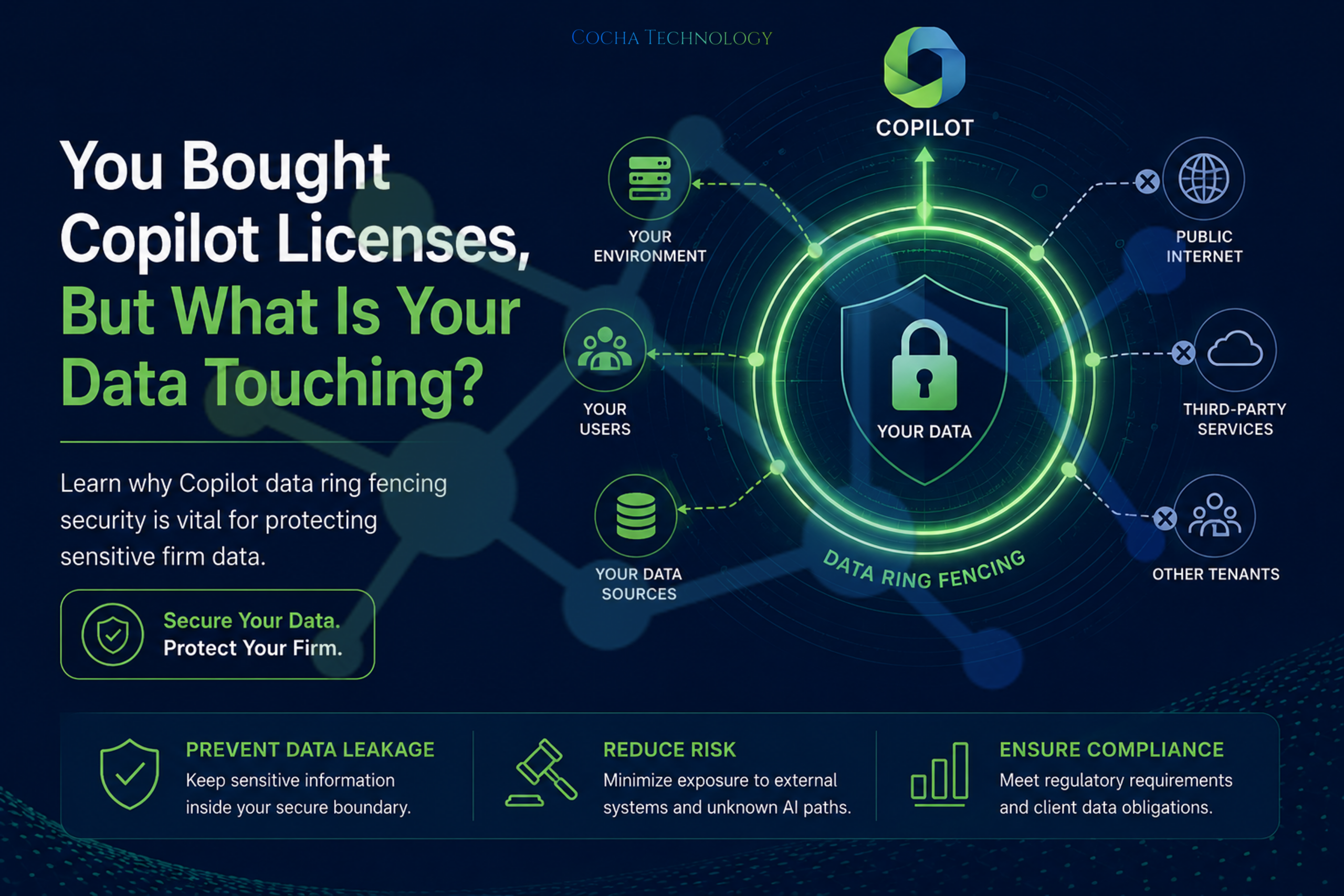
So, you’ve taken the plunge. Your firm or portfolio company has officially invested in Microsoft 365 Copilot licenses. There is a palpable buzz in the office—associates are excited about summarizing depositions in seconds, and analysts are ready to churn through due diligence reports at warp speed. But once the “install” button is clicked, a heavy question usually settles into the pit of the IT Director’s stomach: Now, what does your data actually touch?
In the high-stakes world of law firms and Private Equity (PE), data isn’t just information; it’s the “Crown Jewels.” If that data isn’t managed with a fortress mindset, your new productivity tool can quickly become a liability. To avoid the “Digital Junk Drawer” effect, you need a strategy centered on Copilot data ring fencing security.
The Illusion of Automatic Safety
Many leaders assume that because Copilot lives within the Microsoft 365 ecosystem, it is inherently “safe.” While Microsoft provides robust enterprise-grade protections, Copilot is only as secure as the permissions you’ve already set—or neglected. If an associate has access to a folder they shouldn’t, Copilot has access to it too.
At Cocha Technology, we’ve seen this play out in real-time. I recently spoke with a partner at a mid-sized law firm who was horrified to discover that a junior intern could use Copilot to summarize “all partner compensation files.” Why? Because those files were sitting in a SharePoint folder with “Everyone except external users” permissions. This is where Copilot data ring fencing security moves from a technical checkbox to a business necessity.
1. Establishing a Copilot Data Ring Fencing Security Perimeter
The first step in any successful deployment is defining the boundary. In a PE-backed environment, you are often dealing with cross-portfolio data that must remain strictly isolated. Without a “ring fence,” the AI might inadvertently surface insights from “Company A” while an analyst is working on a report for “Company B.”
A professional Copilot Readiness assessment identifies these overlap risks before the first prompt is ever written. We look for “Ghost Permissions”—access rights granted years ago that are still active today—and shut them down.
2. The Danger of "Over-Sharing" in Law and PE
In the legal sector, attorney-client privilege is the bedrock of the profession. According to a recent study by Gartner, by 2026, 75% of organizations will ignore the “over-sharing” risks of generative AI, leading to significant data leaks.
If a paralegal asks Copilot to “summarize the last three months of meeting notes for Client X,” and those notes happen to contain privileged data from Client Y because of a shared folder structure, you have a major compliance breach on your hands. Effective Copilot data ring fencing security involves auditing your Siloing of data to ensure that client matters are physically and logically separated within your tenant.
3. Implementing Data Loss Prevention (DLP)
You cannot manage what you cannot see. Our approach to DLP (Data Loss Prevention) is built on the principle that AI should be an assistant, not an informant.
We implement sensitive labels (e.g., “Highly Confidential,” “M&A Sensitive”) that Copilot respects. If a document is labeled “Privileged,” the AI is restricted from extracting that data into a general summary that might be seen by unauthorized users. This level of granularity is essential for PE firms managing sensitive exit strategies or legal teams handling high-profile litigation.
The Cocha Perspective:
A Lesson in “Trust but Verify”
I’ve spent over 30 years in IT, and if there is one thing I’ve learned, it’s that “default settings” are the enemy of security. I once worked with a manufacturing client who thought their data was siloed because they had “different folders.” But in the cloud, folders are just labels on a flat data lake.
We ran a Zero Trust Assessment and found that their R&D data was accessible to the sales team. In the world of Copilot, that sales team could have accidentally “summarized” the company’s unpatented trade secrets. This is why we advocate for a Fortress Mindset.
4. Cleaning the "Digital Junk Drawer"
Before you turn on Copilot, you must perform a 4-Step Content Audit. If your firm has ten years of “draft” documents, outdated “company updates,” and legacy files sitting in SharePoint, Copilot will use them.
Imagine Copilot giving an analyst a valuation based on a 2019 “Draft” spreadsheet instead of the 2026 “Final” version. Copilot data ring fencing security requires pruning the “dead weight” from your environment so the AI only learns from the truth.
5. Identifying "Shadow AI" Risks
Even with Copilot, your team might still be using unmanaged, public AI tools like free versions of ChatGPT or rogue PDF summarizers. Our Shadow AI Assessment often finds that employees use these tools because they find them “faster.”
By providing a secure, managed Copilot environment, you offer them the speed they want with the Shadow AI Protection the firm requires. We substitute the dangerous “public” window for a secure “ring-fenced” agent.
6. The Future of AI Sovereignty in Law
As regulators increase pressure on data sovereignty, having a documented Copilot data ring fencing security plan becomes a competitive advantage. It proves to your PE stakeholders and legal clients that you are a “Modern Operator” who respects the gravity of their data.
We help you move away from “keyword whack-a-mole” and toward a state of AI Sovereignty, where you own the intelligence and the infrastructure it sits on.
7. Ongoing Monitoring and "FinOps"
The deployment doesn’t end on day one. To maintain a healthy environment, you must engage in constant cost and security optimization. The cloud is a variable expense, and unmanaged AI usage can lead to “License Sprawl.” We utilize Cloud FinOps principles to ensure you are getting the maximum ROI on those expensive Copilot seats without compromising on safety.
Are You Ready for the Audit?
Buying the licenses was the easy part. Ensuring that those licenses don’t become a backdoor to your sensitive data is the real work. By focusing on Copilot data ring fencing security, you aren’t just checking a box—you are building a sustainable, authoritative system that search engines and AI agents can navigate safely.
Don’t let your productivity tool become your greatest liability. At Cocha Technology, we help you look under the hood, identify the friction, and build a roadmap for a secure AI future.
Don’t wait for a data leak to find out what your team is using. Get your AI Readiness Assessment today and take control of your AI future.
Recent Posts
Have Any Question?
Call or email Cocha. We can help with your cybersecurity needs!
- (281) 607-0616
- info@cochatechnology.com
About the Author:

Steve Combs
Co-Founder & Managing Director,
Cocha Technology
Steven is a fractional CIO/CISO with 30+ years of enterprise IT and security leadership. He has built AI governance frameworks for organizations with 1,700+ users, led enterprise Microsoft Copilot deployments, and conducted security assessments across law firms, energy companies, financial institutions, and PE-backed manufacturers.