AI Risk Mitigation for Law Firms: The Sanctions Are Rising, and They All Say the Same Thing


4 Steps to Deploying DLP Without Disrupting the Entire Company
January 21, 2026
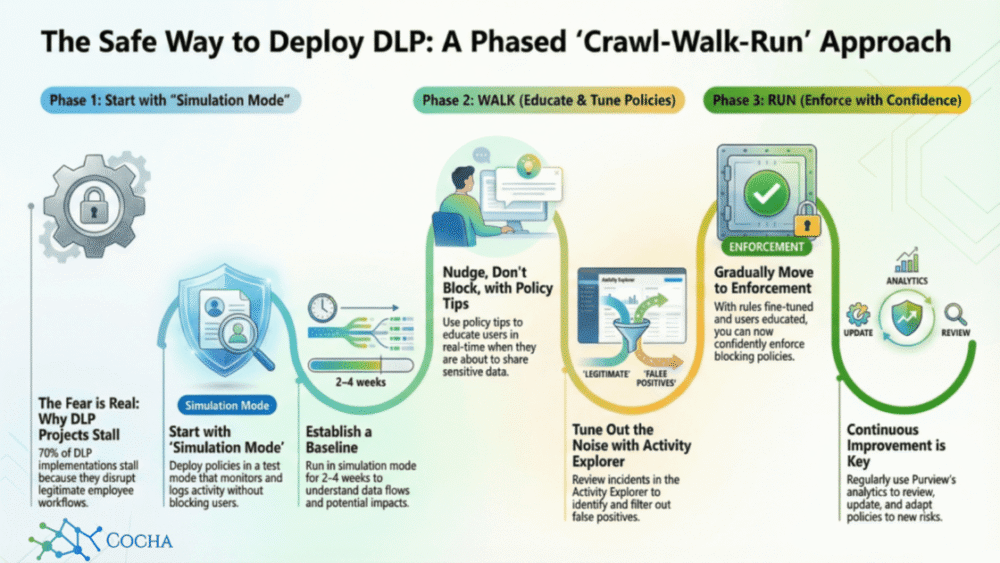
In nearly every session I lead on data protection, I see the same look on people’s faces. It’s that “how do we do this without breaking the business?” anxiety. Most leaders are picturing a flood of helpdesk tickets and a line of frustrated employees at their door.
That fear is valid if you use a “brute-force” mindset. But in 2026, success isn’t about flipping a switch; it’s about getting the lay of the land before you ever start building walls. Here’s a tactical way to use Microsoft Purview to move past the “security says no” reputation and actually help your team work safely.
1. Crawl: Listen before you lock the doors
The first phase is all about observation. You aren’t stopping anyone; you’re just listening to the rhythm of the office before you change the locks.
- Tactical Advice: When you’re setting up a policy in Microsoft Purview DLP, choose the “test it out first” option. This gives you actual evidence of how data is moving instead of just guessing.
- What to look for: Use the Content Explorer within the Purview portal. It gives you a snapshot of where your sensitive info like PII or internal secrets is hiding in SharePoint or OneDrive.
- The Goal: You want to find out that the finance team sends a specific report to an external auditor every Friday before you accidentally block it and derail their weekend.
2. Walk: A nudge is better than a "No"
Once you know where the data is, don’t jump to blocking. Start a conversation instead. In the “Walk” phase, we turn on Policy Tips.
- Tactical Advice: These are the pop-ups that appear in Teams, Outlook, or on the desktop. In Microsoft Purview, you can customize these so they aren’t just robotic error messages.
- The Vibe: The popup should say something like: “Wait, this file looks like it has customer names and addresses. If you need to send this, just let us know why, or remove that info before hitting send.”
- The Why: You’re treating your team like they have common sense. When you give people a chance to pause, they usually stop 90% of the mistakes themselves. It turns your employees into partners rather than “risks.”

3. Cleaning up the false alarms
With your policies running in the background, you’re going to see some friction. This is where you use the data inside Microsoft Purview to fix the “noise” before it becomes a problem.
- Tactical Advice: Head to the Activity Explorer. It’s like a DVR for your data; it shows you exactly what happened and why a rule went off.
- Real-World Fix: You might find a rule blocking credit card numbers is firing constantly in the sales department because of how they format their quotes. Instead of letting them struggle, create a targeted exception in Purview for that specific department or channel.
- The Result: Fixing these small friction points now is what keeps you from getting an angry email from a VP three weeks from now. It ensures the security matches the actual rhythm of the business.
4. Run: Moving at the speed of 2026
By the time you get to “Run” mode, turning on blocking actions should be a non-event. You’ve done the legwork, and the transition is seamless.
- Tactical Advice: Since you’ve already tested the rules against real-world work, a “block” isn’t a mystery anymore. It’s a valid, understood protection that everyone is already used to.
- The AI Factor: Since it’s 2026, things move fast. AI can leak data in seconds. By the time you’re “running,” your Microsoft Purview foundation is solid enough to handle that speed with automated remediation, so you aren’t babysitting every single alert.
From Hall Monitor to Business Partner
This shift changes everything. You aren’t just there to catch people doing something wrong; you’re making the business more resilient. It’s less about being a hall monitor and more about making sure the company can actually move. When you do it this way, security isn’t a project that “finishes” it’s just a better way of working.
If you want to get into the weeds of your own setup, we’ve put together a technical checklist to help you prepare your data for Purview. Or, if you’d rather just talk through a specific problem, reach out for a free Data Security Workshop. We’re here to help you navigate the tricky parts.
Recent Posts
Have Any Question?
Call or email Cocha. We can help with your cybersecurity needs!
- (281) 607-0616
- info@cochatechnology.com
About the Author:

Steve Combs
Co-Founder & Managing Director, Cocha Technology
Steven is a fractional CIO/CISO with 30+ years of enterprise IT and security leadership. He has built AI governance frameworks for organizations with 1,700+ users, led enterprise Microsoft Copilot deployments, and conducted security assessments across law firms, energy companies, financial institutions, and PE-backed manufacturers.