Why Your AI Memory “Forgets”: AI Context Drift and Data Security Risk in Oil and Gas
March 4, 2026
The Problem No One Is Talking About in O&G
Picture a senior landman at a mid-size Houston-based E&P company. She is three months into her team’s Microsoft Copilot deployment and genuinely loves it. She uses it daily to summarize lease agreements, pull acreage data, and draft JOA amendments. It saves her hours every week.
One afternoon she asks Copilot a routine question about a specific prospect area. The response includes detail she did not expect — production estimates from a confidential internal feasibility study that was never meant to leave the geology team. The file had been sitting in a SharePoint folder with broken permission inheritance since a migration two years ago. No one audited it. Copilot found it in seconds.
This is not a hypothetical. It is the predictable outcome when AI context behavior collides with unaudited permissions in a data-heavy environment like oil and gas. Understanding why it happens — and what to do before it does — is what this article is about.
What AI Context Drift Actually Means
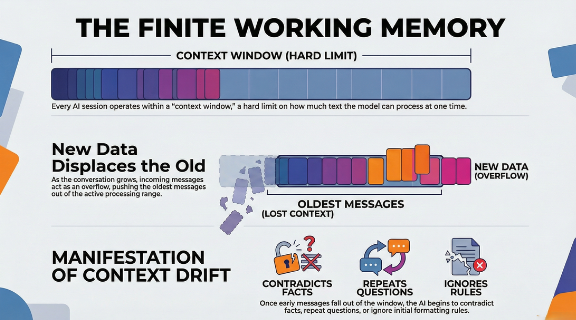
Most people experience AI context drift as an inconvenience. The tool starts forgetting your formatting rules forty messages into a session, or it repeats a question you already answered. Frustrating, but not dangerous.
In an enterprise environment handling proprietary well data, royalty agreements, acquisition targets, and HSE records, context drift is a different category of problem entirely.
Here is the technical reality. Large language models like Microsoft Copilot do not have unlimited memory. They operate within a finite context window — a boundary on how much information the model can actively process at one time. As a conversation grows longer, older content gets displaced to make room for new input. This is a FIFO (First-In, First-Out) architecture. The model does not choose what to forget. It follows a mechanical rule.
The security risk is not that Copilot forgets your instructions. The risk is what it does when it fills that context window with data it should never have accessed in the first place — data that your permissions infrastructure inadvertently made available.
Why Oil and Gas Environments Are Uniquely Exposed
O&G organizations carry a data profile that creates compounding risk when Copilot enters the picture.
- Decades of accumulated file shares.
Most E&P companies have SharePoint environments and file servers that have grown organically over years of acquisitions, divestitures, and personnel turnover. Permissions set during a 2018 data migration are rarely revisited. Global access groups — Everyone, All Staff, Domain Users — are still attached to folders containing seismic data, reserve estimates, and M&A materials.
- High-value, high-sensitivity data in everyday workflows.
A landman, a reservoir engineer, and a compliance officer all use the same M365 environment. Their data sensitivity levels are radically different. Copilot does not distinguish between them — it follows whatever permissions are in place.
- Regulatory exposure.
SEC disclosure requirements, FERC compliance, and state-level royalty reporting mean that data leakage in O&G is not just an embarrassment. It carries legal and regulatory consequences that can materially affect the business.
- Fast Copilot adoption without corresponding security review.
Microsoft’s licensing model makes Copilot easy to enable. The security review required to do it safely is not included in that license.
The Three Ways Context Drift Creates Security Risk
1. Instruction Displacement
When a long Copilot session pushes early context out of the active window, the model loses its governing constraints. If a user started the session with specific instructions about data handling or output formatting, those instructions may no longer be active by the end of the conversation. The model fills the gap with its best inference — which may pull from whatever data is accessible in your environment.
2. Cross-Context Data Surfacing
Copilot indexes your M365 environment broadly. When a user asks a question in one context — say, a Teams chat about a current project — Copilot may surface documents from an entirely different context if the permissions allow it. Sensitive files that were never meant to be part of that conversation become inputs to the response.
3. Overconfident Gap Filling
When context is incomplete or ambiguous, the model does not stop and ask for clarification. It fills the gap. In an O&G environment with fragmented, inconsistently labeled data, that gap filling can produce responses that blend accurate information with inferred detail — with no indication to the user of which is which.
What a Copilot Readiness Assessment Addresses
The answer is not to avoid Copilot. The productivity gains are real and your competitors are already using it. The answer is to make sure your data environment is in order before you flip the switch — or, if Copilot is already live, to get an accurate picture of your current exposure.
A structured Copilot Readiness Assessment covers four areas that directly address the risks above.
- Permissions audit.
Identify every instance of overly broad access — global groups, broken inheritance, externally shared folders — across your SharePoint, OneDrive, and on-premises file shares. This is the foundational step. Copilot will surface whatever your permissions allow.
- Data sensitivity classification.
Tag your highest-risk data — reserve estimates, acquisition targets, royalty data, HSE incident records — so that hard boundaries can be set on what Copilot is permitted to summarize or reference.
- Least privilege enforcement.
Remove access that employees do not need to do their jobs. In most O&G environments we assess, a significant portion of the workforce has access to files outside their functional scope simply because no one ever cleaned it up.
- Continuous monitoring.
Permissions drift over time. New files get created, access gets granted informally, and migrations introduce new gaps. A one-time audit has a limited shelf life. Monitoring ensures your posture stays current.
The 60-Minute Exposure Snapshot
If you want to understand your current risk profile before committing to a full engagement, Cocha’s Exposure Snapshot is built for exactly that. In roughly sixty minutes we give you a clear picture of where your permissions are overexposed, which data classifications are missing, and what Copilot can currently access that it should not.
It is not a 500-page report. It is an actionable view of your specific risk so you can make an informed decision about next steps.
The Window Is Already Open
Copilot does not wait for your permissions to be perfect before it starts working. If your environment has overexposed data — and in our experience with O&G clients, it almost always does — Copilot is already surfacing it to users who ask the right questions.
The question is whether you find out through a structured assessment or through an incident.
Schedule your Copilot Readiness Assessment with Cocha Technology.
Recent Posts
Have Any Question?
Call or email Cocha. We can help with your cybersecurity needs!
- (281) 607-0616
- info@cochatechnology.com
About the Author:

Steve Combs
Co-Founder & Managing Director, Cocha Technology
Steven is a fractional CIO/CISO with 30+ years of enterprise IT and security leadership. He has built AI governance frameworks for organizations with 1,700+ users, led enterprise Microsoft Copilot deployments, and conducted security assessments across law firms, energy companies, financial institutions, and PE-backed manufacturers.