FREE · 60-MINUTE SESSION
Your DLP Probably Isn't Doing What You Think It Does
Some companies have no DLP running at all. Others have Microsoft Purview's default settings, left exactly as they were the day someone turned on the tenant. A smaller group has real policies, reviewed and enforced on a schedule. None of it was built for what an AI agent does with your data. Agents don't act like people, so a tool built to watch people won't catch them.
See how it works ↓
✓ No software to install
✓ 60 minutes of your team’s time
✓ Findings report within 5 business days
Identifying Exposure
35%+
of DLP implementations fail to prevent data loss
Source: CrowdStrike / Industry Research
80%+
of workers use unapproved AI tools at work
Source: UpGuard, November 2025
38%
of employees share sensitive data with AI without approval
Source: CybSafe / NCA, 2024
$650k
average cost of an AI-associated data breach
Source: IBM Cost of a Data Breach Report 2024
The DLP Reality
Whatever You've Got, It Wasn't Built for This
We ask almost every prospect the same question early on: what does your DLP actually block today. The answers span the whole range. A few companies have nothing running. Most have Purview’s out-of-the-box settings, quietly doing very little. A smaller group has real policies, tuned and reviewed on a cadence.
Here’s the thing. It barely matters which one you are.
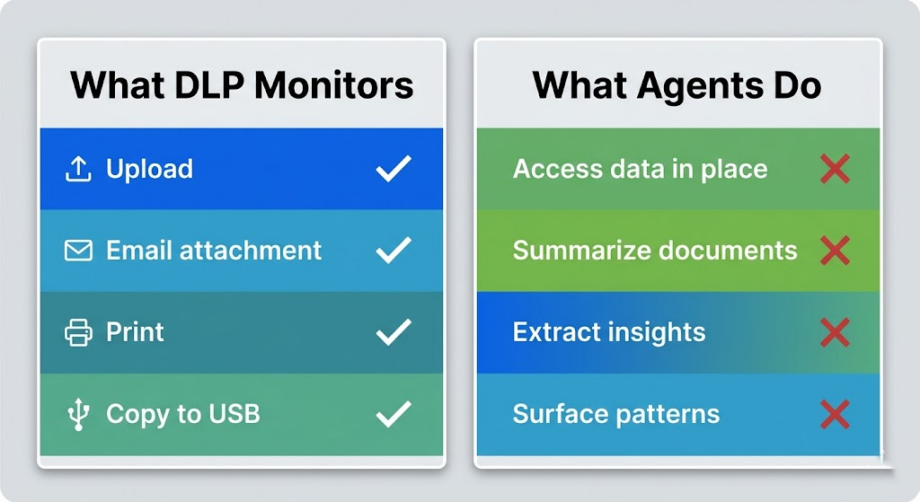
Traditional DLP watches for a person doing something deliberate. Uploading a file. Attaching a document to an email. Sending something to the printer. It was built around a human making a choice, and it applies rules to that choice. That’s the entire model, and for years it worked fine, because humans were the variable it was designed to manage.
Agents don’t make that kind of choice. They connect to your environment, inherit whatever access the person who deployed them already has, and then work continuously in the background, pulling data, summarizing it, answering questions with it. No upload. No email. No print job. Nothing your DLP was ever built to watch for.
So the real question isn’t how well your DLP is configured. It’s whether it was ever pointed at the right layer to begin with. For agents, it wasn’t, no matter how good your policies are on paper.
The Three Ways Agents Leak Data Despite Your DLP
Permission-Based Access
Agents inherit user permissions. If a user can access sensitive data, so can the agent. DLP has no mechanism to distinguish between what a user intends to access and what an agent accesses on their behalf. A finance analyst with access to salary data who connects an agent to their SharePoint gives that agent access to every salary record — because technically, the user has permission.
Insight Extraction
Agents don't need to move a file to leak information. They extract patterns and insights from data that individually would never trigger a DLP rule. No file was downloaded. No email was sent. But the strategic intent, the competitive positioning, the personnel decisions — all of it surfaces in the agent's responses to whoever asks the right question.
Context Leakage Through Conversation
When an agent explains its reasoning or cites sources, it reveals the structure and sensitivity of your data to the person using it. An agent trained on HR files doesn't leak a document — it reveals that certain documents exist, where they live, and what patterns they contain. Your DLP saw nothing.
Why This Matters More If You're a Law Firm
Every one of the three leaks above carries a different weight for you than it does for a manufacturer or a bank. An agent that surfaces patterns from client files isn’t just exposing data. It’s touching material that may be privileged, and once a third party system has processed it, the privilege question gets harder to answer, not easier. Your confidentiality obligations under Rule 1.6 don’t pause because the disclosure happened inside an AI tool instead of an email attachment. If your DLP can’t see what the agent touched, you can’t tell opposing counsel, a regulator, or your own managing partner what actually happened. That’s the gap this assessment is built to find.
What This Free Session Covers
This isn’t a sales call dressed up as an assessment. It’s a working session built around five areas, plus a live look at your Microsoft Secure Score.
The Assessment Covers:
The five modules:
- Data Security Posture — Where your DLP policies stand today: classification coverage, enforcement mode, and what agents can currently reach across your data estate.
- Data Estate & Access Reviews — Your permission model, when access was last reviewed, and how much guest access exposure is sitting inside SharePoint and M365.
- Security Monitoring Coverage — What your EDR/XDR setup catches, whether prompts are getting logged anywhere, and what your SIEM retains.
- Shadow AI Exposure — Your AI usage policy, what your firewall blocks, and, if you can share DNS logs, which outside AI tools your team is already using.
- Secure Score Baseline — A live pull from security.microsoft.com, filtered down to the recommendations that matter for Copilot and agent deployment, not the full list.
One step before we meet:
We send a short, read-only SharePoint exposure script for your admin to run. No elevated credentials needed. They send back the CSV, we review it before the session, and we walk in already knowing your exposure map instead of guessing at it live in front of you.
After the session, you'll have:
- A findings report with severity ratings (critical, high, medium) across all five areas
- Your actual SharePoint site counts by risk tier, pulled straight from your tenant
- Your live Secure Score plus the specific fixes that matter for agent deployment
- A shadow AI exhibit, if DNS logs were provided
- Recommendations ranked by risk, with the reasoning behind each one
This free session is where most people start. Whether it’s enough on its own or the first step toward something bigger comes up naturally on the walkthrough call once you’ve seen the findings.

How the Assessment Works
We Schedule
You fill out the form below. Steven reaches out within 24 hours. We find 60 minutes on your calendar with you and one of your engineers, usually within a week or two. The day before, we send a short SharePoint exposure script and a one-page brief. Your admin runs it and sends back the output before we meet.
We Assess
60 minutes. Five modules, plus a live Secure Score review. Since we already have your SharePoint data in hand by the time we sit down, we're not spending the session gathering the basics, we're already working from it.
We Deliver
A written report within five business days, plus a 30-minute walkthrough call to go through it together and answer whatever comes up. If the findings point to something bigger, that's also when we'll talk about what a deeper engagement, like the paid AI Readiness Assessment, would look like. No pressure either way. Plenty of people take the findings and handle remediation themselves.
Total time from your team: 60 minutes for the session, 30 minutes for the walkthrough. That’s it, apart from the few minutes it takes your admin to run one script.
"We thought our security posture covered agents because we had DLP. The assessment showed us that our DLP didn't see any of what our Copilot deployment was doing. We had a coverage gap we didn't know existed — and we fixed it before it became a problem."
Director of Cybersecurity, AmLaw 100 Law Firm
What Organizations Without This Assessment Are Discovering
- Agent-accessible data that bypassed DLP policies for months before anyone noticed
- Compliance gaps surfaced during audits rather than internal assessments — at the worst possible time
- Sensitive data patterns extracted by agents and surfaced to users who shouldn’t have seen them
- No audit trail when regulators or clients asked what the agent accessed
These scenarios are drawn from publicly documented AI governance incidents and regulatory findings.
Assessment spots are limited.
Steven runs every session himself. No junior analysts, no templated intake handed off to someone else, no offshore review. If you’re planning to expand agent use this quarter, this is the moment to look at it, not after you’ve already deployed.
Get Your Free AI Readiness Assessment
Tell us about your organization. Steven will reach out within 24 hours to schedule your 60-minute assessment session. No sales pitch on the call — just a direct conversation about your current security posture and what the assessment will cover.
What happens after you submit:
- You receive a confirmation email immediately
- Steven emails you personally
- You schedule your 60-minute assessment session
- You receive your findings report within 5 business days

Steven R. Combs | Co-Founder & Principal, Cocha Technology
Steven is a fractional CIO/CISO with 30+ years of enterprise IT and security leadership. He has built AI governance frameworks for organizations with 1,700+ users, led enterprise Microsoft Copilot deployments, and conducted security assessments across law firms, energy companies, financial institutions, and PE-backed manufacturers. He holds certifications in Varonis, Check Point, FinOps, and Microsoft 365 security, with CISSP certification expected May 2026.
View full profile | LinkedIn